FireBeelte 显示环境声音频谱

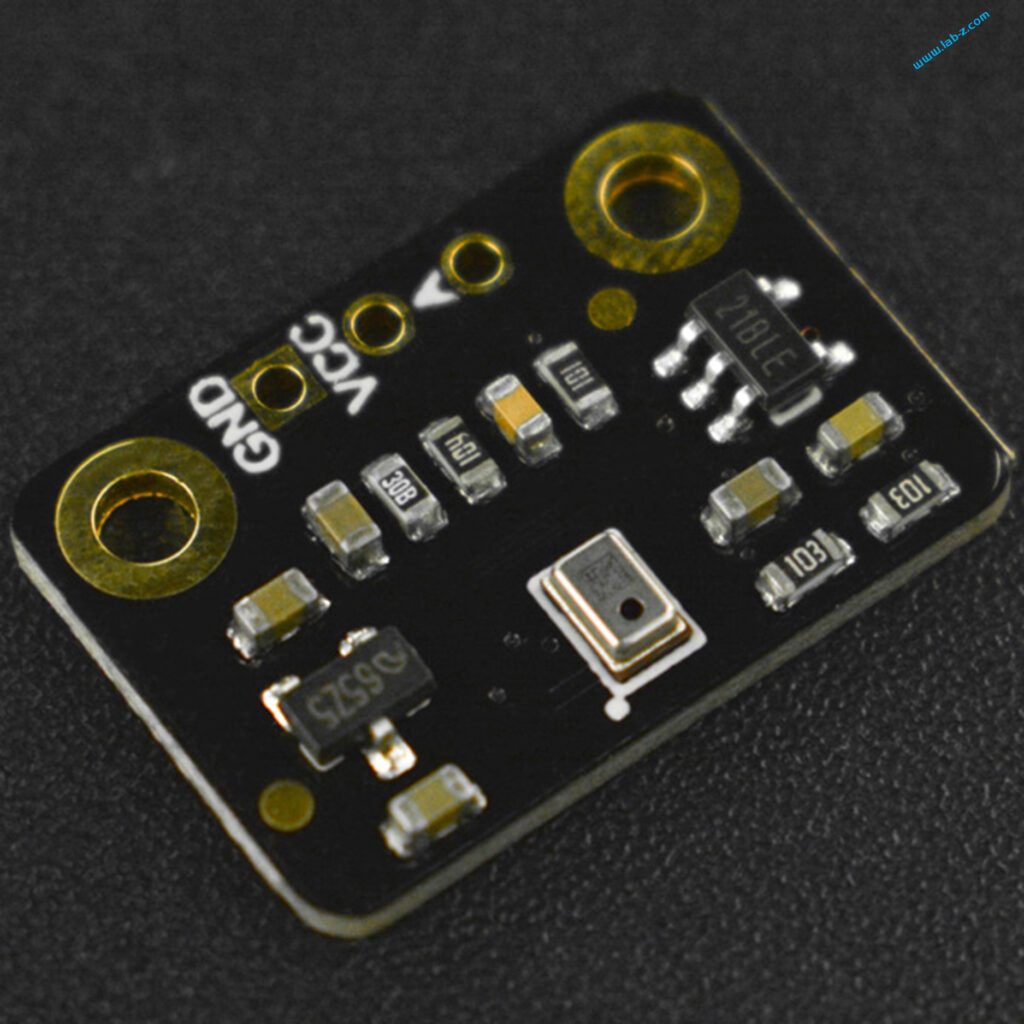
前一段入手了Fermion: 全向MEMS麦克风模块(SEN0487),这款模块非常简单能够直接输出模拟信号。简单之处在于无需外部元件进行放大,当没有检测到声音时,输出电压在1.5V左右浮动,在说话时通过ADC采样可以很容易看到声音的波形。
首先跑了一下WIKI 给出的示例文件,使用 Arduino 自带的串口绘图工具查看了一下波形:

测试视频可以在B站看到:

可以看到内部自带了滤波,敏感度也不错。

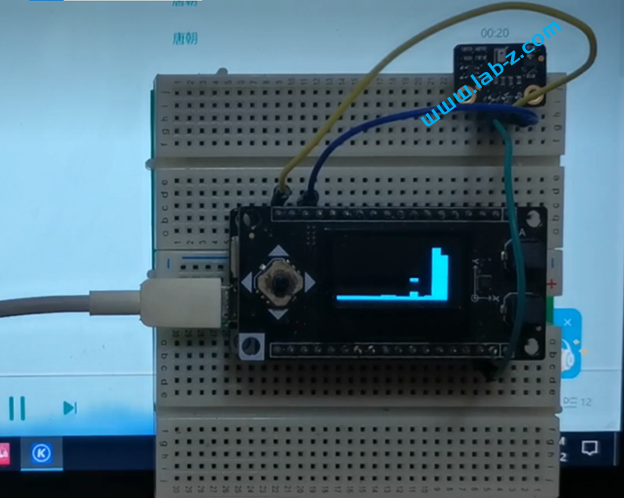
接下来,配合之前多次使用的 12864 OLED制作一个频谱显示装置。代码参考 https://github.com/s-marley/ESP32_FFT_VU 了。硬件部分除了供电的 VCC和GND, 只需要将模块输出连接到A0(IO36)即可。
#include <arduinoFFT.h>
#include "DFRobot_OLED12864.h"
 
// 12864 OLED 配置
#define I2C_addr 0x3c
#define pin_SPI_cs D2
 
#define SAMPLES         1024          // Must be a power of 2
#define SAMPLING_FREQ   40000         // Hz, must be 40000 or less due to ADC conversion time. Determines maximum frequency that can be analysed by the FFT Fmax=sampleF/2.
#define AMPLITUDE       1000          // Depending on your audio source level, you may need to alter this value. Can be used as a 'sensitivity' control.
#define AUDIO_IN_PIN    A0            // Signal in on this pin
 
#define NOISE           500           // Used as a crude noise filter, values below this are ignored
const uint8_t kMatrixWidth = 16;                          // Matrix width
const uint8_t kMatrixHeight = 16;                         // Matrix height
 
#define NUM_BANDS       16            // To change this, you will need to change the bunch of if statements describing the mapping from bins to bands
 
#define BAR_WIDTH      (kMatrixWidth  / (NUM_BANDS - 1))  // If width >= 8 light 1 LED width per bar, >= 16 light 2 LEDs width bar etc
#define TOP            (kMatrixHeight - 0)                // Don't allow the bars to go offscreen
 
DFRobot_OLED12864 OLED(I2C_addr, pin_SPI_cs);
 
// Sampling and FFT stuff
unsigned int sampling_period_us;
byte peak[] = {0, 0, 0, 0, 0, 0, 0, 0, 0, 0, 0, 0, 0, 0, 0, 0}; // The length of these arrays must be >= NUM_BANDS
int oldBarHeights[] = {0, 0, 0, 0, 0, 0, 0, 0, 0, 0, 0, 0, 0, 0, 0, 0};
int bandValues[] = {0, 0, 0, 0, 0, 0, 0, 0, 0, 0, 0, 0, 0, 0, 0, 0};
double vReal[SAMPLES];
double vImag[SAMPLES];
unsigned long newTime;
 
arduinoFFT FFT = arduinoFFT(vReal, vImag, SAMPLES, SAMPLING_FREQ);
 
void setup() {
  Serial.begin(115200);
 
  OLED.init();
 // OLED.flipScreenVertically();
 
  sampling_period_us = round(1000000 * (1.0 / SAMPLING_FREQ));
}
 
unsigned long int Elsp1;
int h[16];
 
void loop() {
 
  // Reset bandValues[]
  for (int i = 0; i < NUM_BANDS; i++) {
    bandValues[i] = 0;
  }
 
  // Sample the audio pin
  for (int i = 0; i < SAMPLES; i++) {
    newTime = micros();
    vReal[i] = analogRead(AUDIO_IN_PIN); // A conversion takes about 9.7uS on an ESP32
    vImag[i] = 0;
    while ((micros() - newTime) < sampling_period_us) {
      /* chill */
    }
  }
 
  // Compute FFT
  FFT.DCRemoval();
  FFT.Windowing(FFT_WIN_TYP_HAMMING, FFT_FORWARD);
  FFT.Compute(FFT_FORWARD);
  FFT.ComplexToMagnitude();
 
  // Analyse FFT results
  for (int i = 2; i < (SAMPLES / 2); i++) {    // Don't use sample 0 and only first SAMPLES/2 are usable. Each array element represents a frequency bin and its value the amplitude.
    if (vReal[i] > NOISE) {                    // Add a crude noise filter
 
      //16 bands, 12kHz top band
      if (i <= 2 )           bandValues[0]  += (int)vReal[i];
      if (i > 2   && i <= 3  ) bandValues[1]  += (int)vReal[i];
      if (i > 3   && i <= 5  ) bandValues[2]  += (int)vReal[i];
      if (i > 5   && i <= 7  ) bandValues[3]  += (int)vReal[i];
      if (i > 7   && i <= 9  ) bandValues[4]  += (int)vReal[i];
      if (i > 9   && i <= 13 ) bandValues[5]  += (int)vReal[i];
      if (i > 13  && i <= 18 ) bandValues[6]  += (int)vReal[i];
      if (i > 18  && i <= 25 ) bandValues[7]  += (int)vReal[i];
      if (i > 25  && i <= 36 ) bandValues[8]  += (int)vReal[i];
      if (i > 36  && i <= 50 ) bandValues[9]  += (int)vReal[i];
      if (i > 50  && i <= 69 ) bandValues[10] += (int)vReal[i];
      if (i > 69  && i <= 97 ) bandValues[11] += (int)vReal[i];
      if (i > 97  && i <= 135) bandValues[12] += (int)vReal[i];
      if (i > 135 && i <= 189) bandValues[13] += (int)vReal[i];
      if (i > 189 && i <= 264) bandValues[14] += (int)vReal[i];
      if (i > 264          ) bandValues[15] += (int)vReal[i];
    }
  }
 
  // Process the FFT data into bar heights
  for (byte band = 0; band < NUM_BANDS; band++) {
 
    // Scale the bars for the display
    int barHeight = bandValues[band] / AMPLITUDE;
    if (barHeight > TOP) barHeight = TOP;
 
    // Small amount of averaging between frames
    barHeight = ((oldBarHeights[band] * 1) + barHeight) / 2;
 
    // Move peak up
    if (barHeight > peak[band]) {
      peak[band] = min(TOP, barHeight);
    }
    h[band] = barHeight;
 
    // Save oldBarHeights for averaging later
    oldBarHeights[band] = barHeight;
 
  }
 
  if (millis() - Elsp1 > 60) {
    for (byte band = 0; band < NUM_BANDS; band++)
      if (peak[band] > 0) peak[band] -= 1;
       
    Elsp1 = millis();
  }
  /*
       //直接输出 FFT 结果
       for (int i=0;i<16;i++) {
         if (bandValues[i]<16) {Serial.print(" ");}
         Serial.print(bandValues[i],HEX);
         Serial.print(" ");
       }
       Serial.println("");
  */
 
  // 擦除上一次
  OLED.clear();  
  for (int i = 0; i < 16; i++) {
   OLED.fillRect(8 * (16-i), 0, 8, 4 * h[i]);
   OLED.fillRect(8 * (16-i), peak[i]*4, 8, 3);
  }
   
  for (int i = 0; i < 16; i++) {  
    Serial.print(h[i], HEX);
    Serial.print("");
  }
  Serial.println("");
  /*
  for (int i = 0; i < 16; i++) {  
    Serial.print(peak[i], HEX);
    Serial.print("");
  }
  Serial.println("");
  */
 
  // 显示当前
  OLED.display();
}

最终成品的测试视频:

参考:

  1. https://www.dfrobot.com.cn/goods-3220.html
  2. https://wiki.dfrobot.com.cn/_SKU_SEN0487_Fermion_MEMS_Microphone_Sensor

作者ziv2013发布于分类Funny

发表回复

BellWin UP520US USB Power Splitter 介绍

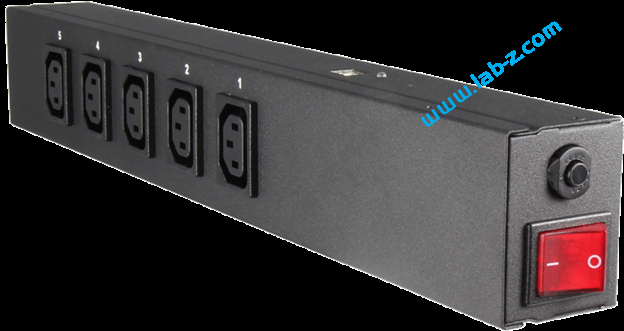
最近在研究一款USB控制的排插:BellWin 出品的带有USB接口的排插(USB Power Splitter)型号是:UP520US。它带有五个插孔,一个用于控制插孔供电的USB接口和一个供电开关。这款排插不是给家用设计的,上面的的插孔和插头都是专门为机房这种特别场合设计的,在家用环境中必须使用转接头才能工作。

电器特性如下【参考1】:

输入:220V,20A

输入频率:50/60Hz

功耗:5W

每一路最高可支持15A,五组最大支持输出20A

工作温度:0-25℃

接口:IEC60320 C13

认证:RoHS,IPC,CUS

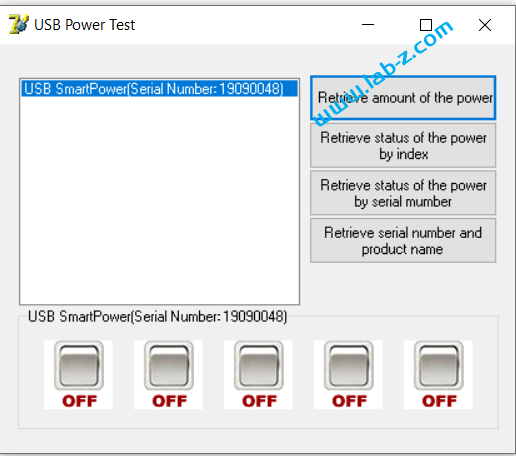
首先,测试一下它自带的控制程序。

用户可以通过下面的按钮控制每一路的开关。

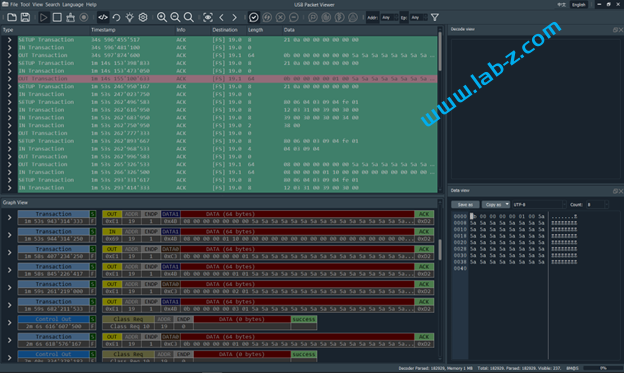
接下来,使用 USB Package Viewer 设备抓取USB 数据包。USB Package Viewer(简称UPV)是一款国产的USB数据逻辑分析仪,能够抓取从 Low Speed 到 High Speed的数据包。有兴趣的朋友可以在【参考2】看到之前我的开箱视频。这个仪器有一个比较大的优点是能够实时显示,这个在分析研究数据量不大的USB设备时非常有用。比如,上位机进行一个动作立刻能够在分析软件上看到数据,这样便于对应数据和操作。

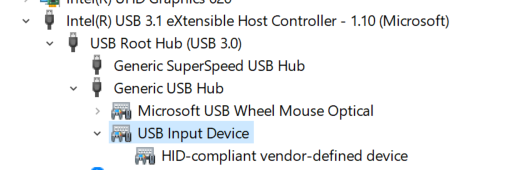
从设备管理器上也可以看出,这个设备使用USB HID 协议。

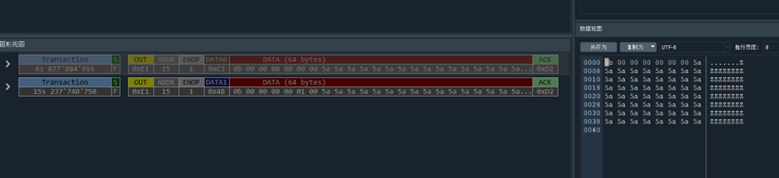
按下试验软件上的开关两次之后,在UPV中可以看到抓到了2个数据包:

经过多次试验,总结数据如下:

操作抓到的数据,总长度64Bytes
Port1 设置为 OFF0B 00 00 00 00 00 00 5A……5A
Port2 设置为OFF0B 00 00 00 00 01 00 5A……5A
Port3 设置为OFF0B 00 00 00 00 02 00 5A……5A
Port4 设置为OFF0B 00 00 00 00 03 00 5A……5A
Port5 设置为OFF0B 00 00 00 00 04 00 5A……5A
Port1 设置为 ON0B 00 00 00 00 00 01 5A……5A
Port2 设置为ON0B 00 00 00 00 01 01 5A……5A
Port3 设置为ON0B 00 00 00 00 02 01 5A……5A
Port4 设置为ON0B 00 00 00 00 03 01 5A……5A
Port5 设置为ON0B 00 00 00 00 04 01 5A……5A

需要注意的是,上面的数据末端,使用0x5A 填充,实际上使用任意数据进行填充都可以, USB 排插以前面的有效数据为准。

根据上述表格,很容易编写一个控制这个排插开关的代码(VS2019):

#include <stdio.h>
#include <tchar.h>
#include <windows.h>
#include <setupapi.h>
 
extern "C" {
 
    void __stdcall
        HidD_GetHidGuid(
            OUT   LPGUID   HidGuid
        );
 
    typedef struct _HIDD_ATTRIBUTES {
        ULONG   Size; // = sizeof (struct _HIDD_ATTRIBUTES)
 
                      //
        // Vendor ids of this hid device
        //
        USHORT  VendorID;
        USHORT  ProductID;
        USHORT  VersionNumber;
 
        //
        // Additional fields will be added to the end of this structure.
        //
    } HIDD_ATTRIBUTES, * PHIDD_ATTRIBUTES;
 
    BOOLEAN __stdcall
        HidD_GetAttributes(
            IN  HANDLE              HidDeviceObject,
            OUT PHIDD_ATTRIBUTES    Attributes
        );
 
    BOOLEAN __stdcall
        HidD_SetFeature(
            _In_    HANDLE   HidDeviceObject,
            _In_reads_bytes_(ReportBufferLength) PVOID ReportBuffer,
            _In_    ULONG    ReportBufferLength
        );
}
 
#pragma comment( lib, "hid.lib" )
#pragma comment( lib, "setupapi.lib" )
 
void SetAll(HANDLE hUsb, bool AllOn)
{
    BOOL Result;
    UCHAR WriteReportBuffer[65];
 
    for (int i = 0; i < 8; i++) {
        WriteReportBuffer[i] = 0x00;
    }
    for (int i = 8; i < 65; i++) {
        WriteReportBuffer[i] = 0x5a;
    }
 
    WriteReportBuffer[1] = 0x0b;
    for (byte i = 0; i < 5; i++) {
        WriteReportBuffer[6] = i;
        if (AllOn) {
            WriteReportBuffer[7] = 0x01;
        }
 
        DWORD lpNumberOfBytesWritten;
 
        Result = WriteFile(hUsb,
            WriteReportBuffer,
            65,
            &lpNumberOfBytesWritten,
            NULL);
        //printf("Written %d bytes Result [%d]\n", lpNumberOfBytesWritten, Result);
    }
 
 
}
 
int main()
{
    GUID HidGuid;
    BOOL Result;
    int  counter = -1;
 
 
    HidD_GetHidGuid(&HidGuid);
    printf("HID GUID: {%08X-%04X-%04X-%02X%02X-%02X%02X%02X%02X%02X%02X}\n"
        , HidGuid.Data1, HidGuid.Data2, HidGuid.Data3
        , HidGuid.Data4[0], HidGuid.Data4[1], HidGuid.Data4[2], HidGuid.Data4[3], HidGuid.Data4[4]
        , HidGuid.Data4[5], HidGuid.Data4[6], HidGuid.Data4[7]);
 
    HDEVINFO hDevInfo = SetupDiGetClassDevs(&HidGuid, NULL, 0, DIGCF_PRESENT | DIGCF_DEVICEINTERFACE);
    if (INVALID_HANDLE_VALUE != hDevInfo)
    {
        SP_DEVICE_INTERFACE_DATA strtInterfaceData = { sizeof(SP_DEVICE_INTERFACE_DATA) };
        for (DWORD index = 0; SetupDiEnumDeviceInterfaces(hDevInfo, NULL, &HidGuid, index, &strtInterfaceData); ++index)
        {
 
            char buf[1000];
            SP_DEVICE_INTERFACE_DETAIL_DATA& strtDetailData = (SP_DEVICE_INTERFACE_DETAIL_DATA&)buf[0];
            strtDetailData.cbSize = sizeof(SP_DEVICE_INTERFACE_DETAIL_DATA);
            if (SetupDiGetDeviceInterfaceDetail(hDevInfo, &strtInterfaceData, &strtDetailData, _countof(buf), NULL, NULL))
            {
                printf("[%d] path: %ls\n", index, strtDetailData.DevicePath);
 
                HANDLE hUsb = CreateFile(strtDetailData.DevicePath,
                    NULL, FILE_SHARE_WRITE,
                    NULL, OPEN_EXISTING,
                    FILE_ATTRIBUTE_NORMAL,
                    NULL);
 
                HIDD_ATTRIBUTES strtAttrib = { sizeof(HIDD_ATTRIBUTES) };
                Result = HidD_GetAttributes(hUsb, &strtAttrib);
                CloseHandle(hUsb);
 
                if (TRUE == Result)
                {
                    if ((0x04D8 == strtAttrib.VendorID) &&
                        (0xFEDC == strtAttrib.ProductID))       //ÕÒµ½ÎÒÃÇ×Ô¼ºµÄÉ豸
                    {
                        printf("VendorID : %hX\n", strtAttrib.VendorID);
                        printf("ProductID: %hX\n", strtAttrib.ProductID);
                        printf("VerNumber: %hX\n", strtAttrib.VersionNumber);
 
                        hUsb = CreateFile(strtDetailData.DevicePath,
                            GENERIC_READ | GENERIC_WRITE, FILE_SHARE_WRITE,
                            NULL, OPEN_EXISTING,
                            FILE_ATTRIBUTE_NORMAL, NULL);
 
                        //Switch(hUsb); GetData(hUsb);
                        SetAll(hUsb,TRUE);
                        Sleep(3000);
                        SetAll(hUsb, FALSE);
 
                        CloseHandle(hUsb);
 
                    }//if ((0x8888==strtAttrib.VendorID) &&
                }            //if(TRUE==Result)
            } // if( SetupDiGetDeviceInterfaceDetail(hDevInfo,&strtInterfaceData,&strtDetailData,_countof(buf),NULL,NULL) )
        }    //for( DWORD index=0;
 
        if (GetLastError() != ERROR_NO_MORE_ITEMS)
        {
            printf("No more items!\n");
        }
 
        SetupDiDestroyDeviceInfoList(hDevInfo);
 
    }  //if( INVALID_HANDLE_VALUE != hDevInfo )
    system("PAUSE");
    return 0;
}

这个代码没有使用厂家提供的API (厂家提供了 DLL)而是直接对 HID设备编程,这样做的好处是无需外挂文件,一个 EXE 都可以搞定。坏处是,没有实现厂家API 提供的诸如取得序列号这样的功能,如果有需求还需要另外研究编写。但是无论如何,能够实现控制端口开关已经足够了。

综上所述:BellWin的UP520US是一款可以通过USB控制的排插,满足实验室安规要求。有需要的朋友可以进一步研究。

参考:

  1. http://powersplitter.bellwin.com.tw/UP520US.html
  2. https://www.bilibili.com/video/BV1CG4y1H7Xk/ USBPacketViewer

UEFI Shell 下 SPD 读取工具

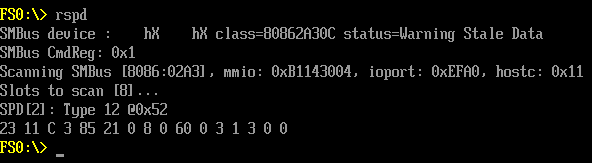
最近需要读取内存条的 SPD 信息,于是研究了一下,在 CloverBootloader 项目中【参考1】找到了一份代码。经过修改后分析出来一个独立的代码, 实体机上测试如下:

Shell 下读取 SPD 测试
#include <Uefi.h>
#include <Library/UefiLib.h>
#include <Library/DebugLib.h>
#include <Library/ShellCEntryLib.h>
#include <Protocol/PciIo.h>
#include <IndustryStandard/Pci22.h>
#include <Library/MemoryAllocationLib.h>
#include <Library/BaseMemoryLib.h>
#include <Library/IoLib.h>
#include <Library/UefiBootServicesTableLib.h>
 
#include "memvendors.h"
#include "spd.h"
 
// Intel SMB reg offsets
#define SMBHSTSTS 0
#define SMBHSTCNT 2
#define SMBHSTCMD 3
#define SMBHSTADD 4
#define SMBHSTDAT 5
#define SMBHSTDAT1 6
#define SBMBLKDAT 7
// MCP and nForce SMB reg offsets
#define SMBHPRTCL_NV 0 /* protocol, PEC */
#define SMBHSTSTS_NV 1 /* status */
#define SMBHSTADD_NV 2 /* address */
#define SMBHSTCMD_NV 3 /* command */
#define SMBHSTDAT_NV 4 /* 32 data registers */
//
 
// XMP memory profile
#define SPD_XMP_SIG1 176
#define SPD_XMP_SIG1_VALUE 0x0C
#define SPD_XMP_SIG2 177
#define SPD_XMP_SIG2_VALUE 0x4A
#define SPD_XMP_PROFILES 178
#define SPD_XMP_VERSION 179
#define SPD_XMP_PROF1_DIVISOR 180
#define SPD_XMP_PROF1_DIVIDEND 181
#define SPD_XMP_PROF2_DIVISOR 182
#define SPD_XMP_PROF2_DIVIDEND 183
#define SPD_XMP_PROF1_RATIO 186
#define SPD_XMP_PROF2_RATIO 221
 
 
#define SPD_XMP20_SIG1 0x180
#define SPD_XMP20_SIG2 0x181
#define SPD_XMP20_PROFILES 0x182
#define SPD_XMP20_VERSION 0x183
/* 0x189 */
#define SPD_XMP20_PROF1_MINCYCLE 0x18C
#define SPD_XMP20_PROF1_FINEADJUST 0x1AF
/* 0x1B8 */
#define SPD_XMP20_PROF2_MINCYCLE 0x1BB
#define SPD_XMP20_PROF2_FINEADJUST 0x1DE
/* 0x1E7 */
 
BOOLEAN       smbIntel;
UINT8           smbPage;
 
/** Read one byte from i2c, used for reading SPD */
UINT8 smb_read_byte(UINT32 base, UINT8 adr, UINT16 cmd)
{
        //   INTN l1, h1, l2, h2;
        UINT64 t;
        UINT8 page;
        UINT8 c;
        //  UINT8 p;
 
        if (smbIntel)
        {
                IoWrite8(base + SMBHSTSTS, 0x1f);               // reset SMBus Controller (set busy)
                IoWrite8(base + SMBHSTDAT, 0xff);
                t=0;
                while ( IoRead8(base + SMBHSTSTS) & 0x01)     // wait until host is not busy
                {
                        if (t > 5)
                        {
                                gBS->Stall(1000000UL);
                                Print(L"host is busy for too long for byte %2hhX:%d!\n", adr, cmd);
                                return 0xFF;                  // break
                        }
                        t++;
                }
 
                page = (cmd >> 8) & 1;
                if (page != smbPage)
                {
                        // p = 0xFF;
                        IoWrite8(base + SMBHSTCMD, 0x00);
                        IoWrite8(base + SMBHSTADD, 0x6C + (page << 1)); // Set SPD Page Address
#if 0
                        IoWrite8(base + SMBHSTCNT, 0x48); // Start + Byte Data Write
                        // Don't use "Byte Data Write" because status goes from 0x41 (Busy) -> 0x44 (Error)
#else
                        IoWrite8(base + SMBHSTCNT, 0x40); // Start + Quick Write
                        // status goes from 0x41 (Busy) -> 0x42 (Completed)
#endif
                        smbPage = page;
 
                        t=0;
                        while (!( (c=IoRead8(base + SMBHSTSTS)) & 0x02))    // wait until command finished
                        {
                                gBS->Stall(1000000UL);
                                if (c & 4)
                                {
                                        Print(L"spd page change error for byte %2hhX:%d!\n", adr, cmd);
                                        break;
                                }
                                if (t > 5)
                                {
                                        Print(L"spd page change taking too long for byte %2hhX:%d!\n", adr, cmd);
                                        break;                                  // break after 5ms
                                }
                                t++;
                        }
                        return smb_read_byte(base, adr, cmd);
                }
 
                // p = 0xFF;
                IoWrite8(base + SMBHSTCMD, (UINT8)(cmd & 0xFF)); // SMBus uses 8 bit commands
                IoWrite8(base + SMBHSTADD, (adr << 1) | 0x01 ); // read from spd
                IoWrite8(base + SMBHSTCNT, 0x48 ); // Start + Byte Data Read
                // status goes from 0x41 (Busy) -> 0x42 (Completed) or 0x44 (Error)
 
                t=0;
                while (!( (c=IoRead8(base + SMBHSTSTS)) & 0x02))    // wait until command finished
                {
                        gBS->Stall(1000000UL);
                        if (c & 4)
                        {
                                // This alway happens when trying to read the memory type (cmd 2) of an empty slot
                                // Print(L"spd byte read error for byte %2hhX:%d!\n", adr, cmd);
                                break;
                        }
                        if (t > 5)
                        {
                                // if (cmd != 2)
                                Print(L"spd byte read taking too long for byte %2hhX:%d!\n", adr, cmd);
                                break;                                  // break after 5ms
                        }
                        t++;
                }
                return IoRead8(base + SMBHSTDAT);
        }
        else
        {
 
        }
}
 
/* SPD i2c read optimization: prefetch only what we need, read non prefetcheable bytes on the fly */
#define READ_SPD(spd, base, slot, x) spd[x] = smb_read_byte(base, 0x50 + slot, x)
 
 
/** Read from smbus the SPD content and interpret it for detecting memory attributes */
STATIC void read_smb(EFI_PCI_IO_PROTOCOL *PciIo, UINT16 vid, UINT16 did)
{
        //  EFI_STATUS  Status;
        UINT8       i;// spd_size, spd_type;
        UINT8       j;
        UINT32          base, mmio, hostc;
        UINT16          Command;
        //RAM_SLOT_INFO*  slot;
        //XBool         fullBanks;
        UINT8*          spdbuf;
//  UINT16          vid, did;
 
        UINT8                  TotalSlotsCount;
 
        smbPage = 0; // valid pages are 0 and 1; assume the first page (page 0) is already selected
//  vid = gPci->Hdr.VendorId;
//  did = gPci->Hdr.DeviceId;
 
        /*Status = */
        PciIo->Pci.Read (
                PciIo,
                EfiPciIoWidthUint16,
                PCI_COMMAND_OFFSET,
                1,
                &Command
        );
 
        Command |= 1;
        /*Status = */
        PciIo->Pci.Write (
                PciIo,
                EfiPciIoWidthUint16,
                PCI_COMMAND_OFFSET,
                1,
                &Command
        );
 
        Print(L"SMBus CmdReg: 0x%X\n", Command);
 
        /*Status = */
        PciIo->Pci.Read (
                PciIo,
                EfiPciIoWidthUint32,
                0x10,
                1,
                &mmio
        );
        if (vid == 0x8086)
        {
                /*Status = */PciIo->Pci.Read (
                        PciIo,
                        EfiPciIoWidthUint32,
                        0x20,
                        1,
                        &base
                );
 
                base &= 0xFFFE;
                smbIntel = TRUE;
        }
        else
        {
                /*Status = */PciIo->Pci.Read (
                        PciIo,
                        EfiPciIoWidthUint32,
                        0x24, // iobase offset 0x24 on MCP
                        1,
                        &base
                );
                base &= 0xFFFC;
                smbIntel = FALSE;
        }
        /*Status = */PciIo->Pci.Read (
                PciIo,
                EfiPciIoWidthUint32,
                0x40,
                1,
                &hostc
        );
 
 
        Print(L"Scanning SMBus [%04X:%04X], mmio: 0x%X, ioport: 0x%X, hostc: 0x%X\n",
              vid, did, mmio, base, hostc);
 
        // needed at least for laptops
        //fullBanks = (gDMI->MemoryModules == gDMI->CntMemorySlots);
 
        spdbuf = AllocateZeroPool(MAX_SPD_SIZE);
 
        TotalSlotsCount = 8; //MAX_RAM_SLOTS;  -- spd can read only 8 slots
        Print(L"Slots to scan [%d]...\n", TotalSlotsCount);
        for (i = 0; i <  TotalSlotsCount; i++)
        {
                //<==
                ZeroMem(spdbuf, MAX_SPD_SIZE);
                READ_SPD(spdbuf, base, i, SPD_MEMORY_TYPE);
                if (spdbuf[SPD_MEMORY_TYPE] == 0xFF)
                {
                        //Print(L"SPD[%d]: Empty\n", i);
                        continue;
                }
                else if (spdbuf[SPD_MEMORY_TYPE] == 0)
                {
                        // First 0x40 bytes of DDR4 spd second page is 0. Maybe we need to change page, so do that and retry.
                        Print(L"SPD[%d]: Got invalid type %d @0x%X. Will set page and retry.\n", i, spdbuf[SPD_MEMORY_TYPE], 0x50 + i);
                        smbPage = 0xFF; // force page to be set
                        READ_SPD(spdbuf, base, i, SPD_MEMORY_TYPE);
                        
                }
 
                // Copy spd data into buffer
                Print(L"SPD[%d]: Type %d @0x%X\n", i, spdbuf[SPD_MEMORY_TYPE], 0x50 + i);
                 for (j=0;j<16;j++) {
                         READ_SPD(spdbuf, base, i, j);
                         Print(L"%X ",spdbuf[j]);
                        }
                 Print(L"\n");
        } // for
        if (smbPage != 0)
        {
                READ_SPD(spdbuf, base, 0, 0); // force first page when we're done
        }
}
 
void ScanSPD()
{
        EFI_STATUS            Status;
        EFI_HANDLE            *HandleBuffer = NULL;
        EFI_PCI_IO_PROTOCOL   *PciIo = NULL;
        UINTN                 HandleCount;
        UINTN                 Index;
        PCI_TYPE00            gPci;
 
        // Scan PCI handles
        Status = gBS->LocateHandleBuffer (
                         ByProtocol,
                         &gEfiPciIoProtocolGuid,
                         NULL,
                         &HandleCount,
                         &HandleBuffer
                 );
 
        if (!EFI_ERROR(Status))
        {
                for (Index = 0; Index < HandleCount; ++Index)
                {
                        Status = gBS->HandleProtocol(HandleBuffer[Index], &gEfiPciIoProtocolGuid, (void **)&PciIo);
                        if (!EFI_ERROR(Status))
                        {
                                // Read PCI BUS
                                //PciIo->GetLocation (PciIo, &Segment, &Bus, &Device, &Function);
                                Status = PciIo->Pci.Read (
                                                 PciIo,
                                                 EfiPciIoWidthUint32,
                                                 0,
                                                 sizeof (gPci) / sizeof (UINT32),
                                                 &gPci
                                         );
                                //SmBus controller has class = 0x0c0500
                                if ((gPci.Hdr.ClassCode[2] == 0x0c) && (gPci.Hdr.ClassCode[1] == 5)
                                                && (gPci.Hdr.ClassCode[0] == 0) && (gPci.Hdr.VendorId == 0x8086 || gPci.Hdr.VendorId == 0x10DE))
                                {
                                        Print(L"SMBus device : %04hX %04hX class=%02X%02X%02X status=%r\n",
                                              gPci.Hdr.VendorId,
                                              gPci.Hdr.DeviceId,
                                              gPci.Hdr.ClassCode[2],
                                              gPci.Hdr.ClassCode[1],
                                              gPci.Hdr.ClassCode[0],
                                              Status
                                             );
                                        read_smb(PciIo, gPci.Hdr.VendorId, gPci.Hdr.DeviceId);
                                }
                        }
                }
        }
 
}
 
/**
  UEFI application entry point which has an interface similar to a
  standard C main function.
 
  The ShellCEntryLib library instance wrappers the actual UEFI application
  entry point and calls this ShellAppMain function.
 
  @param  ImageHandle  The image handle of the UEFI Application.
  @param  SystemTable  A pointer to the EFI System Table.
 
  @retval  0               The application exited normally.
  @retval  Other           An error occurred.
 
**/
INTN
EFIAPI
ShellAppMain (
        IN UINTN Argc,
        IN CHAR16 **Argv
)
{
        ScanSPD();
        return EFI_SUCCESS;
}

完整代码和EFI 下载:

ReadSPD下载

参考:

1. https://github.com/CloverHackyColor/CloverBootloader/releases