批处理延时和计算经过时间

首先介绍一下批处理中延时的实现:下面代码实现延时3秒

CHOICE /T 3 /C ync /CS /D y

计算经过时间,以秒为单位:

@echo off
set "t=%time%"
::You code start here

::You code end here
set "t1=%time%"

if "%t1:~,2%" lss "%t:~,2%" set "add=+24"
set /a "times=(%t1:~,2%-%t:~,2%%add%)*3600+(1%t1:~3,2%%%100-1%t:~3,2%%%100)*60+(1%t1:~6,2%%%100-1%t:~6,2%%%100)" 
echo Time Used %times% Seconds
pause
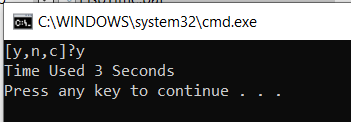
上述代码合在一起进行测试:

@echo off
set "t=%time%"
::You code start here
CHOICE /T 3 /C ync /CS /D y
::You code end here
set "t1=%time%"

if "%t1:~,2%" lss "%t:~,2%" set "add=+24"
set /a "times=(%t1:~,2%-%t:~,2%%add%)*3600+(1%t1:~3,2%%%100-1%t:~3,2%%%100)*60+(1%t1:~6,2%%%100-1%t:~6,2%%%100)" 
echo Time Used %times% Seconds
pause

将一个文件中的多个 Sheet 内容合并的VBA

如下的 VBA 代码可以帮助我们将一个Excel文件中的多个 Sheet 合并到一起:

Sub Merge_Sheets()
    'Insert a new worksheet
    Sheets.Add
     
    'Rename the new worksheet
    ActiveSheet.Name = "ProfEx_Merged_Sheet"
     
    'Loop through worksheets and copy the to your new worksheet
    For Each ws In Worksheets
        ws.Activate
         
        'Don't copy the merged sheet again
        If ws.Name <> "ProfEx_Merged_Sheet" Then
            ws.UsedRange.Select
            Selection.Copy
            Sheets("ProfEx_Merged_Sheet").Activate
             
            'Select the last filled cell
            ActiveSheet.Range("A1048576").Select
            Selection.End(xlUp).Select
             
            'For the first worksheet you don't need to go down one cell
            If ActiveCell.Address <> "$A$1" Then
                ActiveCell.Offset(1, 0).Select
            End If
             
            'Instead of just paste, you can also paste as link, as values etc.
            ActiveSheet.Paste
         
        End If
         
    Next
End Sub

来源:

Merge Sheets: Easily Copy Excel Sheets Underneath on One Sheet!

ESP32 S2 Mini

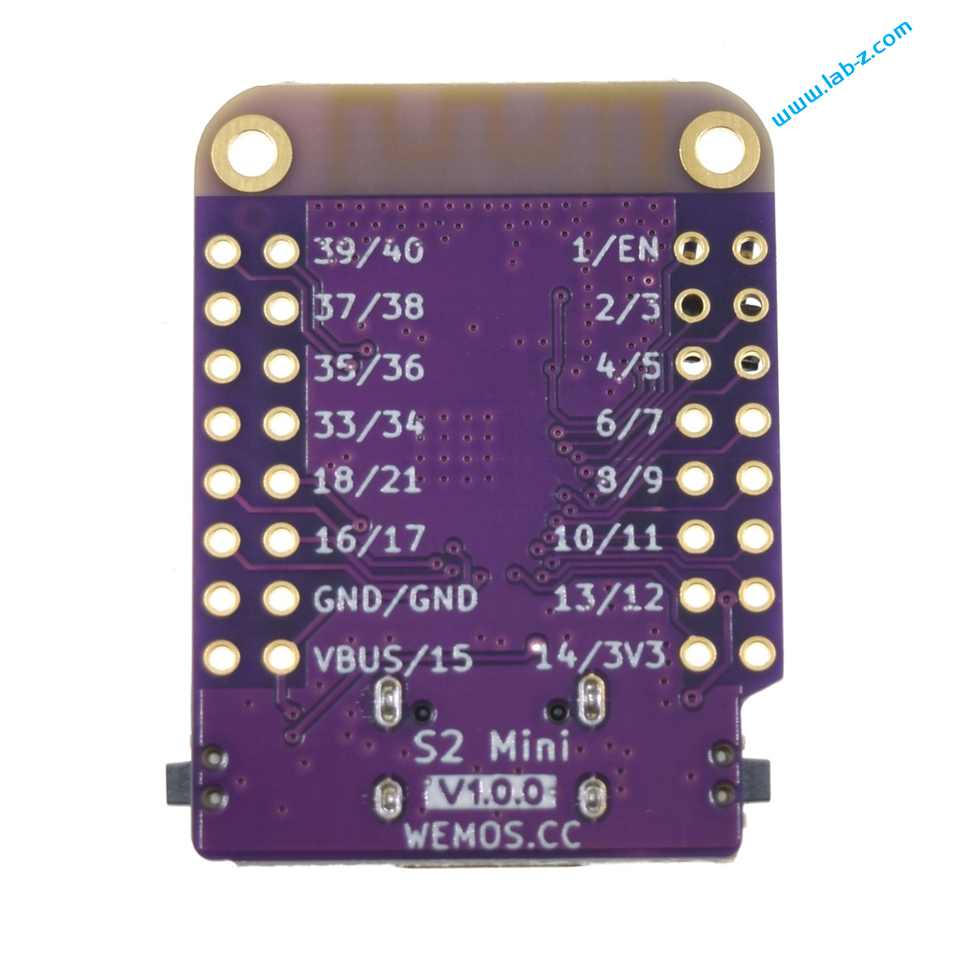
最近发现了一款非常便宜的 ESP32 S2 开发板:wemos 的 ESP32 S2 MINI,价格在12元。这个建议甚至低于 Atmel 328P 芯片,更重要的是这个是开发板直接可以下载代码无需额外 USB转串口设备。

官方网站是 https://www.wemos.cc/en/latest/s2/s2_mini.html#

  • based ESP32-S2FN4R2 WIFI IC
  • Type-C USB
  • 4MB Flash
  • 2MB PSRAM
  • 27x IO
  • ADC, DAC, I2C, SPI, UART, USB OTG
  • Compatible with LOLIN D1 mini shields
  • Compatible with MicroPython, Arduino, CircuitPython and ESP-IDF
  • Default firmware: MicroPython

对于一般的开发已经足够用了。

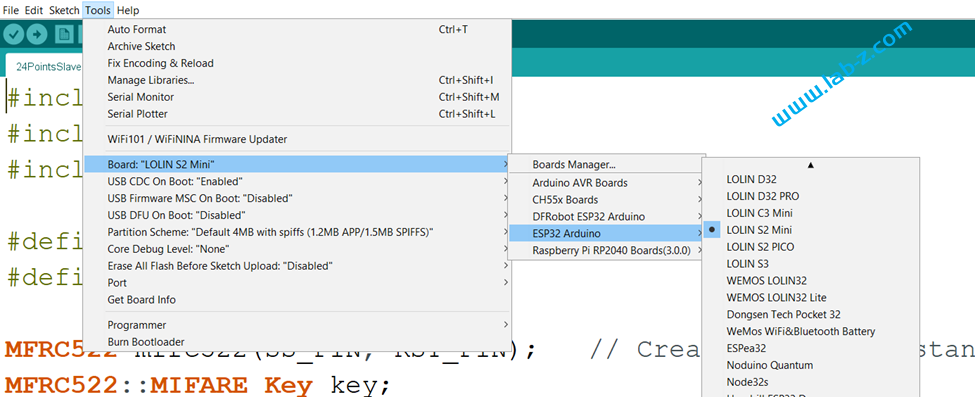
在使用 Arduino 开发时,需要特别注意选择为  LOLIN S2 MINI 开发板,具体如下:

引脚定义在下面这个文件中(ESP32的大多数引脚都可以自行定义,但是为了更好的兼容,个人建议使用预定义值)

C:\Users\UserName\AppData\Local\Arduino15\packages\esp32\hardware\esp32\2.0.6\variants\lolin_s2_mini\pins_arduino.h

Arduino ESP32 I2C Slave 的例子

Arduino 作为 I2C Slave 算是比较冷门的使用方式,下面是一个实际的例子:

#include <Wire.h>
 
byte i2c_rcv=0;               // data received from I2C bus
 
void setup() {
  Wire.begin(0x08);           // join I2C bus as Slave with address 0x08
 
  // event handler initializations
  Wire.onReceive(dataRcv);    // register an event handler for received data
  Wire.onRequest(dataRqst);   // register an event handler for data request
  Serial.begin(115200);
}
 
void loop() {
}
 
//received data handler function
void dataRcv(int numBytes) {
  Serial.print("Slave Received ");
  Serial.print(numBytes);
  Serial.println("Bytes");
  while (Wire.available()) { // read all bytes received
    i2c_rcv = Wire.read();
    Serial.print("[");
    Serial.print(i2c_rcv);
    Serial.print("]");
  }
  Serial.println("");
}
 
// requests data handler function
void dataRqst() {
    Wire.write(i2c_rcv); // send potentiometer position
    Serial.print("Slave send ");
    Serial.print(i2c_rcv,HEX);
}

运行之后,Arduino 作为一个地址为 0x08 的I2C设备。当它收到 Master 发送过来的数据,会进入 void dataRcv(int numBytes)  函数,然后将收到的数据输出到串口上;当它收到 Master 发送的读请求,会进入void dataRqst() 函数,将之前收到的数据返回给 Master 。

试验使用 Leonardo 板子,使用调试器发送 10 17 表示对 0x08 地址的设备发送 0x17,之后调试器发送 11 01 表示从 0x08 设备读取一字节数据。