继续前面提到的在 UEFI下重新制作一个 EasyX 的话题,这次加入 Ascii 显示的功能。
新增加了Ascii显示功能,可以调整字体大小。
直接上结果:
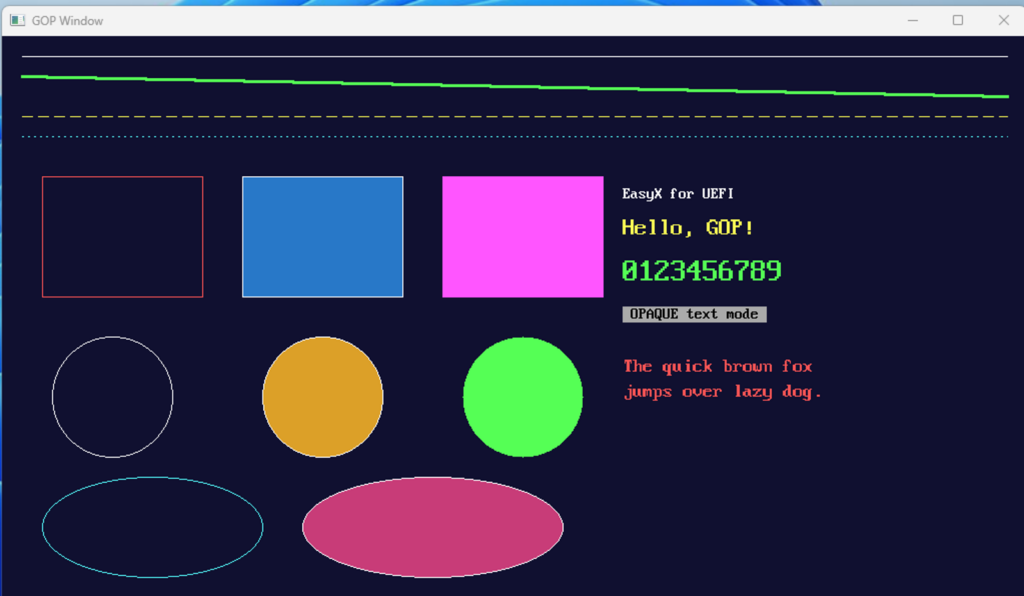
上述测试代的代码:
#include <Uefi.h>
#include <Library/UefiBootServicesTableLib.h>
#include <Library/UefiLib.h>
#include "easyx.h"

/**
  等待用户按下任意键。
**/
STATIC
VOID
WaitAnyKey (
  VOID
  )
{
  EFI_INPUT_KEY  Key;
  UINTN          Index;

  gBS->WaitForEvent (1, &gST->ConIn->WaitForKey, &Index);
  gST->ConIn->ReadKeyStroke (gST->ConIn, &Key);
}

/**
  程序入口。
**/
EFI_STATUS
EFIAPI
UefiMain (
  IN EFI_HANDLE        ImageHandle,
  IN EFI_SYSTEM_TABLE  *SystemTable
  )
{
  EFI_STATUS  Status;
  INT32       W;
  INT32       H;

  //
  // 初始化绘图设备(跟随 GOP 最大分辨率模式)。
  //
  Status = initgraph (0, 0);
  if (EFI_ERROR (Status)) {
    Print (L"initgraph 失败: %r\n", Status);
    return Status;
  }

  W = getwidth ();
  H = getheight ();

  //
  // 批量绘图,减少刷新次数。
  //
  BeginBatchDraw ();

  //
  // 背景填充深蓝。
  //
  setbkcolor (RGB (16, 16, 48));
  cleardevice ();

  //
  // 直线:不同颜色/线宽/线型。
  //
  setlinecolor (WHITE);
  setlinestyle (PS_SOLID, 1);
  line (20, 20, W - 20, 20);

  setlinecolor (LIGHTGREEN);
  setlinestyle (PS_SOLID, 3);
  line (20, 40, W - 20, 60);

  setlinecolor (YELLOW);
  setlinestyle (PS_DASH, 1);
  line (20, 80, W - 20, 80);

  setlinecolor (LIGHTCYAN);
  setlinestyle (PS_DOT, 1);
  line (20, 100, W - 20, 100);

  //
  // 矩形。
  //
  setlinestyle (PS_SOLID, 1);
  setlinecolor (LIGHTRED);
  rectangle (40, 140, 200, 260);

  setfillcolor (RGB (40, 120, 200));
  setlinecolor (WHITE);
  fillrectangle (240, 140, 400, 260);

  setfillcolor (LIGHTMAGENTA);
  solidrectangle (440, 140, 600, 260);

  //
  // 圆。
  //
  setlinecolor (WHITE);
  circle (110, 360, 60);

  setfillcolor (RGB (220, 160, 40));
  setlinecolor (WHITE);
  fillcircle (320, 360, 60);

  setfillcolor (LIGHTGREEN);
  solidcircle (520, 360, 60);

  //
  // 椭圆。
  //
  setlinecolor (LIGHTCYAN);
  ellipse (40, 440, 260, 540);

  setfillcolor (RGB (200, 60, 120));
  setlinecolor (WHITE);
  fillellipse (300, 440, 560, 540);

  //
  // 文字(P2):不同颜色/大小/背景模式。
  //
  settextcolor (WHITE);
  settextstyle (16, 8);
  outtextxy (620, 150, "EasyX for UEFI");

  settextcolor (YELLOW);
  settextstyle (24, 0);            // 高 24,宽按比例
  outtextxy (620, 180, "Hello, GOP!");

  settextcolor (LIGHTGREEN);
  settextstyle (32, 16);
  setbkmode (TRANSPARENT);
  outtextxy (620, 220, "0123456789");

  settextcolor (BLACK);
  setbkcolor (LIGHTGRAY);
  setbkmode (OPAQUE);
  settextstyle (16, 8);
  outtextxy (620, 270, " OPAQUE text mode ");

  setbkmode (TRANSPARENT);
  settextcolor (LIGHTRED);
  settextstyle (20, 10);
  outtextxy (620, 320, "The quick brown fox");
  outtextxy (620, 345, "jumps over lazy dog.");

  //
  // 一次性刷新并结束批量绘图。
  //
  EndBatchDraw ();

  //
  // 等待按键后清理退出。
  //
  WaitAnyKey ();

  closegraph ();

  //
  // 恢复文本控制台。
  //
  gST->ConOut->ClearScreen (gST->ConOut);
  Print (L"EasyX UEFI Demo 结束。分辨率: %d x %d\n", W, H);

  return EFI_SUCCESS;
}
完整的代码和编译后的 EFI 文件下载: