增加ROP2 modes 功能
/**
  设置光栅操作模式(ROP2)。

  @param[in]  Mode  光栅操作模式。
**/
VOID
EFIAPI
SetROP2 (
  IN INT32  Mode
  );
SetROP2 是一个 光栅操作模式(Raster Operation,ROP) 控制函数,用于指定在绘制图形时,源像素和目标像素之间的逻辑组合方式。
功能说明
在没有 ROP2 的图形库中,绘制操作总是直接覆盖背景(COPY 模式)。而 ROP2 模式允许多种像素合成方式,实现特殊的绘制效果。
支持的模式
| 模式值 | 常量名 | 效果 | 示例应用 |
| 12 | R2_COPYPEN | 源像素直接覆盖目标(正常复制,默认模式) | 普通绘图 |
| 6 | R2_XORPEN | 源像素与目标像素进行 XOR 异或操作,结果显示互补色 | 透明效果、可擦除绘图、橡皮筋选择框 |
| 0 | R2_BLACK | 无论源像素什么颜色,总是绘制黑色 | 强制黑色绘制 |
| 15 | R2_WHITE | 无论源像素什么颜色,总是绘制白色 | 强制白色绘制 |
实际应用场景
- 透明绘制:用 XOR 模式在图像上绘制临时标记,再绘制一次可恢复原状
- 高亮选择:用 XOR 绘制选择框,不会永久改变背景
- 可擦除绘图:用 XOR 模式手绘,两次绘制相同位置可消除
- 特殊效果:结合不同模式产生各种视觉效果
测试代码:
/** @file
  EasyX UEFI Graphics Demo: SetROP2 Test

  Demonstrates ROP2 (Raster Operation Mode) functionality.
  Shows how different ROP2 modes affect pixel drawing operations.
**/

#include <Uefi.h>
#include <Library/UefiBootServicesTableLib.h>
#include <Library/UefiLib.h>
#include <Library/PrintLib.h>
#include "easyx.h"

/**
  程序入口。
**/
EFI_STATUS
EFIAPI
UefiMain (
  IN EFI_HANDLE        ImageHandle,
  IN EFI_SYSTEM_TABLE  *SystemTable
  )
{
  EFI_STATUS  Status;
  INT32       W, H;
  ExMessage   Msg;
  BOOLEAN     Running;
  INT32       i, x, y;

  //
  // Initialize graphics device (1024x768).
  //
  Status = initgraph (1024, 768);
  if (EFI_ERROR (Status)) {
    Print (L"initgraph failed: %r\n", Status);
    return Status;
  }

  W = getwidth ();
  H = getheight ();

  //
  // Batch drawing.
  //
  BeginBatchDraw ();

  //
  // Fill background with dark color.
  //
  setbkcolor (RGB (30, 30, 60));
  cleardevice ();

  //
  // Title
  //
  settextcolor (YELLOW);
  settextstyle (24, 12);
  outtextxy (300, 20, "SetROP2 Mode Test");

  settextcolor (LIGHTCYAN);
  settextstyle (12, 6);
  outtextxy (50, 60, "Different ROP2 modes applied to draw shapes on colored backgrounds");

  // =========================================================================
  // Test Row 1: Fill rectangles with different ROP2 modes
  // =========================================================================

  // Background 1: Red background, fill small rect with COPYPEN
  setfillcolor (RED);
  solidrectangle (50, 120, 200, 270);
  settextcolor (WHITE);
  outtextxy (75, 130, "RED BG");

  // R2_COPYPEN (12) - Normal copy (white filled rect)
  SetROP2 (12);
  setlinecolor (WHITE);
  setfillcolor (WHITE);
  settextcolor (WHITE);
  outtextxy (70, 145, "COPY");
  fillrectangle (100, 200, 150, 250);

  // Background 2: Green background, fill small rect with XOR
  setfillcolor (LIGHTGREEN);
  solidrectangle (250, 120, 400, 270);
  settextcolor (BLACK);
  outtextxy (280, 130, "GREEN BG");

  // R2_XORPEN (6) - XOR mode: white XOR green = purple/magenta
  SetROP2 (6);
  setlinecolor (WHITE);
  setfillcolor (WHITE);
  settextcolor (BLACK);
  outtextxy (280, 145, "XOR");
  fillrectangle (290, 200, 360, 250);

  // Background 3: Blue background, fill small rect with BLACK
  setfillcolor (LIGHTBLUE);
  solidrectangle (450, 120, 600, 270);
  settextcolor (WHITE);
  outtextxy (480, 130, "BLUE BG");

  // R2_BLACK (0) - Always draws black
  SetROP2 (0);
  setlinecolor (WHITE);
  setfillcolor (WHITE);
  settextcolor (WHITE);
  outtextxy (480, 145, "BLACK");
  fillrectangle (490, 200, 560, 250);

  // Background 4: White background, fill small rect with WHITE
  setfillcolor (WHITE);
  solidrectangle (650, 120, 800, 270);
  settextcolor (BLACK);
  outtextxy (680, 130, "WHITE BG");

  // R2_WHITE (15) - Always draws white
  SetROP2 (15);
  setlinecolor (BLACK);
  setfillcolor (BLACK);
  settextcolor (BLACK);
  outtextxy (680, 145, "WHITE");
  fillrectangle (690, 200, 760, 250);

  // =========================================================================
  // Test Row 2: Rectangles with gradient backgrounds
  // =========================================================================

  // Create gradient background: Red to Blue horizontally
  for (i = 0; i < 150; i++) {
    UINT32  Ratio = (i * 256) / 150;
    UINT8   R = (UINT8)(255 - (255 * Ratio / 256));
    UINT8   G = 0;
    UINT8   B = (UINT8)(255 * Ratio / 256);
    setlinecolor (RGB (R, G, B));
    line (50 + i, 320, 50 + i, 420);
  }

  settextcolor (YELLOW);
  outtextxy (50, 430, "Gradient: RED -> BLUE");

  // Draw rectangles with different ROP2 modes on gradient
  // Mode 12: COPY
  SetROP2 (12);
  setlinecolor (WHITE);
  rectangle (70, 345, 110, 395);
  settextcolor (WHITE);
  outtextxy (75, 405, "COPY");

  // Mode 6: XOR
  SetROP2 (6);
  setlinecolor (WHITE);
  rectangle (150, 345, 190, 395);
  settextcolor (WHITE);
  outtextxy (155, 405, "XOR");

  // Mode 0: BLACK
  SetROP2 (0);
  setlinecolor (WHITE);
  rectangle (230, 345, 270, 395);
  settextcolor (WHITE);
  outtextxy (235, 405, "BLACK");

  // Mode 15: WHITE
  SetROP2 (15);
  setlinecolor (BLACK);
  rectangle (310, 345, 350, 395);
  settextcolor (WHITE);
  outtextxy (315, 405, "WHITE");

  // =========================================================================
  // Test Row 3: Lines on checker pattern background
  // =========================================================================

  // Draw checker pattern
  for (y = 480; y < 650; y += 20) {
    for (x = 50; x < 400; x += 20) {
      if (((x / 20) + (y / 20)) % 2 == 0) {
        setfillcolor (DARKGRAY);
      } else {
        setfillcolor (LIGHTGRAY);
      }
      solidrectangle (x, y, x + 19, y + 19);
    }
  }

  settextcolor (YELLOW);
  outtextxy (50, 460, "Lines on Checker Pattern");

  // Draw lines with different ROP2 modes
  // Mode 12: COPY
  SetROP2 (12);
  setlinecolor (RED);
  setlinestyle (PS_SOLID, 2);
  line (70, 500, 130, 600);
  line (75, 500, 135, 600);

  // Mode 6: XOR
  SetROP2 (6);
  setlinecolor (RED);
  setlinestyle (PS_SOLID, 2);
  line (160, 500, 220, 600);
  line (165, 500, 225, 600);

  // Mode 0: BLACK
  SetROP2 (0);
  setlinecolor (RED);  // Will be ignored, black will be drawn
  setlinestyle (PS_SOLID, 2);
  line (250, 500, 310, 600);
  line (255, 500, 315, 600);

  // Mode 15: WHITE
  SetROP2 (15);
  setlinecolor (BLACK);  // Will be ignored, white will be drawn
  setlinestyle (PS_SOLID, 2);
  line (340, 500, 400, 600);
  line (345, 500, 405, 600);

  // Labels for Row 3
  settextcolor (WHITE);
  settextstyle (8, 4);
  outtextxy (75, 615, "COPY");
  outtextxy (165, 615, "XOR");
  outtextxy (260, 615, "BLACK");
  outtextxy (350, 615, "WHITE");

  // =========================================================================
  // Legend and Instructions
  // =========================================================================
  settextcolor (LIGHTGREEN);
  settextstyle (12, 6);
  outtextxy (500, 490, "ROP2 Modes:");

  settextcolor (LIGHTCYAN);
  outtextxy (500, 520, "12 (COPYPEN) - Normal copy");
  outtextxy (500, 540, "6 (XORPEN) - XOR with destination");
  outtextxy (500, 560, "0 (BLACK) - Always black");
  outtextxy (500, 580, "15 (WHITE) - Always white");

  settextcolor (RGB (255, 255, 200));
  outtextxy (500, 620, "Press ESC to exit");

  // Restore default ROP2 mode
  SetROP2 (12);

  // =========================================================================
  // Flush and enter main message loop
  // =========================================================================
  EndBatchDraw ();

  Running = TRUE;

  while (Running) {
    getmessage (&Msg, EX_KEY);

    if (Msg.message == WM_KEYDOWN && Msg.vkcode == VK_ESCAPE) {
      Running = FALSE;
    }
  }

  //
  // Close graphics device.
  //
  closegraph ();

  //
  // Restore text console.
  //
  gST->ConOut->ClearScreen (gST->ConOut);
  Print (L"SetROP2 Demo Complete\n");

  return EFI_SUCCESS;
}
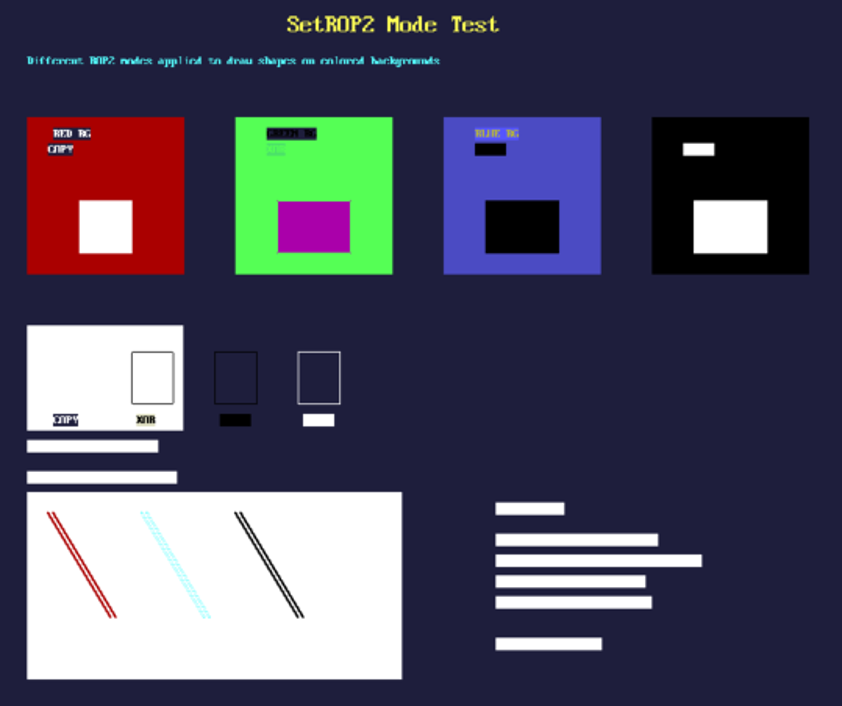
运行结果:
完整的代码和编译后的 EFI :