批处理延时和计算经过时间

首先介绍一下批处理中延时的实现:下面代码实现延时3秒

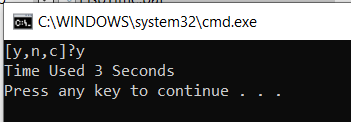
CHOICE /T 3 /C ync /CS /D y

计算经过时间,以秒为单位:

@echo off
set "t=%time%"
::You code start here

::You code end here
set "t1=%time%"

if "%t1:~,2%" lss "%t:~,2%" set "add=+24"
set /a "times=(%t1:~,2%-%t:~,2%%add%)*3600+(1%t1:~3,2%%%100-1%t:~3,2%%%100)*60+(1%t1:~6,2%%%100-1%t:~6,2%%%100)" 
echo Time Used %times% Seconds
pause

上述代码合在一起进行测试:

@echo off
set "t=%time%"
::You code start here
CHOICE /T 3 /C ync /CS /D y
::You code end here
set "t1=%time%"

if "%t1:~,2%" lss "%t:~,2%" set "add=+24"
set /a "times=(%t1:~,2%-%t:~,2%%add%)*3600+(1%t1:~3,2%%%100-1%t:~3,2%%%100)*60+(1%t1:~6,2%%%100-1%t:~6,2%%%100)" 
echo Time Used %times% Seconds
pause

将一个文件中的多个 Sheet 内容合并的VBA

如下的 VBA 代码可以帮助我们将一个Excel文件中的多个 Sheet 合并到一起:

Sub Merge_Sheets()
    'Insert a new worksheet
    Sheets.Add
     
    'Rename the new worksheet
    ActiveSheet.Name = "ProfEx_Merged_Sheet"
     
    'Loop through worksheets and copy the to your new worksheet
    For Each ws In Worksheets
        ws.Activate
         
        'Don't copy the merged sheet again
        If ws.Name <> "ProfEx_Merged_Sheet" Then
            ws.UsedRange.Select
            Selection.Copy
            Sheets("ProfEx_Merged_Sheet").Activate
             
            'Select the last filled cell
            ActiveSheet.Range("A1048576").Select
            Selection.End(xlUp).Select
             
            'For the first worksheet you don't need to go down one cell
            If ActiveCell.Address <> "$A$1" Then
                ActiveCell.Offset(1, 0).Select
            End If
             
            'Instead of just paste, you can also paste as link, as values etc.
            ActiveSheet.Paste
         
        End If
         
    Next
End Sub

来源:

Merge Sheets: Easily Copy Excel Sheets Underneath on One Sheet!

ESP32 S2 Mini

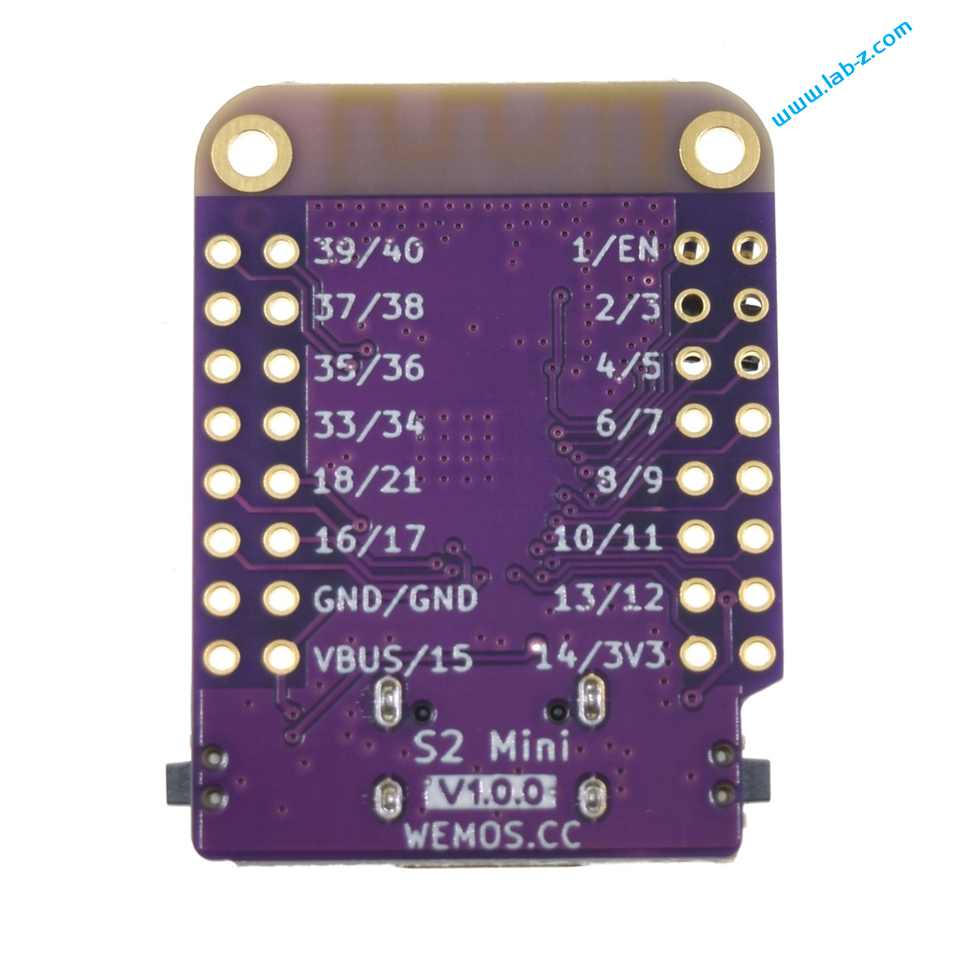
最近发现了一款非常便宜的 ESP32 S2 开发板:wemos 的 ESP32 S2 MINI,价格在12元。这个建议甚至低于 Atmel 328P 芯片,更重要的是这个是开发板直接可以下载代码无需额外 USB转串口设备。

官方网站是 https://www.wemos.cc/en/latest/s2/s2_mini.html#

  • based ESP32-S2FN4R2 WIFI IC
  • Type-C USB
  • 4MB Flash
  • 2MB PSRAM
  • 27x IO
  • ADC, DAC, I2C, SPI, UART, USB OTG
  • Compatible with LOLIN D1 mini shields
  • Compatible with MicroPython, Arduino, CircuitPython and ESP-IDF
  • Default firmware: MicroPython

对于一般的开发已经足够用了。

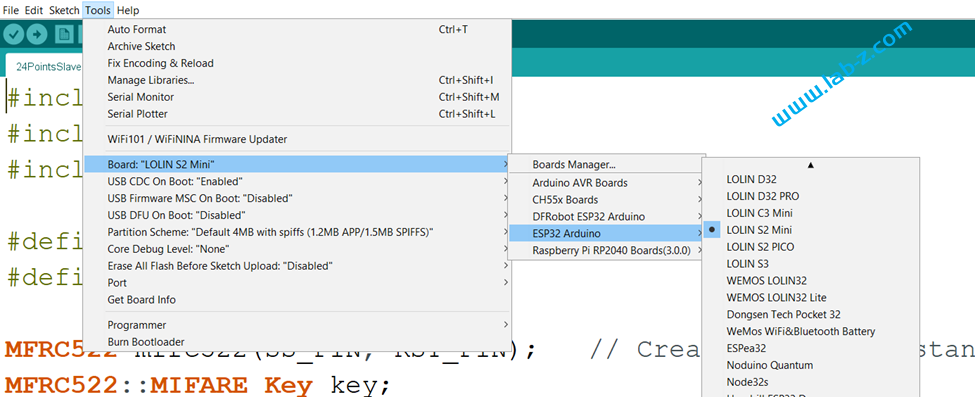
在使用 Arduino 开发时,需要特别注意选择为  LOLIN S2 MINI 开发板,具体如下:

引脚定义在下面这个文件中(ESP32的大多数引脚都可以自行定义,但是为了更好的兼容,个人建议使用预定义值)

C:\Users\UserName\AppData\Local\Arduino15\packages\esp32\hardware\esp32\2.0.6\variants\lolin_s2_mini\pins_arduino.h

Arduino ESP32 I2C Slave 的例子

Arduino 作为 I2C Slave 算是比较冷门的使用方式,下面是一个实际的例子:

#include <Wire.h>
 
byte i2c_rcv=0;               // data received from I2C bus
 
void setup() {
  Wire.begin(0x08);           // join I2C bus as Slave with address 0x08
 
  // event handler initializations
  Wire.onReceive(dataRcv);    // register an event handler for received data
  Wire.onRequest(dataRqst);   // register an event handler for data request
  Serial.begin(115200);
}
 
void loop() {
}
 
//received data handler function
void dataRcv(int numBytes) {
  Serial.print("Slave Received ");
  Serial.print(numBytes);
  Serial.println("Bytes");
  while (Wire.available()) { // read all bytes received
    i2c_rcv = Wire.read();
    Serial.print("[");
    Serial.print(i2c_rcv);
    Serial.print("]");
  }
  Serial.println("");
}
 
// requests data handler function
void dataRqst() {
    Wire.write(i2c_rcv); // send potentiometer position
    Serial.print("Slave send ");
    Serial.print(i2c_rcv,HEX);
}

运行之后,Arduino 作为一个地址为 0x08 的I2C设备。当它收到 Master 发送过来的数据,会进入 void dataRcv(int numBytes)  函数,然后将收到的数据输出到串口上;当它收到 Master 发送的读请求,会进入void dataRqst() 函数,将之前收到的数据返回给 Master 。

试验使用 Leonardo 板子,使用调试器发送 10 17 表示对 0x08 地址的设备发送 0x17,之后调试器发送 11 01 表示从 0x08 设备读取一字节数据。

ESP32 I2C Slave Mode

ESP32 目前支持 I2C 的 Slave Mode ,就是说可以作为一个 I2C 设备存在。

具体的介绍在下面能看到,是一个大佬写了一个 Slave Mode 的库,后来整合到了官方 Release 中。

https://github.com/espressif/arduino-esp32/pull/5746/commits/f9f70d2f73d16f7fb50f59e05323cd041acce830

安装完最新的ESP32 Arduino支持包之后,可以在下面的路径中看到:

C:\Users\UserName\AppData\Local\Arduino15\packages\esp32\hardware\esp32\2.0.6\libraries\Wire

其中的 WireSlave 就是实现一个 I2C Slave 的完整例子。

充放电、升压、一键开机和断电验测试板

这是一个电路测试板,能够实现下面的功能:

  1. 锂电池充放电管理,5V输出
  2. 按键开机,MCU 控制关机(自己给自己切断电源)
  3. 5V升压

整体电路图如下,可以看到分成四部分:锂电池充放电(第一部分),一键开机和MCU关机(第二部分)、5V升压(第三部分)和锂电池座(第四部分):

首先介绍第一部分,核心是 IP5306模块,接口部分定义如下:

引脚功能介绍
1USBINPin1是 USBIN ,连接 MCU ,设置为 INPUT_PULLUP,当USB充电时,会被拉低;当没有充电时会设置为高。从而MCU通过读取这个GPIO 能够得知当前是否有正在进行充电。IP5306 没有反映当前充电状态的引脚,所使用这个设计来获得充电状态;
2OUT1Pin2 是5V输出。当没有对外供电时,这里有4V 左右的电压输出;当外部插入取电时,或者SW2按钮按下时,这里会有5V输出;
3GND 
4BATIN连接电池正极输入;
5GND 
6BAT_ADC一个分压输出,MCU 的 ADC 能够获得当前的电池电压信息

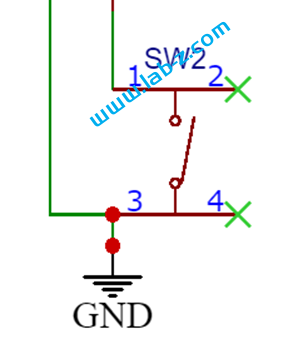
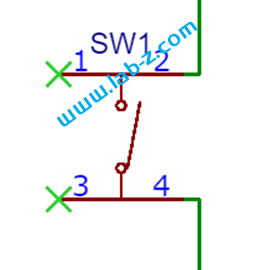
此外这部分的 SW2是一个按钮,短按可以让 IP5306输出5V,再次按下会切断输出,如果负载<50ma,那么 45s之后也会停止输出

接下来是第二部分:

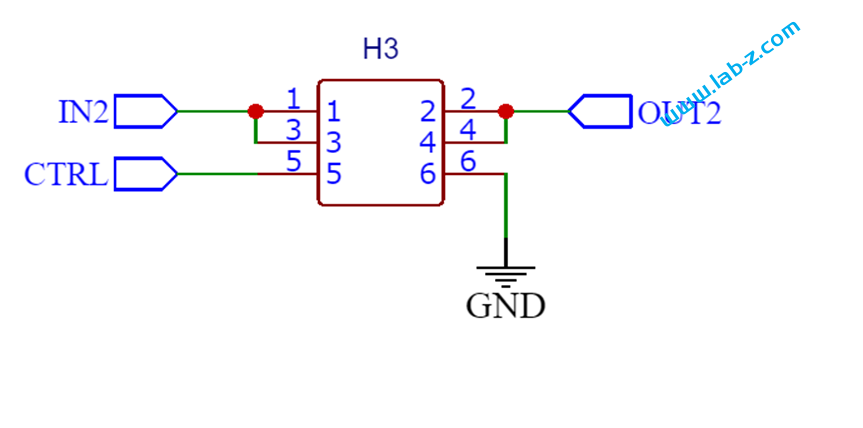
这部分根据【参考1】而来,很好用。接口定义如下:

引脚功能介绍
1IN2输入(第一部分输出的OUT1 可以接入这里)
2OUT2控制后的输出
3IN2同上 IN2
4OUT2同上 OUT2
5CTRL输出控制脚,初始时MCU 需要通过 CTRL对这里输入一个高电平,当需要断电时CTRL输入低电平随即切断Pin2的输出
6GND 
   

这部分也带有一个按键,按下之后 Pin2 即可输出(需要按的稍微长一些,保证MCU 的 CTRL能够输出高电平)

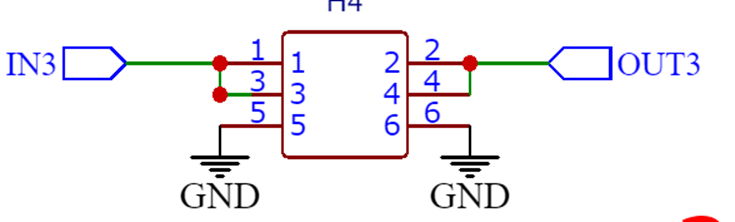
第三部分,基于MT3608 芯片的5V升压设计,具体芯片 DataSheet可以在【参考2】看到,这个也是也是来自开源广场别人的设计(不过忘记是哪篇了,找了一下没找到),接口定义如下:

引脚功能介绍
1IN3电源输入,例如输入3.3V
2OUT3电源输出,5V
3IN3同上IN3
4OUT3同上OUT3
5GND 
6GND 

简单功耗测量,测试方法是在电池串联万用表测量电流。5V对ESP32 S3 板【参考3】输出时,电流在90ma左右;MCU 切断供电后,电流在5ma左右;经过45s后IP5306自动断电后电流在0.04ma左右。

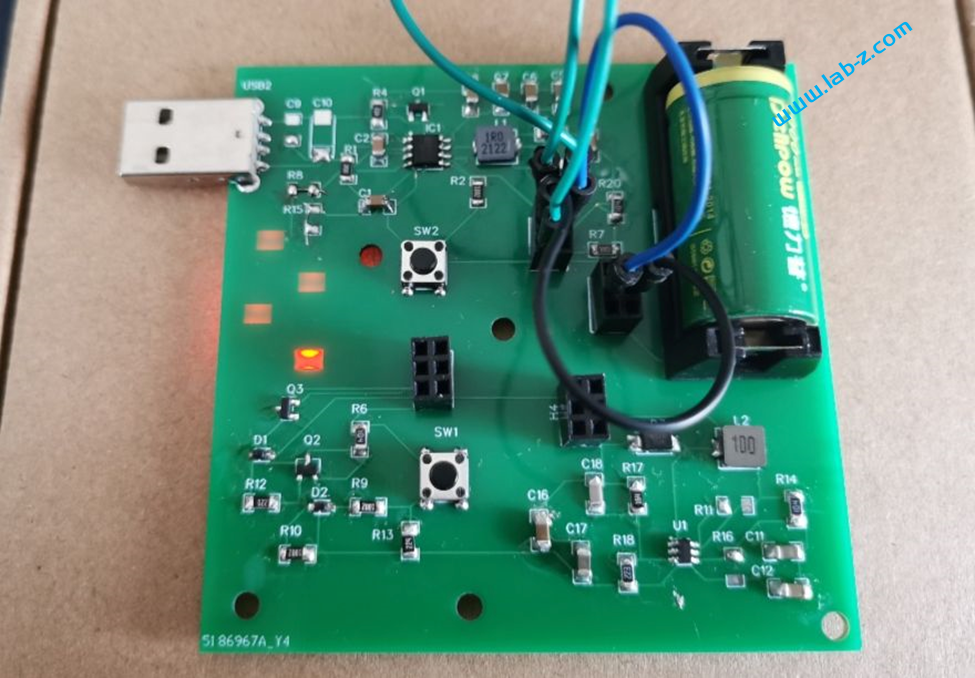
成品

 工作视频在:

上述主要芯片除了电容电阻,其余都是购买自立创商城,有兴趣的朋友可以实验。

参考:

  1. https://oshwhub.com/armxu/kai-ji-zi-dong-guan-ji-dian-lu
  2. https://atta.szlcsc.com/upload/public/pdf/source/20161110/1478743351706.pdf
  3. https://mc.dfrobot.com.cn/thread-315546-1-1.html

SPI NOR 芯片测试板

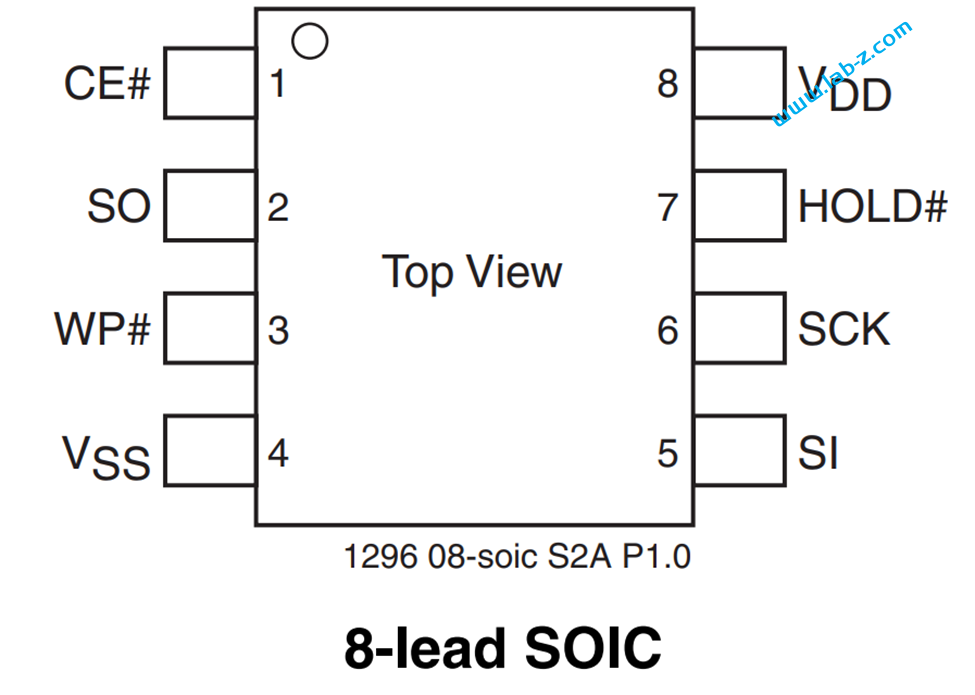
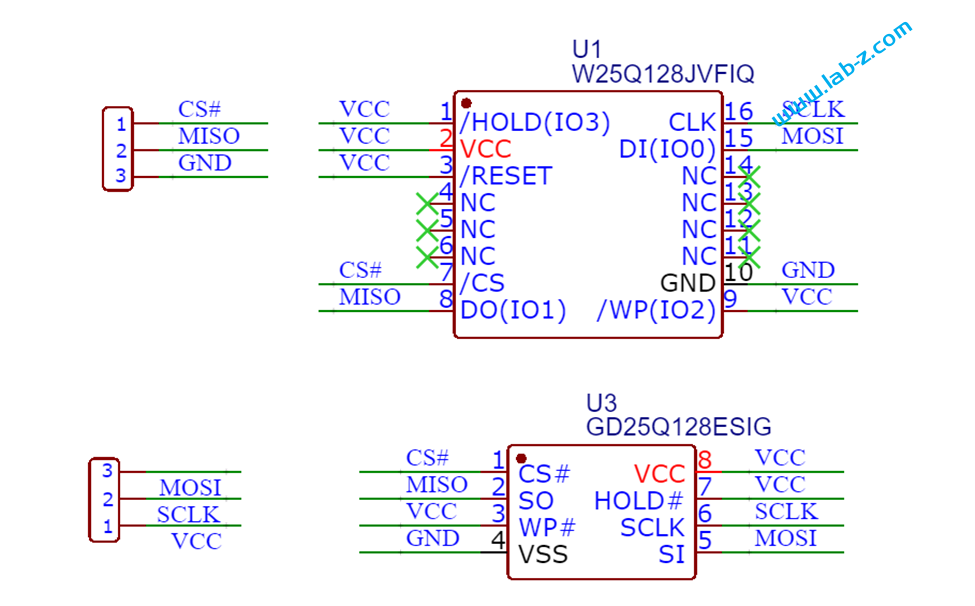
为了测试 SPI NOR, 做了一个测试的小板,一面可以使用 SOP8 的SPI NOR, 一面可以使用 SOP16 的SPI NOR。对于目前我们使用的 SOP8 的 SPI NOR 来说,有8个引脚:

其中的 WP# 是写保护,低有效(拉低的时候无法写入);HOLD# 是暂停操作,比如,当前正在写入,HOLD# 拉低之后暂停写入,拉高后继续写入而无需重新发送写入命令。

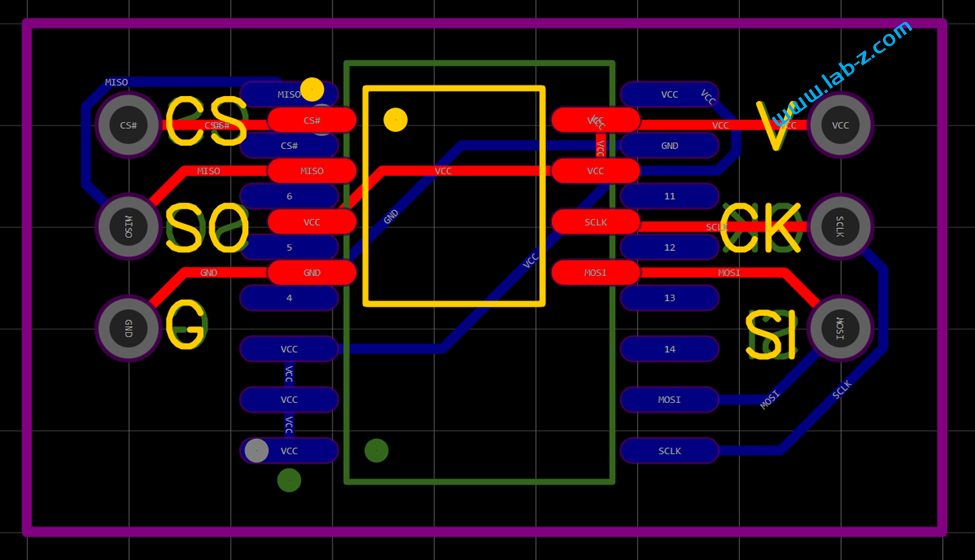
SPINOR 测试板PCB
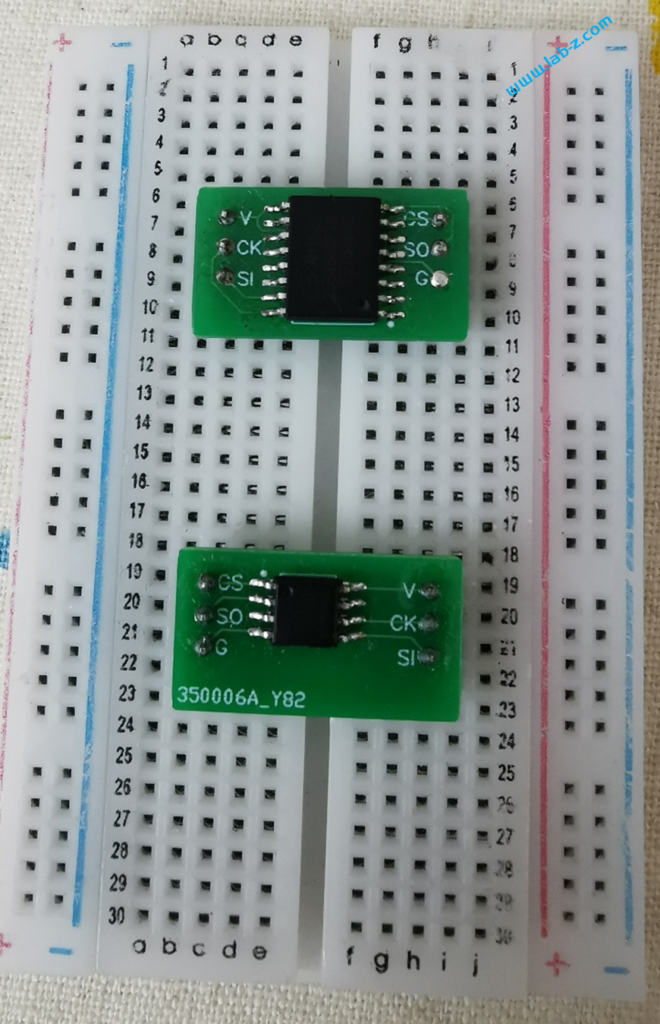
SPINOR 测试板成品

电路图和PCB下载:

STB下载

Step to UEFI (275)UEFI 创建内存虚拟盘

前面介绍过在 UEFI 下创建内存虚拟盘的操作,这次介绍如何创建包含需要内容的内存虚拟盘。生成的虚拟盘可以在没有硬盘的情况下充当临时文件的存放位置。当然如果关机或者断电后,盘中内容会消失。

第一步,根据【参考1】制作一个磁盘镜像VHD,这里出于体积考虑,制作了一个 64MB 的FAT32 空盘;

第二步,上面制作磁盘镜像大部分内容都是 0x00(可以看作是以512Bytes为单位的稀疏矩阵),因此我们还需要一个工具提取文件中的非零内容保存起来,这样能够有效降低镜像尺寸。使用 C# 编写代码如下。简单的说就是以512Bytes为单位读取文件,然后检查512 bytes 中是否为全0.如果不是就记录下来保存到文件中。每一个项目是由 4 Bytes 记录加一个 512Byte的数组构成。特别注意 VHD 镜像文件末尾包含了一个文件头,我们这里会对文件大小取整,对于末尾的文件头不会进行处理。

using System;
using System.Collections.Generic;
using System.Linq;
using System.Text;
using System.Threading.Tasks;
using System.IO;

namespace ConsoleApp7
{
    class Program
    {
        static void Main(string[] args)
        {
            if (args.Count() == 0) {
                Console.WriteLine("Please input file name!");
                Console.ReadKey();
                Environment.Exit(0);
            }

            if (File.Exists((args[0] + ".raw"))) {
                File.Delete(args[0] + ".raw");
            }
            FileStream fs = new FileStream(args[0], FileMode.Open);
            FileStream RawFs = new FileStream(args[0]+".raw", FileMode.CreateNew);
            byte[] array = new byte[512];
            UInt32 Data;
            Boolean EmptyMark;

            // 写入 Disk Image 的Size (以 1MB 为单位)
            Data = (UInt32) fs.Length / 1024 / 1024;
            RawFs.Write(BitConverter.GetBytes(Data), 0, 4);
            
            // 处理整数以内的磁盘,例如:扫描 64MB 以内的内容生成及镜像
            while (fs.Position < fs.Length / 1024 / 1024 * 1024 * 1024) {
                EmptyMark = true;
                fs.Read(array, 0, array.Length);
                for (int i = 0; i < array.Length; i++)
                {
                    if (array[i] != 0x00)
                    {
                        EmptyMark = false;
                        break;
                    }
                }
                if (EmptyMark==false)
                {
                    Data = (UInt32)(fs.Position / 512 - 1);
                    RawFs.Write(BitConverter.GetBytes(Data),0,4);
                    RawFs.Write(array, 0, array.Length);
                    Console.WriteLine("{0}", Data);
                }
            }
            RawFs.Close();
            Console.WriteLine("Done!");

        }
    }
}

例如:64MB的FAT32 空盘,经过上述操作后会变成6K 大小。

第三步,编写Shell 下的 UEFI Application,创建内存虚拟盘,然后读取前述生成的文件,将内容放在虚拟盘中。这样就得到了一个带有文件系统的内存虚拟盘。代码如下:

#include <Library/BaseLib.h>
#include <Uefi.h>
#include <Library/UefiLib.h>
#include <Library/PrintLib.h>
#include <Library/ShellCEntryLib.h>
#include <Protocol/RamDisk.h>
#include <Protocol/DevicePathToText.h>
#include <Protocol/HiiDatabase.h>
#include <Protocol/HiiPackageList.h>
#include <Protocol/HiiImageEx.h>
#include <Protocol/PlatformLogo.h>
#include <Protocol/GraphicsOutput.h>
#include <Library/UefiApplicationEntryPoint.h>
#include <Library/ShellLib.h>
#include <Library/UefiBootServicesTableLib.h>
#include <Library/BaseMemoryLib.h>
#include <Library/MemoryAllocationLib.h>

//DO NOT REMOVE IMAGE_TOKEN (IMG_LOGO)

extern EFI_BOOT_SERVICES         *gBS;

EFI_STATUS
EFIAPI
UefiMain (
    IN EFI_HANDLE        ImageHandle,
    IN EFI_SYSTEM_TABLE  *SystemTable
)
{
	EFI_STATUS               Status;
	EFI_RAM_DISK_PROTOCOL    *MyRamDisk;
	EFI_FILE_HANDLE   		FileHandle;
	UINTN	tmp, DiskSize,SectorIndex;
	UINT64                   *StartingAddr,Position;
	UINT8                    Sector[512];
	UINTN					 ImageFileSize;
	EFI_DEVICE_PATH_PROTOCOL *DevicePath;

	// 磁盘镜像文件
	CHAR16	*DiskImage=L"DiskImage.BIN";
	// 如果磁盘镜像不存在,报错退出
	if (ShellFileExists(DiskImage)!=EFI_SUCCESS)
	{
		Print(L"Couldn't find 'DiskImage.bin'\n");
		return EFI_INVALID_PARAMETER;
	}

	// 打开磁盘镜像文件
	Status = ShellOpenFileByName(
	             DiskImage,
	             (SHELL_FILE_HANDLE *)&FileHandle,
	             EFI_FILE_MODE_READ,
	             0);
	if(Status != RETURN_SUCCESS)
	{
		Print(L"OpenFile failed!\n");
		return EFI_INVALID_PARAMETER;
	}


	// Look for Ram Disk Protocol
	Status = gBS->LocateProtocol (
	             &gEfiRamDiskProtocolGuid,
	             NULL,
	             &MyRamDisk
	         );
	if (EFI_ERROR (Status))
	{
		Print(L"Couldn't find RamDiskProtocol\n");
		return EFI_ALREADY_STARTED;
	}

	tmp=4;
	Status = ShellReadFile(FileHandle,&tmp,&DiskSize);
	Print(L"Disk size %dMB\n",DiskSize);
	DiskSize=DiskSize*1024*1024;

	//Allocate a memory for Image
	StartingAddr = AllocateReservedZeroPool	((UINTN)DiskSize);	 
	if(StartingAddr==0)
	{
		Print(L"Allocate Memory failed!\n");
		return EFI_SUCCESS;
	}

	ShellGetFileSize(FileHandle,&ImageFileSize);
	Position=0;
	Print(L"File size %d\n",ImageFileSize);

	while (Position<ImageFileSize)
	{
		tmp=4;
		Status = ShellReadFile(FileHandle,&tmp,&SectorIndex);
		if (Status!=EFI_SUCCESS)
		{
			break;
		}
		Print(L"Sector index %d\n",SectorIndex);
		tmp=512;
		Status = ShellReadFile(FileHandle,&tmp,&Sector);
		if (Status==EFI_SUCCESS)
		{
			//Print(L"Read success %d\n",(UINT8*)StartingAddr+SectorIndex*512);
			CopyMem((UINT8*)StartingAddr+SectorIndex*512,&Sector,tmp);
		}
		ShellGetFilePosition(FileHandle,&Position);
		//Print(L"postion %d\n",Position);
	}

	//
	// Register the newly created RAM disk.
	//
	Status = MyRamDisk->Register (
	             ((UINT64)(UINTN) StartingAddr),
	             DiskSize,
	             &gEfiVirtualDiskGuid,
	             NULL,
	             &DevicePath
	         );
	if (EFI_ERROR (Status))
	{
		Print(L"Can't create RAM Disk!\n");
		return EFI_SUCCESS;
	}
	ShellCloseFile(&FileHandle);

	return EFI_SUCCESS;
}

基本思路就是:打开镜像文件读取4 Bytes,然后创建这个大小的 Memory Disk。接下来读取 4 Bytes的扇区位置,然后再读取512字节的扇区内容,将这个内容存放在内存中的对应位置。

在Shell 下执行这个程序后,使用 map -r 即可看到新生成的内存盘。

UEFI 代码和编译后的EFI 文件,同时内置了一个64MB的磁盘镜像。

前面提到的 Windows 下的磁盘镜像扫描工具。内置了一个 64MB的空磁盘镜像。

参考:

1. https://www.lab-z.com/vt/

Step to UEFI (274)EFI Application MEMTEST86 自启动研究

前面提到了如何将 MemTest86 打包为一个 EFI 文件,美中不足的是运行这个 EFI 之后无法自动跳转到 Memtest86中执行,还需要手工运行map 和执行。针对这个问题增加代码进行实验。

新增的代码如下:

1.代码从创建 RAM Disk 开始

	//
	// Register the newly created RAM disk.
	//
	Status = MyRamDisk->Register (
	             ((UINT64)(UINTN) StartingAddr),
	             FileSize,
	             &gEfiVirtualDiskGuid,
	             NULL,
	             &DevicePath
	         );
	if (EFI_ERROR (Status))
	{
		Print(L"Can't create RAM Disk!\n");
		return EFI_SUCCESS;
	}

2.使用 ShellExecute 来运行 map -r 命令

	Print(L"Running map -r command!\n");
	CHAR16	  *MapCommmand=L"map -r";
	EFI_STATUS  CmdStat;
	Status = ShellExecute( &gImageHandle, MapCommmand, FALSE, NULL, &CmdStat);
	if (EFI_ERROR (Status))
	{
		Print(L"Can't run MAP command\n");
		return EFI_SUCCESS;
	}
	Print(L"%r\n",CmdStat);

3.接下来扫描所有的 FSx: 。如果存在某个FSx::\efi\boot\mt86.png,那就说明是 MemTest86 的盘。

	UINTN i;
	CHAR16 StrBuffer[80];
	BOOLEAN Found=FALSE;

	for (i=0; i&lt;9; i++)
	{
		UnicodeSPrint(StrBuffer,sizeof(StrBuffer),L"fs%d:\\efi\\boot\\mt86.png",i);
		Print(L"%s\n",StrBuffer);
		if (!EFI_ERROR(ShellFileExists(StrBuffer)))
		{
			UnicodeSPrint(StrBuffer,sizeof(StrBuffer),L"fs%d:\\efi\\boot\\BootX64.EFI",i);
			Found=TRUE;
			break;
		}
	}
	if (Found)
	{
		ShellExecute( &amp;gImageHandle, StrBuffer, FALSE, NULL, NULL);
	}

	return 0;

上述设计逻辑没有问题,但是测试发现无法达到预期的目标:MemTest86 不会自动运行起来。执行之后,仍然需要手工运行 Map -r ,然后找到新生成的 FsX:再进入执行。

于是进行调试,从ShellExecute()函数入手。

这个函数定义在 \ShellPkg\Library\UefiShellLib\UefiShellLib.c 这个文件中。

/**
  Cause the shell to parse and execute a command line.

  This function creates a nested instance of the shell and executes the specified
  command (CommandLine) with the specified environment (Environment). Upon return,
  the status code returned by the specified command is placed in StatusCode.
  If Environment is NULL, then the current environment is used and all changes made
  by the commands executed will be reflected in the current environment. If the
  Environment is non-NULL, then the changes made will be discarded.
  The CommandLine is executed from the current working directory on the current
  device.

  The EnvironmentVariables pararemeter is ignored in a pre-UEFI Shell 2.0
  environment.  The values pointed to by the parameters will be unchanged by the
  ShellExecute() function.  The Output parameter has no effect in a
  UEFI Shell 2.0 environment.

  @param[in] ParentHandle         The parent image starting the operation.
  @param[in] CommandLine          The pointer to a NULL terminated command line.
  @param[in] Output               True to display debug output.  False to hide it.
  @param[in] EnvironmentVariables Optional pointer to array of environment variables
                                  in the form "x=y".  If NULL, the current set is used.
  @param[out] Status              The status of the run command line.

  @retval EFI_SUCCESS             The operation completed sucessfully.  Status
                                  contains the status code returned.
  @retval EFI_INVALID_PARAMETER   A parameter contains an invalid value.
  @retval EFI_OUT_OF_RESOURCES    Out of resources.
  @retval EFI_UNSUPPORTED         The operation is not allowed.
**/
EFI_STATUS
EFIAPI
ShellExecute (
  IN EFI_HANDLE   *ParentHandle,
  IN CHAR16       *CommandLine OPTIONAL,
  IN BOOLEAN      Output OPTIONAL,
  IN CHAR16       **EnvironmentVariables OPTIONAL,
  OUT EFI_STATUS  *Status OPTIONAL
  )

从Log可以看到执行的是下面这段代码:

  //
  // Check for UEFI Shell 2.0 protocols
  //
  if (gEfiShellProtocol != NULL) {
    //
    // Call UEFI Shell 2.0 version (not using Output parameter)
    //
    return (gEfiShellProtocol->Execute (
                                 ParentHandle,
                                 CommandLine,
                                 EnvironmentVariables,
                                 Status
                                 ));
  }

进一步追踪,执行的是 \ShellPkg\Application\Shell\ShellProtocol.c定义的如下:

// Pure FILE_HANDLE operations are passed to FileHandleLib
// these functions are indicated by the *
EFI_SHELL_PROTOCOL  mShellProtocol = {
  EfiShellExecute,
  EfiShellGetEnv,
……
};

具体实现在 \ShellPkg\Application\Shell\ShellProtocol.c文件中:

EFI_STATUS
EFIAPI
EfiShellExecute (
  IN EFI_HANDLE   *ParentImageHandle,
  IN CHAR16       *CommandLine OPTIONAL,
  IN CHAR16       **Environment OPTIONAL,
  OUT EFI_STATUS  *StatusCode OPTIONAL
  )

运行方式如下:

    Temp = NULL;
    Size = 0;
    ASSERT ((Temp == NULL && Size == 0) || (Temp != NULL));
    StrnCatGrow (&Temp, &Size, L"Shell.efi -exit ", 0);
    StrnCatGrow (&Temp, &Size, CommandLine, 0);

    Status = InternalShellExecuteDevicePath (
               ParentImageHandle,
               DevPath,
               Temp,
               (CONST CHAR16 **)Environment,
               StatusCode
               );

    Status = InternalShellExecute (
               (CONST CHAR16 *)CommandLine,
               (CONST CHAR16 **)Environment,
               StatusCode
               );

从代码上看,出现问题的原因是:默认情况下(允许 嵌套/NEST),ShellExecute()运行的 MAP 命令会通过 “shell.efi map -r ”的方式运行,这样相当于重新启动了一个 Shell ,在新启动的 Shell 中执行了 map -r,运行完成后会返回调用者处于的 shell 中,之前的 map 加载出现的 Fsx:盘符失效,所以无法看到新添加的 fsx:。

解决方法:通过 shell.efi -nonest 参数启动 Shell ,这个 Shell 禁止了 Nest ,再次运行 mrd3 调用的 map -r 就是对于当前shell。

完整代码下载:

编译后的 EFI Application 下载: