PPM是Portable Pixmap Format的缩写,这是一种非常冷门儿的图片格式。它带有一个简单的 ASCII头,内部就是最原始的使用 RGB 值表示的每一个点的数据。例如,打开bell_206.ppm【参考1】,基本上可以猜到 P6 标记了图片的存储方式,258*792 是图片尺寸。

更详细的介绍可以在【参考2】看到:
每个图像文件的开头都通过2个字节「magic number」来表明文件格式的类型(PBM, PGM, PPM),以及编码方式(ASCII 或 Binary),magic number分别为P1、P2、P3、P4、P5、P6。
| Magic Number | Type | Encoding |
| P1 | Bitmap | ASCII |
| P2 | Graymap | ASCII |
| P3 | Pixmap | ASCII |
| P4 | Bitmap | Binary |
| P5 | Graymap | Binary |
| P6 | Pixmap | Binary |
ASCII格式适合人类阅读理解,可以用文本编辑器打开,读取对应图像的数据(比如PPM格式的RGB值)。 Binary格式适合机器阅读,按照二进制形式,顺序存储图像信息,不用空格分隔,所以图像处理起来更有效率,占用空间容量更少(由于缺少空格)。
下面着重讲解PPM格式:
PPM图像格式分为两部分,分别为头部分和图像数据部分。
头部分:由3部分组成,通过换行或空格进行分割,一般PPM的标准是空格。
第1部分:P3或P6,指明PPM的编码格式,
第2部分:图像的宽度和高度,通过ASCII表示,
第3部分:最大像素值,0-255字节表示。
在这三部分中,可能会有注释。注释以#开头,例如:# CREATOR: GIMP PNM Filter Version 1.1。
图像数据部分:
ASCII格式:按RGB的顺序排列,RGB中间用空格隔开,图片每一行用回车隔开。
Binary格式:PPM用24bits代表每一个像素,红绿蓝分别占用8bits。
这样看起来编写一个在 UEFI Shell 下显示 PPM 文件的代码并不复杂,最终的代码如下:
#include <stdio.h>
#include <stdlib.h>
#include <string.h>
#include <Uefi.h>
#include <Library/UefiLib.h>
#include <Library/BaseMemoryLib.h>
#include <Protocol/GraphicsOutput.h>

extern EFI_BOOT_SERVICES         *gBS;
extern EFI_SYSTEM_TABLE          *gST;

// PPM 图像结构
typedef struct {
    int width;
    int height;
    int maxval;
    EFI_GRAPHICS_OUTPUT_BLT_PIXEL *pixels;
} PPM_IMAGE;

// 跳过注释和空白
void skip_comments(FILE *fp) {
    int c;
    while ((c = fgetc(fp)) != EOF) {
        if (c == '#') {
            // 跳过整行注释
            while ((c = fgetc(fp)) != EOF && c != '\n');
        } else if (c != ' ' && c != '\t' && c != '\n' && c != '\r') {
            // 非空白字符,放回去
            ungetc(c, fp);
            break;
        }
    }
}

// 读取 PPM 文件
PPM_IMAGE* load_ppm(const char *filename) {
    FILE *fp;
    PPM_IMAGE *img;
    char magic[3];
    int i, r, g, b;

    printf("Loading PPM file: %s\n", filename);

    fp = fopen(filename, "rb");
    if (!fp) {
        printf("Error: Cannot open file %s\n", filename);
        return NULL;
    }

    // 分配图像结构
    img = (PPM_IMAGE*)malloc(sizeof(PPM_IMAGE));
    if (!img) {
        printf("Error: Memory allocation failed\n");
        fclose(fp);
        return NULL;
    }

    // 读取魔数
    if (fread(magic, 1, 2, fp) != 2) {
        printf("Error: Cannot read magic number\n");
        free(img);
        fclose(fp);
        return NULL;
    }
    magic[2] = '\0';

    if (strcmp(magic, "P3") != 0 && strcmp(magic, "P6") != 0) {
        printf("Error: Unsupported format %s (only P3 and P6 supported)\n", magic);
        free(img);
        fclose(fp);
        return NULL;
    }

    printf("PPM Format: %s\n", magic);

    // 跳过空白和注释
    skip_comments(fp);

    // 读取宽度、高度、最大值
    if (fscanf(fp, "%d", &img->width) != 1 ||
        fscanf(fp, "%d", &img->height) != 1 ||
        fscanf(fp, "%d", &img->maxval) != 1) {
        printf("Error: Cannot read image dimensions\n");
        free(img);
        fclose(fp);
        return NULL;
    }

    printf("Dimensions: %d x %d, Max value: %d\n",
           img->width, img->height, img->maxval);

    if (img->width <= 0 || img->height <= 0 || img->maxval <= 0) {
        printf("Error: Invalid image parameters\n");
        free(img);
        fclose(fp);
        return NULL;
    }

    // 跳过最后的空白字符
    fgetc(fp);

    // 分配像素数据
    img->pixels = (EFI_GRAPHICS_OUTPUT_BLT_PIXEL*)malloc(
        img->width * img->height * sizeof(EFI_GRAPHICS_OUTPUT_BLT_PIXEL));
    if (!img->pixels) {
        printf("Error: Cannot allocate pixel buffer\n");
        free(img);
        fclose(fp);
        return NULL;
    }

    // 读取像素数据
    if (strcmp(magic, "P3") == 0) {
        // P3 格式 (ASCII)
        printf("Reading P3 format...\n");
        for (i = 0; i < img->width * img->height; i++) {
            if (fscanf(fp, "%d %d %d", &r, &g, &b) != 3) {
                printf("Error: Cannot read pixel data at position %d\n", i);
                free(img->pixels);
                free(img);
                fclose(fp);
                return NULL;
            }

            // 转换为 0-255 范围并设置像素 (BGR 格式)
            img->pixels[i].Red = (UINT8)((b * 255) / img->maxval);
            img->pixels[i].Green = (UINT8)((g * 255) / img->maxval);
            img->pixels[i].Blue = (UINT8)((r * 255) / img->maxval);
            img->pixels[i].Reserved = 0;
        }
    } else {
        // P6 格式 (Binary)
        printf("Reading P6 format...\n");
        for (i = 0; i < img->width * img->height; i++) {
            unsigned char rgb[3];
            if (fread(rgb, 1, 3, fp) != 3) {
                printf("Error: Cannot read binary pixel data at position %d\n", i);
                free(img->pixels);
                free(img);
                fclose(fp);
                return NULL;
            }

            // 转换为 0-255 范围并设置像素 (BGR 格式)
            img->pixels[i].Red = (UINT8)((rgb[0] * 255) / img->maxval);
            img->pixels[i].Green = (UINT8)((rgb[1] * 255) / img->maxval);
            img->pixels[i].Blue = (UINT8)((rgb[2] * 255) / img->maxval);
            img->pixels[i].Reserved = 0;
        }
    }

    fclose(fp);
    printf("PPM file loaded successfully!\n");
    return img;
}

// 释放图像内存
void free_ppm(PPM_IMAGE *img) {
    if (img) {
        if (img->pixels) {
            free(img->pixels);
        }
        free(img);
    }
}

// 显示图像
EFI_STATUS display_image(PPM_IMAGE *img, int x, int y) {
    EFI_STATUS Status;
    EFI_GRAPHICS_OUTPUT_PROTOCOL *gop;

    if (!img || !img->pixels) {
        return EFI_INVALID_PARAMETER;
    }

    Status = gBS->LocateProtocol(&gEfiGraphicsOutputProtocolGuid, NULL, (VOID**)&gop);
    if (EFI_ERROR(Status)) {
        printf("Error: Cannot locate Graphics Output Protocol\n");
        return Status;
    }

    Status = gop->Blt(gop, img->pixels, EfiBltBufferToVideo,
                      0, 0, 0, 0, img->width, img->height, 0);

    if (EFI_ERROR(Status)) {
        printf("Error: Failed to display image\n");
		Print(L"%r\n\r",Status);
    } else {
        printf("Image displayed successfully!\n");
    }

    return Status;
}

// 主函数
int main(int argc, char *argv[]) {
    PPM_IMAGE *img;
    EFI_STATUS Status;
    EFI_GRAPHICS_OUTPUT_PROTOCOL *gop;
    const char *filename = "test.ppm";  // 默认文件名
    int center_x, center_y;

    printf("Simple PPM Viewer for UEFI\n");
    printf("==========================\n\n");

    // 如果提供了命令行参数,使用指定的文件名
    if (argc > 1) {
        filename = argv[1];
    }

    // 检查图形输出协议
    Status = gBS->LocateProtocol(&gEfiGraphicsOutputProtocolGuid, NULL, (VOID**)&gop);
    if (EFI_ERROR(Status)) {
        printf("Error: Graphics Output Protocol not available\n");
        return 1;
    }

    printf("Screen Resolution: %d x %d\n",
           gop->Mode->Info->HorizontalResolution,
           gop->Mode->Info->VerticalResolution);

    // 加载 PPM 文件
    img = load_ppm(filename);
    if (!img) {
        printf("Failed to load PPM file\n");
        return 1;
    }

    // 检查图像是否适合屏幕
    if (img->width > (int)gop->Mode->Info->HorizontalResolution ||
        img->height > (int)gop->Mode->Info->VerticalResolution) {
        printf("Warning: Image (%dx%d) is larger than screen (%dx%d)\n",
               img->width, img->height,
               gop->Mode->Info->HorizontalResolution,
               gop->Mode->Info->VerticalResolution);
    }

    // 计算居中位置
    center_x = ((int)gop->Mode->Info->HorizontalResolution - img->width) / 2;
    center_y = ((int)gop->Mode->Info->VerticalResolution - img->height) / 2;

    if (center_x < 0) center_x = 0;
    if (center_y < 0) center_y = 0;

    // 显示图像
    Status = display_image(img, center_x, center_y);
    if (EFI_ERROR(Status)) {
        printf("Failed to display image\n");
        free_ppm(img);
        return 1;
    }

    // 清理资源
    free_ppm(img);

    printf("PPM Viewer finished.\n");

    return 0;
}
在模拟器中运行结果如下:
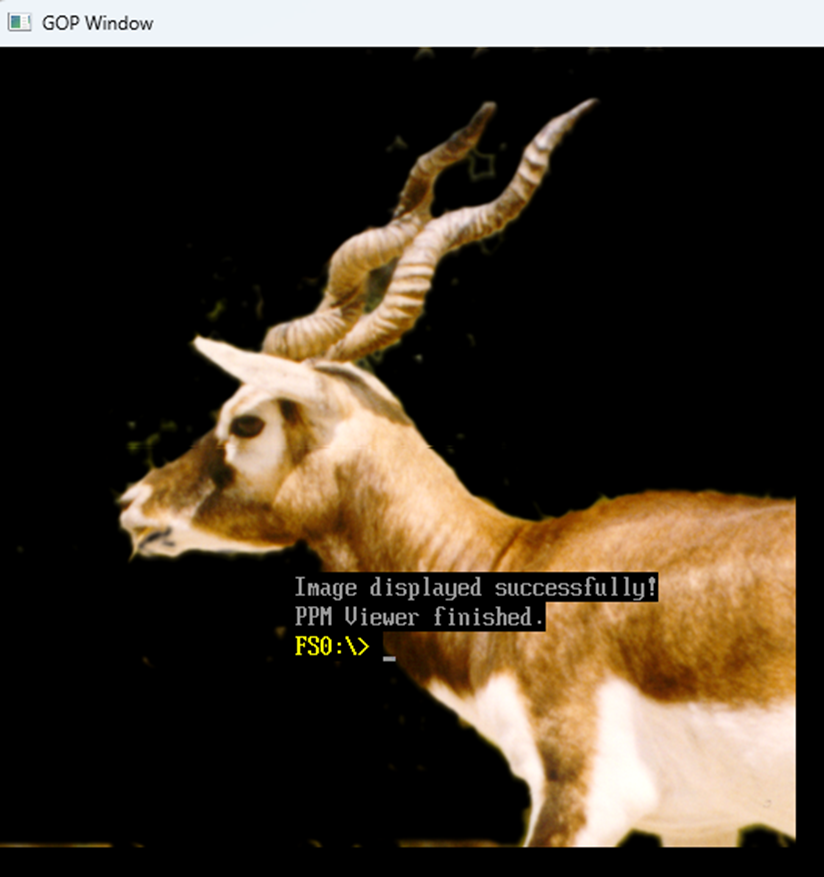
完整的代码下载:
参考:
1. https://people.sc.fsu.edu/~jburkardt/data/ppmb/ppmb.html PPMB Files Portable Pixel Map (binary)
2. https://blog.csdn.net/qq_41598072/article/details/81129203 PPM图片格式及其C读写代码