这里介绍如何编写一个计算CRC32的工具。在EDK的代码中,BaseTools\Source\Common 中有Crc32的例子,这里直接引用了 CRC32.h 和 CRC32.C。
代码中有很多注释,因此不做解释了。
#include  <Uefi.h>
#include  <Library/UefiLib.h>
#include  <Library/ShellCEntryLib.h>

#include  <stdio.h>
#include  <stdlib.h>
#include  <wchar.h>

#include <Protocol/EfiShell.h>
#include <Library/ShellLib.h>
#include <Library/MemoryAllocationLib.h>

#include "Crc32.h"

extern EFI_BOOT_SERVICES         *gBS;
extern EFI_SYSTEM_TABLE			 *gST;
extern EFI_RUNTIME_SERVICES 	 *gRT;

extern EFI_SHELL_PROTOCOL        *gEfiShellProtocol;

int
EFIAPI
main (
  IN int Argc,
  IN CHAR16 **Argv
  )
{
  EFI_FILE_HANDLE   FileHandle;
  RETURN_STATUS     Status;
  EFI_FILE_INFO     *FileInfo = NULL;
  EFI_HANDLE        *HandleBuffer=NULL;
  UINTN  			ReadSize;
  UINT32			CrcOut=0;

  //Check if there is a parameter
  if (Argc == 1) {
	Print(L"Usage: crctest [filename]\n");
	return 0;
  }

  //Open the file given by the parameter
  Status = ShellOpenFileByName(Argv[1], (SHELL_FILE_HANDLE *)&FileHandle,
                               EFI_FILE_MODE_READ , 0);

  if(Status != RETURN_SUCCESS) {
        Print(L"OpenFile failed!\n");
		return EFI_SUCCESS;
      }

  //Get file size
  FileInfo = ShellGetFileInfo( (SHELL_FILE_HANDLE)FileHandle);

  //Allocate a memory buffer
  HandleBuffer = AllocateZeroPool((UINTN) FileInfo-> FileSize);
  if (HandleBuffer == NULL) {
      return (SHELL_OUT_OF_RESOURCES);   }

  ReadSize=(UINTN) FileInfo-> FileSize;

  //Load the whole file to the buffer
  Status = ShellReadFile(FileHandle,&ReadSize,HandleBuffer);

  //Calculate the CRC32
  CalculateCrc32 ((UINT8*)HandleBuffer,ReadSize,&CrcOut);

  //Output
  Print(L"File Name: %s\n",Argv[1]);
  Print(L"File Size: %d\n",ReadSize);
  Print(L"CRC32    : %x\n",CrcOut);

  FreePool(HandleBuffer);
  return EFI_SUCCESS;
}
运行结果 (计算自己的CRC32)
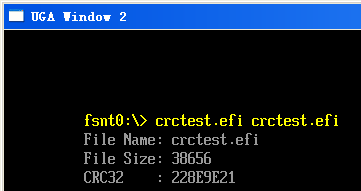
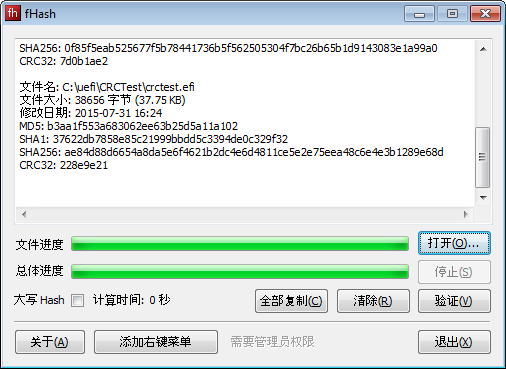
为了保证正确,下载了一个CRC计算工具,可以看出,计算结果和上面的相同。
完整代码下载
实际上除了上面的方法之外,还有更加简单的方法:直接使用 Boot Services 中的 CalculateCrc32 功能:
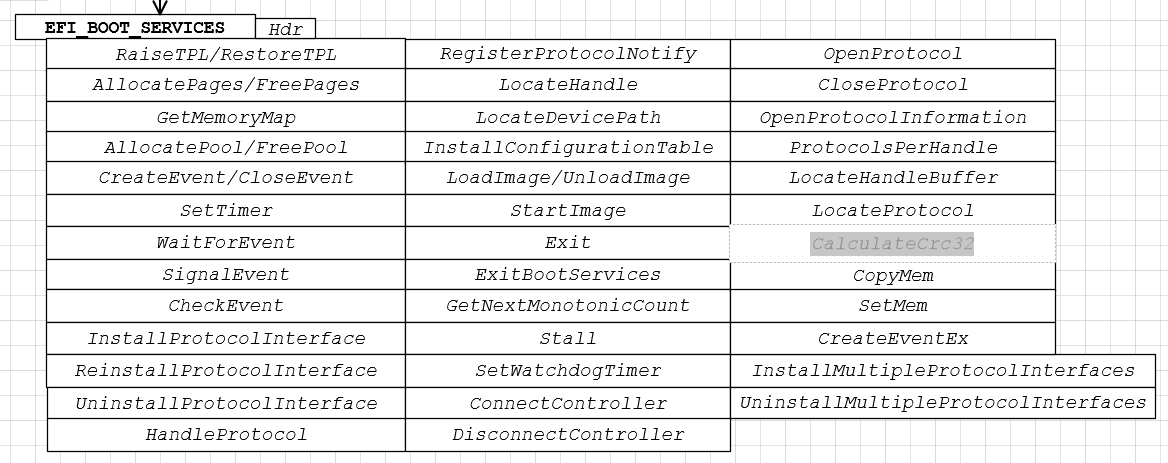
就是这样。