因为有数学公式,所以用PDF的方式展示出来。
具体代码下载:
这次使用 SetupDiGetClassDevs 和 SetupDiEnumDeviceInterfaces 函数直接查询系统中的硬盘信息。具体的解释,请参考
http://cutebunny.blog.51cto.com/301216/625577 《windows的磁盘操作之七——获取当前所有的物理磁盘号》 这是非常好的文章。
枚举的结果并非 \\.\PhysicalDriveX 而是类似 \\?\usbstor#disk&ven_adata&prod_usb_flash_drive&rev_1.00#000000000000000922&0#{53f56307-b6bf-11d0-94f2-00a0c91efb8b} 这样的字符串。(天杀同学指出:这种符号连接,是链接到atapi生成的设备,比如\device\ide\idedeviceP0TTolo-3这种设备上的,这个设备上面会附加\Device\Harddisk0\DR0,应用程序打开\\?\ide#xxxx这个,就和打开\\.\PhysicalDrive0一样了,因为请求在驱动里面都是从上层往下层传递的. )同样可以直接给CreateFile作为参数使用。
另外,这个程序如果直接运行,会出现打印出来上述字符串,然后又显示 “CreateFile() Error: 5”的问题。这个错误表示 “Access denied”.
它是由于在程序中使用CreateFile而没有相应的权限导致的。
程序中使用了很多C语言的变长数组,这在我看起来无比诡异…….
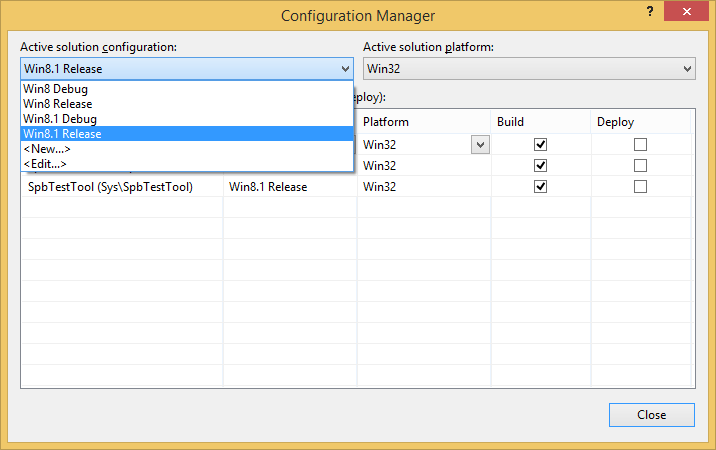
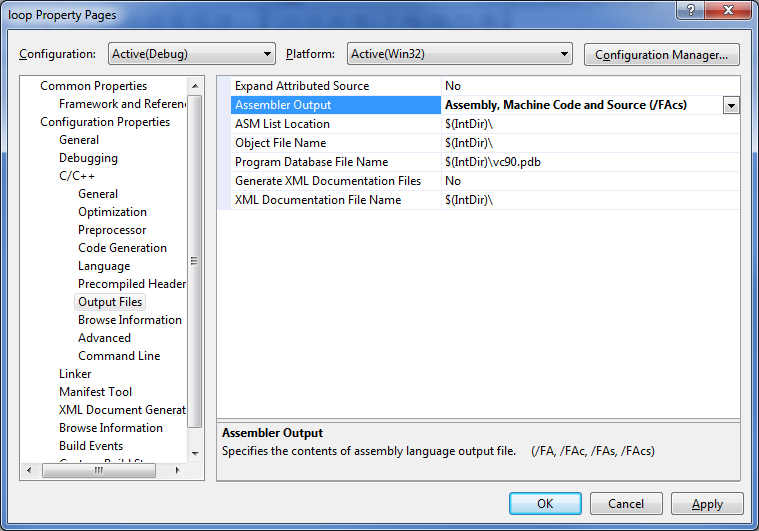
编译中需要加入 lib,具体方式请参考下图
运行结果如下图,可以看到,最后还给出了硬盘号。
这样的方法更精确一些,在很多硬盘的情况下会节省查询的时间,但是和1中的方法相比,复杂度提高了很多倍。
代码如下
// phylist1.cpp : Defines the entry point for the console application.
//
#include "stdafx.h"
#include <windows.h>
#include <stdio.h>
#include <conio.h>
#include <winioctl.h>
#include <setupapi.h>
#define MAX_DEVICE 10
#define INTERFACE_DETAIL_SIZE (1024)
DEFINE_GUID(GUID_DEVINTERFACE_DISK, 0x53f56307L, 0xb6bf, 0x11d0, 0x94, 0xf2, 0x00, 0xa0, 0xc9, 0x1e, 0xfb, 0x8b);
/******************************************************************************
* Function: get device path from GUID
* input: lpGuid, GUID pointer
* output: pszDevicePath, device paths
* return: Succeed, the amount of found device paths
* Fail, -1
******************************************************************************/
DWORD GetDevicePath(LPGUID lpGuid, WCHAR **pszDevicePath)
{
HDEVINFO hDevInfoSet;
SP_DEVICE_INTERFACE_DATA ifdata;
PSP_DEVICE_INTERFACE_DETAIL_DATA pDetail;
DWORD nCount;
BOOL result;
//get a handle to a device information set
hDevInfoSet = SetupDiGetClassDevs(
lpGuid, // class GUID
NULL, // Enumerator
NULL, // hwndParent
DIGCF_PRESENT | DIGCF_DEVICEINTERFACE // present devices
);
//fail...
if (hDevInfoSet == INVALID_HANDLE_VALUE)
{
fprintf(stderr, "IOCTL_STORAGE_GET_DEVICE_NUMBER Error: %ld\n", GetLastError());
return (DWORD)-1;
}
pDetail = (PSP_DEVICE_INTERFACE_DETAIL_DATA)malloc(INTERFACE_DETAIL_SIZE);
if (pDetail == NULL)
{
return (DWORD)-1;
}
pDetail->cbSize = sizeof(SP_DEVICE_INTERFACE_DETAIL_DATA);
nCount = 0;
result = TRUE;
// device index = 0, 1, 2... test the device interface one by one
while (result)
{
ifdata.cbSize = sizeof(ifdata);
//enumerates the device interfaces that are contained in a device information set
result = SetupDiEnumDeviceInterfaces(
hDevInfoSet, // DeviceInfoSet
NULL, // DeviceInfoData
lpGuid, // GUID
nCount, // MemberIndex
&ifdata // DeviceInterfaceData
);
if (result)
{
// get details about a device interface
result = SetupDiGetDeviceInterfaceDetail(
hDevInfoSet, // DeviceInfoSet
&ifdata, // DeviceInterfaceData
pDetail, // DeviceInterfaceDetailData
INTERFACE_DETAIL_SIZE, // DeviceInterfaceDetailDataSize
NULL, // RequiredSize
NULL // DeviceInfoData
);
if (result)
{
// copy the path to output buffer
wcscpy(pszDevicePath[nCount], pDetail->DevicePath);
printf("%ws\n", pDetail->DevicePath);
nCount++;
}
}
}
free(pDetail);
(void)SetupDiDestroyDeviceInfoList(hDevInfoSet);
return nCount;
}
/******************************************************************************
* Function: get all present disks' physical number
* input: N/A
* output: ppDisks, array of disks' physical number
* return: Succeed, the amount of present disks
* Fail, -1
******************************************************************************/
DWORD GetAllPresentDisks(DWORD **ppDisks)
{
WCHAR *szDevicePath[MAX_DEVICE]; // device path
DWORD nDevice;
HANDLE hDevice;
STORAGE_DEVICE_NUMBER number;
BOOL result;
DWORD readed;
WORD i, j;
for (i = 0; i < MAX_DEVICE; i++)
{
szDevicePath[i] = (WCHAR *)malloc(INTERFACE_DETAIL_SIZE);
if (NULL == szDevicePath[i])
{
for (j = 0; j < i; j++)
{
free(szDevicePath[i]);
}
return (DWORD)-1;
}
}
// get the device paths
nDevice = GetDevicePath(const_cast<LPGUID>(&GUID_DEVINTERFACE_DISK), szDevicePath);
if ((DWORD)-1 == nDevice)
{
for (i = 0; i < MAX_DEVICE; i++)
{
free(szDevicePath[i]);
}
return (DWORD)-1;
}
*ppDisks = (DWORD *)malloc(sizeof(DWORD) * nDevice);
// get the disk's physical number one by one
for (i = 0; i < nDevice; i++)
{
hDevice = CreateFile(
szDevicePath[i], // drive to open
GENERIC_READ | GENERIC_WRITE, // access to the drive
FILE_SHARE_READ | FILE_SHARE_WRITE, //share mode
NULL, // default security attributes
OPEN_EXISTING, // disposition
0, // file attributes
NULL // do not copy file attribute
);
if (hDevice == INVALID_HANDLE_VALUE) // cannot open the drive
{
for (j = 0; j < MAX_DEVICE; j++)
{
free(szDevicePath[j]);
}
free(*ppDisks);
fprintf(stderr, "CreateFile() Error: %ld\n", GetLastError());
return DWORD(-1);
}
result = DeviceIoControl(
hDevice, // handle to device
IOCTL_STORAGE_GET_DEVICE_NUMBER, // dwIoControlCode
NULL, // lpInBuffer
0, // nInBufferSize
&number, // output buffer
sizeof(number), // size of output buffer
&readed, // number of bytes returned
NULL // OVERLAPPED structure
);
if (!result) // fail
{
fprintf(stderr, "IOCTL_STORAGE_GET_DEVICE_NUMBER Error: %ld\n", GetLastError());
for (j = 0; j < MAX_DEVICE; j++)
{
free(szDevicePath[j]);
}
free(*ppDisks);
(void)CloseHandle(hDevice);
return (DWORD)-1;
}
*(*ppDisks + i) = number.DeviceNumber;
// printf("%d\n",number.DeviceNumber);
(void)CloseHandle(hDevice);
}
for (i = 0; i < MAX_DEVICE; i++)
{
free(szDevicePath[i]);
}
return nDevice;
}
int _tmain(int argc, _TCHAR* argv[])
{
DWORD *pDisk;
int t,j;
t=GetAllPresentDisks(&pDisk);
for (j=0; j<t;j++)
{
printf("%d \n", *pDisk++);
}
_getch();
return 0;
}
完整代码下载
枚举的结果是 “\\.\PhysicalDriveX”这样的形式。
需要注意的是:程序必须在 Administrator 权限下运行。即运行时,要求 “Run as Administrator”。同样在VS2008中编译时,由于权限不够,可能无法看到运行结果。本程序使用的是最传统的方法,使用CreateFile尝试不同的 PhysicalDirve+Number如果能够打开就是存在的。
#include "stdafx.h"
#include <windows.h>
#include <stdio.h>
#include <conio.h>
int _tmain(int argc, _TCHAR* argv[])
{
int i;
TCHAR Device[0x20];
HANDLE hDevice;
for (i=0;i<10;i++)
{
wsprintf(Device,TEXT("\\\\.\\PhysicalDrive%d"), i);
hDevice = CreateFile(Device,
GENERIC_READ,
FILE_SHARE_READ,
NULL, OPEN_EXISTING, FILE_ATTRIBUTE_NORMAL,NULL);
if (hDevice!=INVALID_HANDLE_VALUE) {printf("%ws \n",Device); }
CloseHandle( hDevice );
}
_getch();
return 0;
}
上面一篇文章给出了 Delphi 版本获得当前系统增加/移除USB设备名称的方法。这篇给出一个VC 的版本。编译器为 VS2008 Express,代码如下
#include "stdafx.h"
#include <windows.h>
#include <stdio.h>
#include <tchar.h>
#include <strsafe.h>
#include <dbt.h>
#include <Shellapi.h>
// This GUID is for all USB
/* A5DCBF10-6530-11D2-901F-00C04FB951ED */
GUID GUID_DEVINTERFACE_USB_DEVICE = { 0xA5DCBF10L, 0x6530, 0x11D2, 0x90, 0x1F, 0x00, 0xC0, 0x4F, 0xB9, 0x51, 0xED };
// For informational messages and window titles
PWSTR g_pszAppName;
// Forward declarations
void OutputMessage(HWND hOutWnd, WPARAM wParam, LPARAM lParam);
void ErrorHandler(LPTSTR lpszFunction);
//
// DoRegisterDeviceInterfaceToHwnd
//
BOOL DoRegisterDeviceInterfaceToHwnd(
IN GUID InterfaceClassGuid,
IN HWND hWnd,
OUT HDEVNOTIFY *hDeviceNotify
)
// Routine Description:
// Registers an HWND for notification of changes in the device interfaces
// for the specified interface class GUID.
// Parameters:
// InterfaceClassGuid - The interface class GUID for the device
// interfaces.
// hWnd - Window handle to receive notifications.
// hDeviceNotify - Receives the device notification handle. On failure,
// this value is NULL.
// Return Value:
// If the function succeeds, the return value is TRUE.
// If the function fails, the return value is FALSE.
// Note:
// RegisterDeviceNotification also allows a service handle be used,
// so a similar wrapper function to this one supporting that scenario
// could be made from this template.
{
DEV_BROADCAST_DEVICEINTERFACE NotificationFilter;
ZeroMemory( &NotificationFilter, sizeof(NotificationFilter) );
NotificationFilter.dbcc_size = sizeof(DEV_BROADCAST_DEVICEINTERFACE);
NotificationFilter.dbcc_devicetype = DBT_DEVTYP_DEVICEINTERFACE;
NotificationFilter.dbcc_classguid = InterfaceClassGuid;
*hDeviceNotify = RegisterDeviceNotification(
hWnd, // events recipient
&NotificationFilter, // type of device
DEVICE_NOTIFY_WINDOW_HANDLE // type of recipient handle
);
if ( NULL == *hDeviceNotify )
{
ErrorHandler(TEXT("RegisterDeviceNotification"));
return FALSE;
}
return TRUE;
}
//
// MessagePump
//
void MessagePump(
HWND hWnd
)
// Routine Description:
// Simple main thread message pump.
//
// Parameters:
// hWnd - handle to the window whose messages are being dispatched
// Return Value:
// None.
{
MSG msg;
int retVal;
// Get all messages for any window that belongs to this thread,
// without any filtering. Potential optimization could be
// obtained via use of filter values if desired.
while( (retVal = GetMessage(&msg, NULL, 0, 0)) != 0 )
{
if ( retVal == -1 )
{
ErrorHandler(TEXT("GetMessage"));
break;
}
else
{
TranslateMessage(&msg);
DispatchMessage(&msg);
}
}
}
//
// WinProcCallback
//
INT_PTR WINAPI WinProcCallback(
HWND hWnd,
UINT message,
WPARAM wParam,
LPARAM lParam
)
// Routine Description:
// Simple Windows callback for handling messages.
// This is where all the work is done because the example
// is using a window to process messages. This logic would be handled
// differently if registering a service instead of a window.
// Parameters:
// hWnd - the window handle being registered for events.
// message - the message being interpreted.
// wParam and lParam - extended information provided to this
// callback by the message sender.
// For more information regarding these parameters and return value,
// see the documentation for WNDCLASSEX and CreateWindowEx.
{
LRESULT lRet = 1;
static HDEVNOTIFY hDeviceNotify;
static HWND hEditWnd;
static ULONGLONG msgCount = 0;
switch (message)
{
case WM_CREATE:
//
// This is the actual registration., In this example, registration
// should happen only once, at application startup when the window
// is created.
//
// If you were using a service, you would put this in your main code
// path as part of your service initialization.
//
if ( ! DoRegisterDeviceInterfaceToHwnd(
GUID_DEVINTERFACE_USB_DEVICE,
hWnd,
&hDeviceNotify) )
{
// Terminate on failure.
ErrorHandler(TEXT("DoRegisterDeviceInterfaceToHwnd"));
ExitProcess(1);
}
//
// Make the child window for output.
//
hEditWnd = CreateWindow(TEXT("EDIT"),// predefined class
NULL, // no window title
WS_CHILD | WS_VISIBLE | WS_VSCROLL |
ES_LEFT | ES_MULTILINE | ES_AUTOVSCROLL,
0, 0, 0, 0, // set size in WM_SIZE message
hWnd, // parent window
(HMENU)1, // edit control ID
(HINSTANCE) GetWindowLong(hWnd, GWL_HINSTANCE),
NULL); // pointer not needed
if ( hEditWnd == NULL )
{
// Terminate on failure.
ErrorHandler(TEXT("CreateWindow: Edit Control"));
ExitProcess(1);
}
// Add text to the window.
SendMessage(hEditWnd, WM_SETTEXT, 0,
(LPARAM)TEXT("Registered for USB device notification...\n"));
break;
case WM_SETFOCUS:
SetFocus(hEditWnd);
break;
case WM_SIZE:
// Make the edit control the size of the window's client area.
MoveWindow(hEditWnd,
0, 0, // starting x- and y-coordinates
LOWORD(lParam), // width of client area
HIWORD(lParam), // height of client area
TRUE); // repaint window
break;
case WM_DEVICECHANGE :
{
//
// This is the actual message from the interface via Windows messaging.
// This code includes some additional decoding for this particular device type
// and some common validation checks.
//
// Note that not all devices utilize these optional parameters in the same
// way. Refer to the extended information for your particular device type
// specified by your GUID.
//
PDEV_BROADCAST_DEVICEINTERFACE b = (PDEV_BROADCAST_DEVICEINTERFACE) lParam;
TCHAR strBuff[256];
// Output some messages to the window.
switch (wParam)
{
case DBT_DEVICEARRIVAL:
msgCount++;
StringCchPrintf(
strBuff, 256,
TEXT("Message %d: DBT_DEVICEARRIVAL\n"), msgCount);
OutputMessage(hEditWnd, wParam, (LPARAM)strBuff);
StringCchPrintf(
strBuff, 256,
TEXT("USB Device information: \n"));
OutputMessage(hEditWnd, wParam, (LPARAM)strBuff);
//MultiByteToWideChar(CP_ACP, 0, strBuff,256,b->dbcc_name,sizeof(b->dbcc_name));
OutputMessage(hEditWnd, wParam, (LPARAM)b->dbcc_name);
break;
case DBT_DEVICEREMOVECOMPLETE:
msgCount++;
StringCchPrintf(
strBuff, 256,
TEXT("Message %d: DBT_DEVICEREMOVECOMPLETE\n"), msgCount);
break;
case DBT_DEVNODES_CHANGED:
msgCount++;
StringCchPrintf(
strBuff, 256,
TEXT("Message %d: DBT_DEVNODES_CHANGED\n"), msgCount);
break;
default:
msgCount++;
StringCchPrintf(
strBuff, 256,
TEXT("Message %d: WM_DEVICECHANGE message received, value %d unhandled.\n"),
msgCount, wParam);
break;
}
OutputMessage(hEditWnd, wParam, (LPARAM)strBuff);
}
break;
case WM_CLOSE:
if ( ! UnregisterDeviceNotification(hDeviceNotify) )
{
ErrorHandler(TEXT("UnregisterDeviceNotification"));
}
DestroyWindow(hWnd);
break;
case WM_DESTROY:
PostQuitMessage(0);
break;
default:
// Send all other messages on to the default windows handler.
lRet = DefWindowProc(hWnd, message, wParam, lParam);
break;
}
return lRet;
}
#define WND_CLASS_NAME TEXT("SampleAppWindowClass")
//
// InitWindowClass
//
BOOL InitWindowClass()
// Routine Description:
// Simple wrapper to initialize and register a window class.
// Parameters:
// None
// Return Value:
// TRUE on success, FALSE on failure.
// Note:
// wndClass.lpfnWndProc and wndClass.lpszClassName are the
// important unique values used with CreateWindowEx and the
// Windows message pump.
{
WNDCLASSEX wndClass;
wndClass.cbSize = sizeof(WNDCLASSEX);
wndClass.style = CS_OWNDC | CS_HREDRAW | CS_VREDRAW;
wndClass.hInstance = reinterpret_cast<HINSTANCE>(GetModuleHandle(0));
wndClass.lpfnWndProc = reinterpret_cast<WNDPROC>(WinProcCallback);
wndClass.cbClsExtra = 0;
wndClass.cbWndExtra = 0;
wndClass.hIcon = LoadIcon(0,IDI_APPLICATION);
wndClass.hbrBackground = CreateSolidBrush(RGB(192,192,192));
wndClass.hCursor = LoadCursor(0, IDC_ARROW);
wndClass.lpszClassName = WND_CLASS_NAME;
wndClass.lpszMenuName = NULL;
wndClass.hIconSm = wndClass.hIcon;
if ( ! RegisterClassEx(&wndClass) )
{
ErrorHandler(TEXT("RegisterClassEx"));
return FALSE;
}
return TRUE;
}
//
// main
//
int __stdcall _tWinMain(
HINSTANCE hInstanceExe,
HINSTANCE, // should not reference this parameter
PTSTR lpstrCmdLine,
int nCmdShow
)
{
//
// To enable a console project to compile this code, set
// Project->Properties->Linker->System->Subsystem: Windows.
//
int nArgC = 0;
PWSTR* ppArgV = CommandLineToArgvW(lpstrCmdLine, &nArgC);
g_pszAppName = ppArgV[0];
if ( ! InitWindowClass() )
{
// InitWindowClass displays any errors
return -1;
}
// Main app window
HWND hWnd = CreateWindowEx(
WS_EX_CLIENTEDGE | WS_EX_APPWINDOW,
WND_CLASS_NAME,
g_pszAppName,
WS_OVERLAPPEDWINDOW, // style
CW_USEDEFAULT, 0,
640, 480,
NULL, NULL,
hInstanceExe,
NULL);
if ( hWnd == NULL )
{
ErrorHandler(TEXT("CreateWindowEx: main appwindow hWnd"));
return -1;
}
// Actually draw the window.
ShowWindow(hWnd, SW_SHOWNORMAL);
UpdateWindow(hWnd);
// The message pump loops until the window is destroyed.
MessagePump(hWnd);
return 1;
}
//
// OutputMessage
//
void OutputMessage(
HWND hOutWnd,
WPARAM wParam,
LPARAM lParam
)
// Routine Description:
// Support routine.
// Send text to the output window, scrolling if necessary.
// Parameters:
// hOutWnd - Handle to the output window.
// wParam - Standard windows message code, not used.
// lParam - String message to send to the window.
// Return Value:
// None
// Note:
// This routine assumes the output window is an edit control
// with vertical scrolling enabled.
// This routine has no error checking.
{
LRESULT lResult;
LONG bufferLen;
LONG numLines;
LONG firstVis;
// Make writable and turn off redraw.
lResult = SendMessage(hOutWnd, EM_SETREADONLY, FALSE, 0L);
lResult = SendMessage(hOutWnd, WM_SETREDRAW, FALSE, 0L);
// Obtain current text length in the window.
bufferLen = SendMessage (hOutWnd, WM_GETTEXTLENGTH, 0, 0L);
numLines = SendMessage (hOutWnd, EM_GETLINECOUNT, 0, 0L);
firstVis = SendMessage (hOutWnd, EM_GETFIRSTVISIBLELINE, 0, 0L);
lResult = SendMessage (hOutWnd, EM_SETSEL, bufferLen, bufferLen);
// Write the new text.
lResult = SendMessage (hOutWnd, EM_REPLACESEL, 0, lParam);
// See whether scrolling is necessary.
if (numLines > (firstVis + 1))
{
int lineLen = 0;
int lineCount = 0;
int charPos;
// Find the last nonblank line.
numLines--;
while(!lineLen)
{
charPos = SendMessage(
hOutWnd, EM_LINEINDEX, (WPARAM)numLines, 0L);
lineLen = SendMessage(
hOutWnd, EM_LINELENGTH, charPos, 0L);
if(!lineLen)
numLines--;
}
// Prevent negative value finding min.
lineCount = numLines - firstVis;
lineCount = (lineCount >= 0) ? lineCount : 0;
// Scroll the window.
lResult = SendMessage(
hOutWnd, EM_LINESCROLL, 0, (LPARAM)lineCount);
}
// Done, make read-only and allow redraw.
lResult = SendMessage(hOutWnd, WM_SETREDRAW, TRUE, 0L);
lResult = SendMessage(hOutWnd, EM_SETREADONLY, TRUE, 0L);
}
//
// ErrorHandler
//
void ErrorHandler(
LPTSTR lpszFunction
)
// Routine Description:
// Support routine.
// Retrieve the system error message for the last-error code
// and pop a modal alert box with usable info.
// Parameters:
// lpszFunction - String containing the function name where
// the error occurred plus any other relevant data you'd
// like to appear in the output.
// Return Value:
// None
// Note:
// This routine is independent of the other windowing routines
// in this application and can be used in a regular console
// application without modification.
{
LPVOID lpMsgBuf;
LPVOID lpDisplayBuf;
DWORD dw = GetLastError();
FormatMessage(
FORMAT_MESSAGE_ALLOCATE_BUFFER |
FORMAT_MESSAGE_FROM_SYSTEM |
FORMAT_MESSAGE_IGNORE_INSERTS,
NULL,
dw,
MAKELANGID(LANG_NEUTRAL, SUBLANG_DEFAULT),
(LPTSTR) &lpMsgBuf,
0, NULL );
// Display the error message and exit the process.
lpDisplayBuf = (LPVOID)LocalAlloc(LMEM_ZEROINIT,
(lstrlen((LPCTSTR)lpMsgBuf)
+ lstrlen((LPCTSTR)lpszFunction)+40)
* sizeof(TCHAR));
StringCchPrintf((LPTSTR)lpDisplayBuf,
LocalSize(lpDisplayBuf) / sizeof(TCHAR),
TEXT("%s failed with error %d: %s"),
lpszFunction, dw, lpMsgBuf);
MessageBox(NULL, (LPCTSTR)lpDisplayBuf, g_pszAppName, MB_OK);
LocalFree(lpMsgBuf);
LocalFree(lpDisplayBuf);
}
上面的代码改编自 MSDN :http://msdn.microsoft.com/en-us/library/windows/desktop/aa363432(v=vs.85).aspx
运行结果
此外,本文还参考了如下文章
http://blog.csdn.net/daoxwj/article/details/8819784
http://www.codeproject.com/Articles/14500/Detecting-Hardware-Insertion-and-or-Removal
下载
vcusb
根据 http://delphi.cjcsoft.net/viewthread.php?tid=48860 文章内容,将类似 \\?\USB#Vid_4146&Pid_d2b5#0005050400044#{a5dcbf10-6530-11d2-901f-00c04fb951ed} 转化为更易读的类型,例如
USB Inserted
Device Type = USB Mass Storage Device
Driver Name = Disk drive
Friendly Name = I0MEGA UMni1GB*IOM2J4 USB Device
之前《关于监视插入U盘的问题(1)》中给出了接收 WM_DEVICECHANGE 消息的方法。从资料中可以看出,直接处理这个消息能够获得当前系统发生变化的盘符,但是无法处理未产生盘符变化(未分区或者其他USB设备)。对于这样的问题,可以使用RegisterDeviceNotification来向系统注册一个回调函数,并且设置好只通知USB设备变化,通过这样的方法能够取得发生变化的USB设备的信息,之后再通过查询注册表对照出更易读的信息。
文章还指出这样的转换是通过读取注册表来完成的。
我编写了如下例子,实践证明这个程序工作很好。除了普通的U盘,我还地尝试了一个 USB2UART 的 Cable,可以看出工作正常。
测试环境为 Win7+Delphi10,不需要管理员权限运行程序即可。
unit Unit1;
interface
uses
Windows, Messages, SysUtils, Variants, Classes, Graphics, Controls, Forms,
Dialogs,MahUSB;
type
TForm1 = class(TForm)
procedure FormShow(Sender: TObject);
procedure FormClose(Sender: TObject; var Action: TCloseAction);
private
{ Private declarations }
FUsb : TUsbClass;
procedure UsbIN(ASender : TObject; const ADevType,ADriverName,
AFriendlyName : string);
procedure UsbOUT(ASender : TObject; const ADevType,ADriverName,
AFriendlyName : string);
public
{ Public declarations }
end;
var
Form1: TForm1;
implementation
{$R *.dfm}
procedure TForm1.FormClose(Sender: TObject; var Action: TCloseAction);
begin
FreeAndNil(FUsb);
end;
procedure TForm1.FormShow(Sender: TObject);
begin
FUsb := TUsbClass.Create;
FUsb.OnUsbInsertion := UsbIN;
FUsb.OnUsbRemoval := UsbOUT;
end;
procedure TForm1.UsbIN(ASender : TObject; const ADevType,ADriverName,
AFriendlyName : string);
begin
showmessage('USB Inserted - Device Type = ' + ADevType + #13#10 +
'Driver Name = ' + ADriverName + #13+#10 +
'Friendly Name = ' + AFriendlyName);
end;
procedure TForm1.UsbOUT(ASender : TObject; const ADevType,ADriverName,
AFriendlyName : string);
begin
showmessage('USB Removed - Device Type = ' + ADevType + #13#10 +
'Driver Name = ' + ADriverName + #13+#10 +
'Friendly Name = ' + AFriendlyName);
end;
end.
============================================================================================
unit MahUSB;
interface
uses Windows, Messages, SysUtils, Classes, Registry, Masks;
type
{ Event Types }
TOnUsbChangeEvent = procedure(AObject : TObject;
const ADevType,ADriverName,
AFriendlyName : string) of object;
{ USB Class }
TUsbClass = class(TObject)
private
FHandle : HWND;
FOnUsbRemoval,
FOnUsbInsertion : TOnUsbChangeEvent;
procedure GetUsbInfo(const ADeviceString : string;
out ADevType,ADriverDesc,
AFriendlyName : string);
procedure WinMethod(var AMessage : TMessage);
procedure RegisterUsbHandler;
procedure WMDeviceChange(var AMessage : TMessage);
public
constructor Create;
destructor Destroy; override;
property OnUsbInsertion : TOnUsbChangeEvent read FOnUsbInsertion
write FOnUsbInsertion;
property OnUsbRemoval : TOnUsbChangeEvent read FOnUsbRemoval
write FOnUsbRemoval;
end;
// -----------------------------------------------------------------------------
implementation
type
// Win API Definitions
PDevBroadcastDeviceInterface = ^DEV_BROADCAST_DEVICEINTERFACE;
DEV_BROADCAST_DEVICEINTERFACE = record
dbcc_size : DWORD;
dbcc_devicetype : DWORD;
dbcc_reserved : DWORD;
dbcc_classguid : TGUID;
dbcc_name : char;
end;
const
// Miscellaneous
GUID_DEVINTF_USB_DEVICE : TGUID = '{A5DCBF10-6530-11D2-901F-00C04FB951ED}';
USB_INTERFACE = $00000005; // Device interface class
USB_INSERTION = $8000; // System detected a new device
USB_REMOVAL = $8004; // Device is gone
// Registry Keys
USBKEY = 'SYSTEM\CurrentControlSet\Enum\USB\%s\%s';
USBSTORKEY = 'SYSTEM\CurrentControlSet\Enum\USBSTOR';
SUBKEY1 = USBSTORKEY + '\%s';
SUBKEY2 = SUBKEY1 + '\%s';
constructor TUsbClass.Create;
begin
inherited Create;
FHandle := AllocateHWnd(WinMethod);
RegisterUsbHandler;
end;
destructor TUsbClass.Destroy;
begin
DeallocateHWnd(FHandle);
inherited Destroy;
end;
procedure TUsbClass.GetUsbInfo(const ADeviceString : string;
out ADevType,ADriverDesc,
AFriendlyName : string);
var sWork,sKey1,sKey2 : string;
oKeys,oSubKeys : TStringList;
oReg : TRegistry;
i,ii : integer;
bFound : boolean;
begin
ADevType := '';
ADriverDesc := '';
AFriendlyName := '';
if ADeviceString<>'' then begin
bFound := false;
oReg := TRegistry.Create;
oReg.RootKey := HKEY_LOCAL_MACHINE;
// Extract the portions of the string we need for registry. eg.
// \\?\USB#Vid_4146&Pid_d2b5#0005050400044#{a5dcbf10- ..... -54334fb951ed}
// We need sKey1='Vid_4146&Pid_d2b5' and sKey2='0005050400044'
sWork := copy(ADeviceString,pos('#',ADeviceString) + 1,1026);
sKey1 := copy(sWork,1,pos('#',sWork) - 1);
sWork := copy(sWork,pos('#',sWork) + 1,1026);
sKey2 := copy(sWork,1,pos('#',sWork) - 1);
// Get the Device type description from \USB key
if oReg.OpenKeyReadOnly(Format(USBKEY,[skey1,sKey2])) then begin
ADevType := oReg.ReadString('DeviceDesc');
oReg.CloseKey;
oKeys := TStringList.Create;
oSubKeys := TStringList.Create;
// Get list of keys in \USBSTOR and enumerate each key
// for a key that matches our sKey2='0005050400044'
// NOTE : The entry we are looking for normally has '&0'
// appended to it eg. '0005050400044&0'
if oReg.OpenKeyReadOnly(USBSTORKEY) then begin
oReg.GetKeyNames(oKeys);
oReg.CloseKey;
// Iterate through list to find our sKey2
for i := 0 to oKeys.Count - 1 do begin
if oReg.OpenKeyReadOnly(Format(SUBKEY1,[oKeys[i]])) then begin
oReg.GetKeyNames(oSubKeys);
oReg.CloseKey;
for ii := 0 to oSubKeys.Count - 1 do begin
if MatchesMask(oSubKeys[ii],sKey2 + '*') then begin
// Got a match?, get the actual desc and friendly name
if oReg.OpenKeyReadOnly(Format(SUBKEY2,[oKeys[i],
oSubKeys[ii]])) then begin
ADriverDesc := oReg.ReadString('DeviceDesc');
AFriendlyName := oReg.ReadString('FriendlyName');
oReg.CloseKey;
end;
bFound := true;
end;
end;
end;
if bFound then break;
end;
end;
FreeAndNil(oKeys);
FreeAndNil(oSubKeys);
end;
FreeAndNil(oReg);
end;
end;
procedure TUsbClass.WMDeviceChange(var AMessage : TMessage);
var iDevType : integer;
sDevString,sDevType,
sDriverName,sFriendlyName : string;
pData : PDevBroadcastDeviceInterface;
begin
if (AMessage.wParam = USB_INSERTION) or
(AMessage.wParam = USB_REMOVAL) then begin
pData := PDevBroadcastDeviceInterface(AMessage.LParam);
iDevType := pData^.dbcc_devicetype;
// Is it a USB Interface Device ?
if iDevType = USB_INTERFACE then begin
sDevString := PChar(@pData^.dbcc_name);
GetUsbInfo(sDevString,sDevType,sDriverName,sFriendlyName);
// Trigger Events if assigned
if (AMessage.wParam = USB_INSERTION) and
Assigned(FOnUsbInsertion) then
FOnUsbInsertion(self,sDevType,sDriverName,sFriendlyName);
if (AMessage.wParam = USB_REMOVAL) and
Assigned(FOnUsbRemoval) then
FOnUsbRemoval(self,sDevType,sDriverName,sFriendlyName);
end;
end;
end;
procedure TUsbClass.WinMethod(var AMessage : TMessage);
begin
if (AMessage.Msg = WM_DEVICECHANGE) then
WMDeviceChange(AMessage)
else
AMessage.Result := DefWindowProc(FHandle,AMessage.Msg,
AMessage.wParam,AMessage.lParam);
end;
procedure TUsbClass.RegisterUsbHandler;
var rDbi : DEV_BROADCAST_DEVICEINTERFACE;
iSize : integer;
begin
iSize := SizeOf(DEV_BROADCAST_DEVICEINTERFACE);
ZeroMemory(@rDbi,iSize);
rDbi.dbcc_size := iSize;
rDbi.dbcc_devicetype := USB_INTERFACE;
rDbi.dbcc_reserved := 0;
rDbi.dbcc_classguid := GUID_DEVINTF_USB_DEVICE;
rDbi.dbcc_name := #0;
RegisterDeviceNotification(FHandle,@rDbi,DEVICE_NOTIFY_WINDOW_HANDLE);
end;
end.
之前的一篇文章展示了如何在Console中使用Timer,他使用的是CallBack方式进行回调的。这里演示直接处理 WM_TIMER 的方法,代码如下
#include “stdafx.h”
#include
#include
#include
int count =0;
VOID ShowTimer()
{
count++;
printf(“WM_TIMER in work thread count=%d\n”,count);
}
DWORD CALLBACK Thread(PVOID pvoid)
{
MSG msg;
UINT timerid=SetTimer(NULL,111,3000,NULL);
BOOL bRet;
PeekMessage(&msg,NULL,WM_USER,WM_USER,PM_NOREMOVE);
while((bRet = GetMessage(&msg,NULL,0,0))!= 0)
{
if(bRet==-1)
{
// handle the error and possibly exit
}
else
{
if (msg.message == WM_TIMER) { ShowTimer(); }
TranslateMessage(&msg);
DispatchMessage(&msg);
}
}
KillTimer(NULL,timerid);
printf(“thread end here\n”);
return 0;
}
int main()
{
DWORD dwThreadId;
printf(“Use timer in workthread of console application\n”);
HANDLE hThread = CreateThread(NULL,0,Thread,0,0,&dwThreadId);
_getch();
return 0;
}
运行结果和之前的相同。
代码和EXE在这里下载
另外,还有如下的一个例子,来自 http://read.pudn.com/downloads121/sourcecode/windows/console/512780/1ms/1ms.cpp__.htm
//************************************************************************************
//本程序使用了两种实现定时的方法,都是基于API的,而不是MFC
//
// 1. 是使用线程定时休眠的方法,启动线程ThreadProc,在线程中输出,然后Sleep 1000ms
//
// 2. 使用定时器方法,设置一个1000ms的定时器(SetTimer),然后捕捉该消息,然后调用回调函数
// TimerProc,在该函数中输出DEF,注意,SetTimer可以直接写回调函数地址,不必捕捉消息。
// 3. 本例子已经很详细了。
// 4. 祝你好运。
//
//************************************************************************************
#include “stdafx.h”
#include
DWORD WINAPI ThreadProc( LPVOID lpParameter )//方法1
{
static DWORD tick=0;
DWORD tmp = GetTickCount();
while(1)
{
tick = GetTickCount()-tmp;//获得系统从启动开始到现在的ms数
tmp = GetTickCount();
printf(“THREAD_PROC: abc %d, tickcount: %d\n”,tick,tmp);//打印abc和上次打印到这次打印之间的毫秒间隔。
Sleep(1000);//每隔1000ms打印abc
}
}
VOID TimerProc()//方法2
{
static DWORD tick=0;
static DWORD tmp = GetTickCount();
tick = GetTickCount()-tmp;
tmp = GetTickCount();
printf(” TimerProc________________def %d\n”,tick);
}
int main()
{
DWORD dwthread;
::CreateThread(NULL,0,ThreadProc,(LPVOID)0,1024,&dwthread);//生成一个线程,在该线程里每1000ms输出一个”abc”,然后SLEEP
SetTimer(0,0,1000,0);//设置一个定时器,定时器的回调函数为0,仅产生定时器消息,在main函数里捕捉该消息
MSG msg;
bool flag;
while(1)//该循环捕捉定时器消息,并且防止main函数退出
{
PeekMessage(&msg, NULL, WM_USER, WM_USER, PM_NOREMOVE);
while( (flag = GetMessage( &msg, NULL, 0, 0 )) != 0)
{
if (flag == -1)
{
// handle the error and possibly exit
}
else if(msg.message==WM_TIMER)
{
TimerProc();//如果是定时器消息,调用timerproc
}
else
{
TranslateMessage(&msg);
DispatchMessage(&msg);
}
}
}
}
本文是参考 http://bbs.csdn.net/topics/390293365?page=1#post-393016986 完成的。
修改了其中的Demo,使得程序能够在 VS2008 Express 下编译成功。
修改后的代码如下,删除了读取识别出来盘符上指定文件的代码
//编程识别u盘的插入,通过处理WM_DEVICECHANGE的消息,来达到识别的效果
//vc下编译通过,能够识别
#include “stdafx.h”
#include
#include
#include
#include
LRESULT CALLBACK WndProc(HWND hwnd, UINT message, WPARAM wParam, LPARAM lParam);
TCHAR FirstDriveFromMask (ULONG unitmask);
int APIENTRY WinMain(HINSTANCE hInstance,
HINSTANCE hPreInstance,
LPSTR lpCmdLine,
int nCmdShow)
{
//windows窗口类的成员
TCHAR szClassName[] = TEXT(“MainWClass”);
WNDCLASSEX wndclass;
wndclass.cbSize = sizeof(wndclass);
wndclass.style = CS_HREDRAW | CS_VREDRAW;
wndclass.lpfnWndProc = WndProc;
wndclass.cbClsExtra = 0;
wndclass.cbWndExtra = 0;
wndclass.hInstance = hInstance;
wndclass.hIcon = ::LoadIcon(NULL,IDI_APPLICATION);
wndclass.hCursor = ::LoadCursor(NULL,IDC_ARROW);
wndclass.hbrBackground = (HBRUSH)::GetStockObject(WHITE_BRUSH);
wndclass.lpszMenuName = NULL;
wndclass.lpszClassName = szClassName;
wndclass.hIconSm = NULL;
::RegisterClassEx(&wndclass);
HWND hwnd = ::CreateWindowEx(
0,
szClassName,
TEXT(“mc”),
WS_OVERLAPPEDWINDOW,
CW_USEDEFAULT,
CW_USEDEFAULT,
CW_USEDEFAULT,
CW_USEDEFAULT,
NULL,
NULL,
hInstance,
NULL);
UINT Cret = GetLastError();
//printf(“%d\n”,GetLastError());
if (hwnd == NULL)
{
::MessageBox(NULL,TEXT(“Create Window error!”),TEXT(“error”),MB_OK);
return -1;
}
::ShowWindow(hwnd,nCmdShow);
::UpdateWindow(hwnd);
MSG msg;
while (::GetMessage(&msg,NULL,0,0))
{
::TranslateMessage(&msg);
::DispatchMessage(&msg);
}
return msg.wParam;
}
//回调函数处理消息
LRESULT CALLBACK WndProc(HWND hwnd, UINT message, WPARAM wParam, LPARAM lParam)
{
switch (message)
{
case WM_CREATE:/*初始化*/
MessageBox(hwnd, TEXT(“go!”), TEXT(“405 Studio”), MB_OK);
break;
case WM_DEVICECHANGE:
if(wParam == DBT_DEVICEARRIVAL) //设备激活
{
PDEV_BROADCAST_HDR lpdb = (PDEV_BROADCAST_HDR)lParam;
PDEV_BROADCAST_VOLUME lpdbv = (PDEV_BROADCAST_VOLUME)lpdb;
TCHAR szMsg[80],Disk;
Disk = FirstDriveFromMask(lpdbv ->dbcv_unitmask);
wsprintf (szMsg,TEXT(“Drive %c: Media has arrived./n”),Disk);
MessageBox (hwnd, szMsg, TEXT(“WM_DEVICECHANGE”), MB_OK);
//Sleep(1000);
::PostQuitMessage(0);
}
break;
default:
return DefWindowProc (hwnd, message, wParam, lParam) ;
}
return 0;
}
//提取u盘的盘符
TCHAR FirstDriveFromMask (ULONG unitmask)
{
char i;
for (i = 0; i < 26; ++i)
{
if (unitmask & 0x1)
break;
unitmask = unitmask >> 1;
}
return (i + ‘A’);
}
首先运行本程序,然后插入U盘,可以看出识别出来插入U盘的盘符,另外弹出来的是Windows自动播放的对话框。运行结果如下:
源程序和编译后的EXE可以从下面下载
本文内容来自 http://biancheng.dnbcw.info/60/60901.html 是在一个控制台窗口中创建一个线程,然后在线程中处理Timer的消息
整理后的代码如下,VC2008 Express编译通过
#include “stdafx.h”
#include
#include
#include
int count =0;
VOID CALLBACK TimerProc(HWND hwnd,UINT uMsg,UINT_PTR idEvent,DWORD dwTime)
{
count++;
printf(“WM_TIMER in work thread count=%d\n”,count);
}
DWORD CALLBACK Thread(PVOID pvoid)
{
MSG msg;
UINT timerid=SetTimer(NULL,111,3000,TimerProc);
BOOL bRet;
PeekMessage(&msg,NULL,WM_USER,WM_USER,PM_NOREMOVE);
while((bRet = GetMessage(&msg,NULL,0,0))!= 0)
{
if(bRet==-1)
{
// handle the error and possibly exit
}
else
{
TranslateMessage(&msg);
DispatchMessage(&msg);
}
}
KillTimer(NULL,timerid);
printf(“thread end here\n”);
return 0;
}
int main()
{
DWORD dwThreadId;
printf(“Use timer in workthread of console application\n”);
HANDLE hThread = CreateThread(NULL,0,Thread,0,0,&dwThreadId);
_getch();
return 0;
}
运行结果
下载 ConTimer
最近在看编译原理方面的东西,状态机是很重要的部分。之前遇到过一个问题,用这个问题让我深刻的理解了状态机。当年写了这篇文章,但是看起来这次更新忘记上传了。现在补上这篇文章。具体的问题是这样的:
“我不是计算机专业毕业的,也没有研究过离散数学(听说状态机属于离散数学)。前几天刚好有机会听别人讲这方面的问题,于是针对这个题目研究了一下。记录与此。
一.问题
请画出车库门控制器的 FSM(finite state machine)。车库门的功能如下:
1. 开启车库门
2. 关闭车库门
3. 车库门进行中(正在开启或关闭中)停止
4. 当车库门是处于第 3 点的状态时,往(停止前)反方向运行
PS:以上这些功能只须使用一个控制键”
解决方法和分析的过程在PDF 中能找到。