最近实验了一下 WinDBG 调试 VirtualBox 中的 Win10,简单介绍一下方法:
1. VirtualBox的设置(特别注意,名称上最好不要用 com1 之类的,有可能会和系统设备冲突)
2.WinDbg的设置
3.进入 Windows10 之后打开 debug 功能。在 Windows看起来是通过串口进行调试的
4. 启动 WinDBG 进行调试
Arduino 模拟鼠标目前有三种方法:
1.外部加电阻 USB母头等元件,然后烧录模拟程序,用 328P作为处理器。这种方法的缺点是:原件多,不容易调试,占用板载资源多,做出来之后基本上不能完成什么功能了(因为Usb低速设备传输要求1.5Mb/s,而328P最高只有16MHz),有兴趣的朋友可以看一下之前我做的一个锁屏的装置【参考1】;
2.直接使用Leonardo 这样主控是ATmega32u4【参考2】 的板子。这种方法的好处是:Arduino 原生库支持,资料比较多,调试方便。个人推荐初学者如果有鼠标键盘的需要可以玩这个;
3.原版的Arduino Uno 上面使用的串口芯片是 16u2,可以给这个芯片刷写上一个特殊的Firmware,它和PC端用USB鼠标或者键盘通讯,然后和 328P 使用串口通讯。
本文介绍的就是第三种方法。
在玩第三种方法的时候,你需要特别准备一个烧写器。我用的是 USBTINY 这款。
本次实验的目标是将uno模拟成鼠标。参考的资料来自下面的页面:
http://hunt.net.nz/users/darran/weblog/cca39/Arduino_UNO_Mouse_HID.html
我刷写的工具是 AvrDudess 2.4,用法很简单,接线之后(建议选购下载器的时候直接选带完整线的,否则每次接线也是很麻烦的事情),按下 Detect按钮,软件需要检查到正确芯片的类型,比如,我的转接芯片是 16u2。如果无法侦测,那么请检查连线。如果折腾了很久都不行,那么请联系卖家所要驱动和刷写工具。刚开始的时候我就在这里折腾了很长时间。
因为串口芯片被刷掉了,所以接下来也必须使用刷写器写入编译好的Arduino 程序。

输入程序,确定编译无误
/* Arduino USB Mouse HID demo */
/* Author: Darran Hunt
* Release into the public domain.
*/
struct {
uint8_t buttons;
int8_t x;
int8_t y;
int8_t wheel; /* Not yet implemented */
} mouseReport;
uint8_t nullReport[4] = { 0, 0, 0, 0 };
void setup();
void loop();
void setup()
{
Serial.begin(9600);
delay(200);
}
/* Move the mouse in a clockwise square every 5 seconds */
void loop()
{
int ind;
delay(5000);
mouseReport.buttons = 0;
mouseReport.x = 0;
mouseReport.y = 0;
mouseReport.wheel = 0;
mouseReport.x = -2;
for (ind=0; ind<20; ind++) {
Serial.write((uint8_t *)&mouseReport, 4);
Serial.write((uint8_t *)&nullReport, 4);
}
mouseReport.x = 0;
mouseReport.y = -2;
for (ind=0; ind<20; ind++) {
Serial.write((uint8_t *)&mouseReport, 4);
Serial.write((uint8_t *)&nullReport, 4);
}
mouseReport.x = 2;
mouseReport.y = 0;
for (ind=0; ind<20; ind++) {
Serial.write((uint8_t *)&mouseReport, 4);
Serial.write((uint8_t *)&nullReport, 4);
}
mouseReport.x = 0;
mouseReport.y = 2;
for (ind=0; ind<20; ind++) {
Serial.write((uint8_t *)&mouseReport, 4);
Serial.write((uint8_t *)&nullReport, 4);
}
}
接线如下:
用 IDE 上传内容,需要一些设置,指定刷写工具

然后使用 File->Upload Using Programmer 来进行上传

上传成功:

成功之后,用Arduino Usb口连接电脑,你的鼠标每隔一段会自动旋转一圈,同时在设备管理器中会出现一个鼠标设备:

这个和16u2 Firmware source code(Descriptors.c)中定义是相同的
.VendorID = 0x03EB,
.ProductID = 0x2041,
.ReleaseNumber = 0x0000
最后,特别提醒:设计模拟USB鼠标键盘之类的程序时,一定要考虑留多加一个运行条件。比如:某个引脚设定为低时才运行,或者上电10s才运行。否则有可能出现程序正常,但是因为键盘鼠标的干扰你没有再重新刷写新的代码的机会。
本文提到的16u2特别的 Firmware 下载 Arduino-mouse-0.1 源程序 arduino-mouse-0.1.tar
参考:
1. http://www.lab-z.com/20140101/ 用 Arduino 打造一个自动锁屏装置
2. http://www.arduino.cn/thread-1205-1-1.html Arduino Leonardo 中文介绍
上一次【参考1】介绍的屏幕旋转项目中还带有 Shell Command的内容。就是说可以把他调用驱动的Application”包”到Shell 中。这次介绍一下具体的实现。
源代码放置的位置目录和上一次实验相同。之后进行下面的步骤:
1.在 C:\EDK\ShellPkg\ShellPkg.dsc的
ShellPkg/Application/Shell/Shell.inf {
<LibraryClasses>
NULL|ShellPkg/Library/UefiShellLevel2CommandsLib/UefiShellLevel2CommandsLib.inf
NULL|ShellPkg/Library/UefiShellLevel1CommandsLib/UefiShellLevel1CommandsLib.inf
NULL|ShellPkg/Library/UefiShellLevel3CommandsLib/UefiShellLevel3CommandsLib.inf
!ifndef $(NO_SHELL_PROFILES)
NULL|ShellPkg/Library/UefiShellDriver1CommandsLib/UefiShellDriver1CommandsLib.inf
NULL|ShellPkg/Library/UefiShellInstall1CommandsLib/UefiShellInstall1CommandsLib.inf
NULL|ShellPkg/Library/UefiShellDebug1CommandsLib/UefiShellDebug1CommandsLib.inf
NULL|ShellPkg/Library/UefiShellNetwork1CommandsLib/UefiShellNetwork1CommandsLib.inf
!ifdef $(INCLUDE_DP)
NULL|ShellPkg/Library/UefiDpLib/UefiDpLib.inf
!endif #$(INCLUDE_DP)
!endif #$(NO_SHELL_PROFILES)
##LABZDEBUG_Start
NULL|GopRotatePkg/Library/GopRotateShellCommandLib/GopRotateShellCommandLib.inf
##LABZDEBUG_End
}
2. 使用编译命令 重新编译 Shell。具体方法还可以在【参考2】看到
build by build -a IA32 -p ShellPkg\ShellPkg.dsc -b RELEASE
3.正常编译之后shell.efi 可以在这个目录中找到 C:\EDK\Build\Shell\RELEASE_MYTOOLS\IA32
4.从C:\EDK\Nt32Pkg\Nt32Pkg.fdf) 可以看到,NT32Pkg 用的是 FullShell
5.用生成的Shell .efi 替换C:\EDK\EdkShellBinPkg\FullShell\Ia32中的 Shell_Full.efi
6.用 Build 重新编译Nt32 项目,然后再用 Build run 运行模拟器
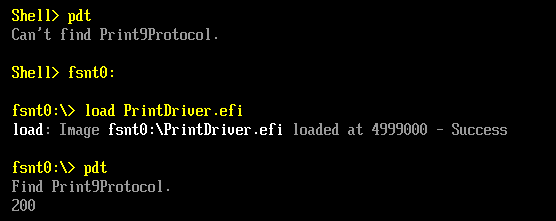
7.在模拟器中先加载Driver Load GopRotate.efi
8.枚举一下当前Shell中有 GraphicsOutput Protocol支持的 Device Handle。模拟器中有两个设备,分别对应2个窗口

下面是重新编译通过的 shell 有兴趣的朋友可以直接使用
参考:
1. http://www.lab-z.com/stu88/ Step to UEFI (88) 一个转屏驱动
2. http://www.lab-z.com/how2buildshell/ Step to UEFI (35) —– How to build Shell.efi
这次介绍一个通过驱动程序旋转屏幕的项目,地址是https://github.com/apop2/GopRotate 。项目的简介是“A EDK2 Package that supplies a UEFI driver that will bind on top of Graphics Output Devices and rotate any BLT operations by 0, 90, 180 or 270 degrees.”。
本文并不打算做原理上的分析,只是介绍如何编译和实验。
实验环境是 UDK2014
1.在 C:\EDK\Nt32Pkg\Nt32Pkg.dsc 文件的 [Components] 段中添加下面的内容
MdeModulePkg/Application/VariableInfo/VariableInfo.inf MdeModulePkg/Universal/PlatformDriOverrideDxe/PlatformDriOverrideDxe.inf ##LABZDebug_Start GopRotatePkg/GopRotate/GopRotate.inf ##LABZDebug_End ################################################################################################### # # BuildOptions Section - Define the module specific tool chain flags that should be used as # the default flags for a module. These flags are appended to any
2.将 GopRotatePkg 目录拷贝到你UDK 的根目录下 例如: C:\EDK\
3.使用 Build 命令编译 NT32
4.使用 build run 运行模拟器
至此,驱动程序已经编译完成。下面要编译使用这个驱动的 Application。
5.将GopRot 按照一个普通的Application编译
编译完成后可以进行实验了。
6.使用 load goprotate.efi 加载驱动

7.输入 goprot.efi 2 进行测试。
运行之前的屏幕是这样的:

运行之后屏幕就变成这样了

完整的代码下载
前面提到的驱动项目完整代码
GopRotatePkg
调用驱动的应用程序代码
GopRot
一个标准的 Arduino Uno上面有两个可以编程的IC,一个是负责USB 转串口的ATmega16U2,一个主控芯片ATmega328P,下图红色标记的就是16u2,绿色标记的是 328P.

然后对应的有三种Firmware: 16U2 中有一个, 328P 中有两个。16u2的负责USB转串口;328P的一个Firmware是BootLoader,从功能上说主要是负责把 16u2收到串口数据刷新到328P 上;328P中的另外一个 Firmware 就是我们平常写的程序,编译之后生成的,用来完成我们期望的功能。
一般情况下,如果想更新16u2,需要额外的设备,比如 USB IPS ; 我们IDE只能更新328P 中的程序部分.328P 的BootLoader也是需要额外的设备来进行更新的。更新 16u2使用下图左上角框住部分的排针,更新 328P 使用下图中间橘色框图中指出的引脚。

16u2的Firmware 可以在类似 \arduino-1.6.3\hardware\arduino\avr\firmwares\atmegaxxu2\arduino-usbserial 的路径中找到
328P Bootloader 的Firmware 可以在\arduino-1.6.3\hardware\arduino\avr\bootloaders\atmega 的路径中找到。
Base64编码出现的背景【参考1】:电子邮件的传输需要把原始内容编码为可见的ASCII来进行传输,很早之前出现的电子邮件编码规则兼容性不太好,比如没有考虑邮件的多种内容的问题,还有对文件音频视频附件之类兼容不好。因此,提出来新的编码,这种新的编码格式编解码很简单,同时编码后的内容只比编码之前大33%,这就是Base64。
这里是来自网上【参考2】的一份 Arduino base64库,下面简单介绍一下用法:
int base64_encode(char *output, char *input, int inputLen); 对字符串进行base64编码
int base64_decode(char *output, char *input, int inputLen); 对Base64字符串进行b解码
int base64_enc_len(int inputLen); “预测”Base64编码后的字符串长度
int base64_dec_len(char *input, int inputLen); “预测”Base64编码字符串解码后的字符串长度
下面是一个完整的例子【参考2】:
#include <Base64.h>
/*
Base64 Encode/Decode example
Encodes the text "Hello world" to "SGVsbG8gd29ybGQA" and decodes "Zm9vYmFy" to "foobar"
Created 29 April 2015
by Nathan Friedly - http://nfriedly.com/
This example code is in the public domain.
*/
void setup()
{
// start serial port at 9600 bps:
Serial.begin(9600);
while (!Serial) {
; // wait for serial port to connect. Needed for Leonardo only
}
Serial.println("Base64 example");
// encoding
char input[] = "Hello world";
int inputLen = sizeof(input);
int encodedLen = base64_enc_len(inputLen);
char encoded[encodedLen];
Serial.print(input); Serial.print(" = ");
// note input is consumed in this step: it will be empty afterwards
base64_encode(encoded, input, inputLen);
Serial.println(encoded);
// decoding
char input2[] = "Zm9vYmFy";
int input2Len = sizeof(input2);
int decodedLen = base64_dec_len(input2, input2Len);
char decoded[decodedLen];
base64_decode(decoded, input2, input2Len);
Serial.print(input2); Serial.print(" = "); Serial.println(decoded);
}
void loop()
{
}
运行结果:
这里【参考4】,提供了一个在线版的Base64编解码工具,可以用来检查结果是否正确。
完整的代码下载:
sketch_apr20a
最后,之前我还介绍过MD5的 Arduino 库【参考3】,有兴趣的朋友也可以研究一下。
参考:
1. http://www.faqs.org/rfcs/rfc2045.html
2. https://github.com/adamvr/arduino-base64 库下载
arduino-base64-master
3. http://www.lab-z.com/arduinomd5/ Arduino 的MD5库
4. http://www1.tc711.com/tool/BASE64.htm 在线编码解码
之前文章中提到过,用LoadImage和StartImage无法加载CLIB build出来的 Application。这次认真研究一下这个问题。
首先,准备实验的材料: 两个简单的小程序 Hello1 和 Hello2 。前者是 CLIB 编出来的,后者是普通的EFI 程序。此外还有一个加载器程序 exec4.efi 。
1. 单独执行编译出来的 Hello1.efi 和Hello2.efi都没问题。实验 exec4 ,加载 hello1.efi 会出错,虚拟机会重启到 Setup中,加载 hello2.efi 正常;
2. 对 Hello1 进行分析,分析的方法是加入【参考1】提到的那种按键Pause。
2.1 在Build\NT32IA32\DEBUG_MYTOOLS\IA32\AppPkg\Applications\Hello1\Hello1\Makefile文件中可以看到,入口定义:
IMAGE_ENTRY_POINT = _ModuleEntryPoint
2.2 我们再根据编译过程生成的MAP文件,确定 _ModuleEntryPoint 是在 ApplicationEntryPoint.c 中。同样【参考2】可以给我们提供很多经验,相比普通的EFI程序,增加的CLib只是在整个架构中插入了多函数,并不会改变整体的架构。
/**
Entry point to UEFI Application.
This function is the entry point for a UEFI Application. This function must call
ProcessLibraryConstructorList(), ProcessModuleEntryPointList(), and ProcessLibraryDestructorList().
The return value from ProcessModuleEntryPointList() is returned.
If _gUefiDriverRevision is not zero and SystemTable->Hdr.Revision is less than _gUefiDriverRevison,
then return EFI_INCOMPATIBLE_VERSION.
@param ImageHandle The image handle of the UEFI Application.
@param SystemTable A pointer to the EFI System Table.
@retval EFI_SUCCESS The UEFI Application exited normally.
@retval EFI_INCOMPATIBLE_VERSION _gUefiDriverRevision is greater than SystemTable->Hdr.Revision.
@retval Other Return value from ProcessModuleEntryPointList().
**/
EFI_STATUS
EFIAPI
_ModuleEntryPoint (
IN EFI_HANDLE ImageHandle,
IN EFI_SYSTEM_TABLE *SystemTable
)
{
EFI_STATUS Status;
if (_gUefiDriverRevision != 0) {
//
// Make sure that the EFI/UEFI spec revision of the platform is >= EFI/UEFI spec revision of the application.
//
if (SystemTable->Hdr.Revision < _gUefiDriverRevision) {
return EFI_INCOMPATIBLE_VERSION;
}
}
//
// Call constructor for all libraries.
//
ProcessLibraryConstructorList (ImageHandle, SystemTable);
//
// Call the module's entry point
//
Status = ProcessModuleEntryPointList (ImageHandle, SystemTable);
//
// Process destructor for all libraries.
//
ProcessLibraryDestructorList (ImageHandle, SystemTable);
//
// Return the return status code from the driver entry point
//
return Status;
}
首先追到的是 ProcessLibraryConstructorList 我们在其中插入Debug信息。特别注意,插入的位置在 \Build\NT32IA32\DEBUG_MYTOOLS\IA32\AppPkg\Applications\Hello1\Hello1\DEBUG\AutoGen.c
因为这个文件是编译过程中生成的,所以我们不可以重新 Build AppPkg,而要在目录中(\Build\NT32IA32\DEBUG_MYTOOLS\IA32\AppPkg\Applications\Hello1\Hello1\) 直接运行 NMake来编译;
2.3 插入Debug信息后,NMAKE 编译通过,直接运行 Hello1.efi 一次,确保没问题,再用 exec4 加载 hello1.efi 。同样有错误,这说明问题不是发生在ProcessLibraryConstructorList 中;下面是插入后的代码式样:
VOID
EFIAPI
ProcessLibraryConstructorList (
IN EFI_HANDLE ImageHandle,
IN EFI_SYSTEM_TABLE *SystemTable
)
{
EFI_STATUS Status;
EFI_INPUT_KEY Key;
SystemTable->ConOut->OutputString(SystemTable->ConOut,L"UefiRuntimeServicesTableLibConstructor\n\r");
Key.ScanCode=SCAN_NULL;
while (SCAN_UP!=Key.ScanCode)
{Status= SystemTable -> ConIn -> ReadKeyStroke(SystemTable->ConIn,&Key);}
SystemTable->ConOut->OutputString(SystemTable->ConOut,L"Waiting for DOWN_KEY\n\r");
Key.ScanCode=SCAN_NULL;
while (SCAN_DOWN!=Key.ScanCode)
{Status= SystemTable -> ConIn -> ReadKeyStroke(SystemTable->ConIn,&Key);}
Status = UefiRuntimeServicesTableLibConstructor (ImageHandle, SystemTable);
ASSERT_EFI_ERROR (Status);
SystemTable->ConOut->OutputString(SystemTable->ConOut,L"UefiBootServicesTableLibConstructor\n\r");
Key.ScanCode=SCAN_NULL;
while (SCAN_UP!=Key.ScanCode)
{Status= SystemTable -> ConIn -> ReadKeyStroke(SystemTable->ConIn,&Key);}
SystemTable->ConOut->OutputString(SystemTable->ConOut,L"Waiting for DOWN_KEY\n\r");
Key.ScanCode=SCAN_NULL;
while (SCAN_DOWN!=Key.ScanCode)
{Status= SystemTable -> ConIn -> ReadKeyStroke(SystemTable->ConIn,&Key);}
Status = UefiBootServicesTableLibConstructor (ImageHandle, SystemTable);
ASSERT_EFI_ERROR (Status);
SystemTable->ConOut->OutputString(SystemTable->ConOut,L"UefiLibConstructor\n\r");
Key.ScanCode=SCAN_NULL;
while (SCAN_UP!=Key.ScanCode)
{Status= SystemTable -> ConIn -> ReadKeyStroke(SystemTable->ConIn,&Key);}
SystemTable->ConOut->OutputString(SystemTable->ConOut,L"Waiting for DOWN_KEY\n\r");
Key.ScanCode=SCAN_NULL;
while (SCAN_DOWN!=Key.ScanCode)
{Status= SystemTable -> ConIn -> ReadKeyStroke(SystemTable->ConIn,&Key);}
Status = UefiLibConstructor (ImageHandle, SystemTable);
ASSERT_EFI_ERROR (Status);
SystemTable->ConOut->OutputString(SystemTable->ConOut,L"__wchar_construct\n\r");
Key.ScanCode=SCAN_NULL;
while (SCAN_UP!=Key.ScanCode)
{Status= SystemTable -> ConIn -> ReadKeyStroke(SystemTable->ConIn,&Key);}
SystemTable->ConOut->OutputString(SystemTable->ConOut,L"Waiting for DOWN_KEY\n\r");
Key.ScanCode=SCAN_NULL;
while (SCAN_DOWN!=Key.ScanCode)
{Status= SystemTable -> ConIn -> ReadKeyStroke(SystemTable->ConIn,&Key);}
Status = __wchar_construct (ImageHandle, SystemTable);
ASSERT_EFI_ERROR (Status);
SystemTable->ConOut->OutputString(SystemTable->ConOut,L"ShellLibConstructor \n\r");
Key.ScanCode=SCAN_NULL;
while (SCAN_UP!=Key.ScanCode)
{Status= SystemTable -> ConIn -> ReadKeyStroke(SystemTable->ConIn,&Key);}
SystemTable->ConOut->OutputString(SystemTable->ConOut,L"Waiting for DOWN_KEY\n\r");
Key.ScanCode=SCAN_NULL;
while (SCAN_DOWN!=Key.ScanCode)
{Status= SystemTable -> ConIn -> ReadKeyStroke(SystemTable->ConIn,&Key);}
Status = ShellLibConstructor (ImageHandle, SystemTable);
ASSERT_EFI_ERROR (Status);
SystemTable->ConOut->OutputString(SystemTable->ConOut,L"UefiHiiServicesLibConstructor \n\r");
Key.ScanCode=SCAN_NULL;
while (SCAN_UP!=Key.ScanCode)
{Status= SystemTable -> ConIn -> ReadKeyStroke(SystemTable->ConIn,&Key);}
SystemTable->ConOut->OutputString(SystemTable->ConOut,L"Waiting for DOWN_KEY\n\r");
Key.ScanCode=SCAN_NULL;
while (SCAN_DOWN!=Key.ScanCode)
{Status= SystemTable -> ConIn -> ReadKeyStroke(SystemTable->ConIn,&Key);}
Status = UefiHiiServicesLibConstructor (ImageHandle, SystemTable);
ASSERT_EFI_ERROR (Status);
}
直接运行程序会不断暂停等待按键才继续:
2.4 接下来在ProcessModuleEntryPointList中像上面一样插入Debug,
//
// Call the module's entry point
//
Status = ProcessModuleEntryPointList (ImageHandle, SystemTable);
EFI_STATUS
EFIAPI
ProcessModuleEntryPointList (
IN EFI_HANDLE ImageHandle,
IN EFI_SYSTEM_TABLE *SystemTable
)
{
EFI_STATUS Status;
EFI_INPUT_KEY Key;
SystemTable->ConOut->OutputString(SystemTable->ConOut,L"ShellCEntryLib \n\r");
Key.ScanCode=SCAN_NULL;
while (SCAN_UP!=Key.ScanCode)
{Status= SystemTable -> ConIn -> ReadKeyStroke(SystemTable->ConIn,&Key);}
SystemTable->ConOut->OutputString(SystemTable->ConOut,L"Waiting for DOWN_KEY\n\r");
Key.ScanCode=SCAN_NULL;
while (SCAN_DOWN!=Key.ScanCode)
{Status= SystemTable -> ConIn -> ReadKeyStroke(SystemTable->ConIn,&Key);}
Status=ShellCEntryLib (ImageHandle, SystemTable);
SystemTable->ConOut->OutputString(SystemTable->ConOut,L"ShellCEntryLib Exit \n\r");
Key.ScanCode=SCAN_NULL;
while (SCAN_UP!=Key.ScanCode)
{Status= SystemTable -> ConIn -> ReadKeyStroke(SystemTable->ConIn,&Key);}
SystemTable->ConOut->OutputString(SystemTable->ConOut,L"Waiting for DOWN_KEY\n\r");
Key.ScanCode=SCAN_NULL;
while (SCAN_DOWN!=Key.ScanCode)
{Status= SystemTable -> ConIn -> ReadKeyStroke(SystemTable->ConIn,&Key);}
return EFI_SUCCESS;
}
再次实验 Exec4 加载发现,现象消失了。仔细琢磨一下,应该是我最后 return EFI_SUCCESS 导致的。所以问题就应该发生在进入 ShellCEntryLib 那里。
2.5 继续调试直接在 ShellCEntryLib 加入 Debug 信息
/**
UEFI entry point for an application that will in turn call the
ShellAppMain function which has parameters similar to a standard C
main function.
An application that uses UefiShellCEntryLib must have a ShellAppMain
function as prototyped in Include/Library/ShellCEntryLib.h.
Note that the Shell uses POSITIVE integers for error values, while UEFI
uses NEGATIVE values. If the application is to be used within a script,
it needs to return one of the SHELL_STATUS values defined in ShellBase.h.
@param ImageHandle The image handle of the UEFI Application.
@param SystemTable A pointer to the EFI System Table.
@retval EFI_SUCCESS The application exited normally.
@retval Other An error occurred.
**/
EFI_STATUS
EFIAPI
ShellCEntryLib (
IN EFI_HANDLE ImageHandle,
IN EFI_SYSTEM_TABLE *SystemTable
)
{
INTN ReturnFromMain;
EFI_SHELL_PARAMETERS_PROTOCOL *EfiShellParametersProtocol;
EFI_SHELL_INTERFACE *EfiShellInterface;
EFI_STATUS Status;
ReturnFromMain = -1;
EfiShellParametersProtocol = NULL;
EfiShellInterface = NULL;
Status = SystemTable->BootServices->OpenProtocol(ImageHandle,
&gEfiShellParametersProtocolGuid,
(VOID **)&EfiShellParametersProtocol,
ImageHandle,
NULL,
EFI_OPEN_PROTOCOL_GET_PROTOCOL
);
if (!EFI_ERROR(Status)) {
SystemTable->ConOut->OutputString(SystemTable->ConOut,L"Shell2\n\r");
//
// use shell 2.0 interface
//
ReturnFromMain = ShellAppMain (
EfiShellParametersProtocol->Argc,
EfiShellParametersProtocol->Argv
);
} else {
SystemTable->ConOut->OutputString(SystemTable->ConOut,L"Shell1\n\r");
//
// try to get shell 1.0 interface instead.
//
Status = SystemTable->BootServices->OpenProtocol(ImageHandle,
&gEfiShellInterfaceGuid,
(VOID **)&EfiShellInterface,
ImageHandle,
NULL,
EFI_OPEN_PROTOCOL_GET_PROTOCOL
);
if (!EFI_ERROR(Status)) {
SystemTable->ConOut->OutputString(SystemTable->ConOut,L"Shell1.1\n\r");
//
// use shell 1.0 interface
//
ReturnFromMain = ShellAppMain (
EfiShellInterface->Argc,
EfiShellInterface->Argv
);
} else {
SystemTable->ConOut->OutputString(SystemTable->ConOut,L"Shell fail\n\r");
ASSERT(FALSE);
}
}
return ReturnFromMain;
}
用exec4加载之后输出如下:
可以看到,两种方式下,运行路径是不同的。
最后的结论:产生问题的原因是,当我们用 StartImage 运行一个 CLib程序的时候,Clib带入的函数找不到 Efi Shell Interface (要用这个Interface 的原因是希望取命令行参数传给被调用者)。找不到的时候就报错,报告一个加载不成功。
本文提到的 hello1 hello2 exec4 的源代码下载:
exec4
Hello2
Hello1
参考:
1.http://www.lab-z.com/utpk/ UEFI Tips 用按键做Pause
2.http://www.lab-z.com/22applicationentry/ Application的入口分析
我一直在使用 VirtualBox 虚拟机,忽然想起可以通过设置串口的方式来进行Windbg对虚拟机中的OS进行调试,这就意味着同样也可以使用串口来进行虚拟机和主机的通讯。
具体的操作是根据【参考1】进行的。
在虚拟机中调整Settings->Serial Ports的设置,可以看到VirtualBox支持2个串口。在Enable串口之前,进入虚拟机只有一个 LPT1 (我不知道是怎么来的) 。
Disconnected 未连接,虚拟机中会出现串口,但是不和任何实际设备对应
Host Pipe 主机管道,选择之后会要求你输入一个管道的名称。虚拟机中对于串口的访问都会发生在这个管道上。管道名称是 \\.\pipe\
Host Device主机设备,可以选择主机上的一个设备比如 com1。虚拟机上对于串口的访问重新发送/接收到这个设备上。
Raw File 裸文件,可以设置主机的一个文件。看起来这个功能更多只是用来看一下串口的Log,应该不能用作交互控制。
例子:我设置一个名称为 labz1 的pipe。

正常启动进入虚拟机(XP系统)
可以看到,有一个com1

此外其他配置使用默认即可
参考:
1. http://www.crifan.com/summary_how_to_configure_virtualbox_serial_port/ 【详解】如何配置VirtualBox中的虚拟机的串口
很多年前,我去AMI学习,偶然间看到他们在代码中加入通过 60/61 Port来读取键盘按键信息实现一个按需Delay ,深以为意。今天偶然间想起来,在调试Application 的时候,配合屏幕输出也可以用这样的方式来进行Debug。
下面是一个例子:
#include <Uefi.h>
#include <Library/UefiLib.h>
#include <Library/ShellCEntryLib.h>
extern EFI_BOOT_SERVICES *gBS;
extern EFI_SYSTEM_TABLE *gST;
extern EFI_RUNTIME_SERVICES *gRT;
#define SCAN_NULL 0x0000
#define SCAN_UP 0x0001
#define SCAN_DOWN 0x0002
#define SCAN_ESC 0x0017
int
EFIAPI
main (
IN int Argc,
IN CHAR16 **Argv
)
{
EFI_INPUT_KEY Key;
EFI_STATUS Status;
gST->ConOut->OutputString(gST->ConOut,L"Test Starting.....\n\r");
gST->ConOut->OutputString(gST->ConOut,L"Waiting for UP_KEY\n\r");
Key.ScanCode=SCAN_NULL;
while (SCAN_UP!=Key.ScanCode)
{
Status= gST -> ConIn -> ReadKeyStroke(gST->ConIn,&Key);
}
gST->ConOut->OutputString(gST->ConOut,L"Waiting for DOWN_KEY\n\r");
Key.ScanCode=SCAN_NULL;
while (SCAN_DOWN!=Key.ScanCode)
{
Status= gST -> ConIn -> ReadKeyStroke(gST->ConIn,&Key);
}
return EFI_SUCCESS;
}
通过按光标向上和向下继续运行,运行结果:
完整文件下载