最近发现开机之后桌面有一个弹出窗口,郁闷的是上面没有关闭按钮,也无法通过 ALT+F4关闭。

为了确认这个窗口的归属,使用 SPY++

再进一步查看属性就得知他是多玩坦克世界盒子的广告窗口。关掉坦克世界盒子这个窗口也会随之消失。

最近发现开机之后桌面有一个弹出窗口,郁闷的是上面没有关闭按钮,也无法通过 ALT+F4关闭。

为了确认这个窗口的归属,使用 SPY++

再进一步查看属性就得知他是多玩坦克世界盒子的广告窗口。关掉坦克世界盒子这个窗口也会随之消失。

最近偶然看到BaseLib 提供了AsmReadMm0() 和AsmWriteMm0()函数,于是进行了下面的实验。
首先,用AsmReadMm0 读取当前 MM0 寄存器的值,然后随机生成一个再写入 MM0 中。
#include <Uefi.h>
#include <Library/BaseLib.h>
#include <Library/UefiLib.h>
#include <Library/UefiApplicationEntryPoint.h>
EFI_STATUS
EFIAPI
MMXTestMain (
IN EFI_HANDLE ImageHandle,
IN EFI_SYSTEM_TABLE *SystemTable
)
{
UINT64 x=AsmReadMm0();
Print(L"Current MM0 =0x%lX\n",x);
AsmRdRand64(&x);
Print(L"Random Value=0x%lX\n",x);
AsmWriteMm0(x);
return EFI_SUCCESS;
}
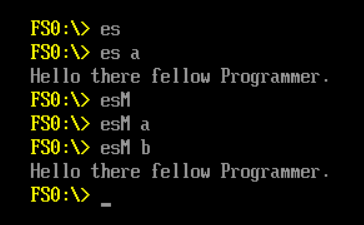
之后在 NT32Pkg 的模拟器中运行结果如下:

可以看到,前一次运行之后随机生成一个数值,写入MM0之后再次运行还可以读出。
=====================================================================================
R0-R7 是独立于 RXX 的寄存器,之前文章引用过一幅示意图,上面写的 RAX or R0 这句话会误导读者以为他们是同一个寄存器。

实际上,R0-R7 是用来进行浮点运算的 80Bits的寄存器。MMX0-7是R0-R7 0-64Bits的别名:

完整代码:
在实模式下,内存寻址是通过 “段寄存器:偏移” 来进行的。保护模式出现之后,因为内存地址长度的增加,这样的方式无法完成(不够长)。为了解决这样的使用索引来处理成为顺理成章的事情。

同时为了考虑兼容性,最终引入了Global Descriptor Table 来进行扩展。关于内存的地址信息存放在这个 GDT 中。接下来 CS/DS/ES这样的段寄存器不再存放内存的地址而是存放 GDT 中的“第x个条目”这样的信息。再引入一个 GDTR 的寄存器存放 GDT 在内存中的位置。
在\MdePkg\Include\Library\BaseLib.h中有定义读取 GDTR 的函数。
/**
Reads the current Global Descriptor Table Register(GDTR) descriptor.
Reads and returns the current GDTR descriptor and returns it in Gdtr. This
function is only available on IA-32 and x64.
If Gdtr is NULL, then ASSERT().
@param Gdtr The pointer to a GDTR descriptor.
**/
VOID
EFIAPI
AsmReadGdtr (
OUT IA32_DESCRIPTOR *Gdtr
);
读取之后的 GDTR 寄存器定义如下【参考1】:

在代码中定义如下:
///
/// Byte packed structure for an IDTR, GDTR, LDTR descriptor.
///
#pragma pack (1)
typedef struct {
UINT16 Limit;
UINTN Base;
} IA32_DESCRIPTOR;
#pragma pack ()
Base 是给定 GDT 在内存中的地址,Limit 实际上是给出Table 的长度。从 Figure 2-6 可以看到,32位下和 64位下Limit 长度都是 16Bit的,但是 Base 的长度可能是32或者64位的,代码使用 UINTN 来实现一个 Structure 兼容2种情况。
获得了内存地址后就可以开始进行解析。其中的每一个项目结构体如下:
///
/// Byte packed structure for a segment descriptor in a GDT/LDT.
///
typedef union {
struct {
UINT32 LimitLow:16;
UINT32 BaseLow:16;
UINT32 BaseMid:8;
UINT32 Type:4;
UINT32 S:1;
UINT32 DPL:2;
UINT32 P:1;
UINT32 LimitHigh:4;
UINT32 AVL:1;
UINT32 L:1;
UINT32 DB:1;
UINT32 G:1;
UINT32 BaseHigh:8;
} Bits;
UINT64 Uint64;
} IA32_SEGMENT_DESCRIPTOR;


首先,我们编写一个读取解析的代码:
#include <Uefi.h>
#include <Library/BaseLib.h>
#include <Library/BaseMemoryLib.h>
#include <Library/MemoryAllocationLib.h>
#include <Library/UefiLib.h>
#include <Library/UefiApplicationEntryPoint.h>
#include <Library/DebugLib.h>
#include <Protocol/PciIo.h>
EFI_STATUS
EFIAPI
GDTMain (
IN EFI_HANDLE ImageHandle,
IN EFI_SYSTEM_TABLE *SystemTable
)
{
UINTN GdtEntryCount;
IA32_SEGMENT_DESCRIPTOR *GdtEntry;
IA32_DESCRIPTOR GdtrDesc;
UINT16 Index;
AsmReadGdtr (&GdtrDesc);
GdtEntryCount = (GdtrDesc.Limit + 1) / sizeof (IA32_SEGMENT_DESCRIPTOR);
GdtEntry = (IA32_SEGMENT_DESCRIPTOR *) GdtrDesc.Base;
Print(L"GDTR=0x%lX\n",GdtEntry);
for (Index = 0; Index < GdtEntryCount; Index++) {
Print(L"No.[%d] ",Index);
Print(L"Seg. Desc 0x%lX\n",GdtEntry->Uint64);
Print(L"Base=0x%lX\n",
(GdtEntry->Bits.BaseHigh<<24)|
(GdtEntry->Bits.BaseMid<<16)|
(GdtEntry->Bits.BaseLow));
Print(L"Limit=0x%X\n",
(GdtEntry->Bits.LimitHigh<<16)|
(GdtEntry->Bits.LimitLow));
if (GdtEntry->Bits.S==0) {
Print(L"Descriptor Type: system\n");
}
else {
Print(L"Descriptor Type: Code or Data\n");
}
if (GdtEntry->Bits.L==0) {
Print(L"Not 64-bit code segment\n");
}else {
Print(L"64-bit code segment\n");

}
GdtEntry++;
}
return EFI_SUCCESS;
}
运行之后结果如下:
GDTR=0x8C634718
No.[0] Seg. Desc 0x0
Base=0x0
Limit=0x0
Descriptor Type: system
Not 64-bit code segment

No.[1] Seg. Desc 0xCF92000000FFFF
Base=0x0
Limit=0xFFFFF
Descriptor Type: Code or Data
Not 64-bit code segment
No.[2] Seg. Desc 0xCF9F000000FFFF
Base=0x0
Limit=0xFFFFF
Descriptor Type: Code or Data
Not 64-bit code segment
No.[3] Seg. Desc 0xCF93000000FFFF
Base=0x0
Limit=0xFFFFF
Descriptor Type: Code or Data
Not 64-bit code segment
No.[4] Seg. Desc 0xCF9A000000FFFF
Base=0x0
Limit=0xFFFFF
Descriptor Type: Code or Data
Not 64-bit code segment
No.[5] Seg. Desc 0x0
Base=0x0
Limit=0x0
Descriptor Type: system
Not 64-bit code segment
No.[6] Seg. Desc 0xCF93000000FFFF
Base=0x0
Limit=0xFFFFF
Descriptor Type: Code or Data
Not 64-bit code segment
No.[7] Seg. Desc 0xAF9B000000FFFF
Base=0x0
Limit=0xFFFFF
Descriptor Type: Code or Data
64-bit code segment
No.[8] Seg. Desc 0x0
Base=0x0
Limit=0x0
Descriptor Type: system
Not 64-bit code segment
经过研究,代码中设置 GDT Table 是在 \Edk2\UefiCpuPkg\CpuDxe\CpuGdt.c 中,有定义 GDT 如下:
//
// Global descriptor table (GDT) Template
//
STATIC GDT_ENTRIES GdtTemplate = {
//
// NULL_SEL
//
{
0x0, // limit 15:0
0x0, // base 15:0
0x0, // base 23:16
0x0, // type
0x0, // limit 19:16, flags
0x0, // base 31:24
},
//
// LINEAR_SEL
//
{
0x0FFFF, // limit 15:0
0x0, // base 15:0
0x0, // base 23:16
0x092, // present, ring 0, data, read/write
0x0CF, // page-granular, 32-bit
0x0,
},
//
// LINEAR_CODE_SEL
//
{
0x0FFFF, // limit 15:0
0x0, // base 15:0
0x0, // base 23:16
0x09F, // present, ring 0, code, execute/read, conforming, accessed
0x0CF, // page-granular, 32-bit
0x0,
},
//
// SYS_DATA_SEL
//
{
0x0FFFF, // limit 15:0
0x0, // base 15:0
0x0, // base 23:16
0x093, // present, ring 0, data, read/write, accessed
0x0CF, // page-granular, 32-bit
0x0,
},
//
// SYS_CODE_SEL
//
{
0x0FFFF, // limit 15:0
0x0, // base 15:0
0x0, // base 23:16
0x09A, // present, ring 0, code, execute/read
0x0CF, // page-granular, 32-bit
0x0,
},
//
// SPARE4_SEL
//
{
0x0, // limit 15:0
0x0, // base 15:0
0x0, // base 23:16
0x0, // type
0x0, // limit 19:16, flags
0x0, // base 31:24
},
//
// LINEAR_DATA64_SEL
//
{
0x0FFFF, // limit 15:0
0x0, // base 15:0
0x0, // base 23:16
0x092, // present, ring 0, data, read/write
0x0CF, // page-granular, 32-bit
0x0,
},
//
// LINEAR_CODE64_SEL
//
{
0x0FFFF, // limit 15:0
0x0, // base 15:0
0x0, // base 23:16
0x09A, // present, ring 0, code, execute/read
0x0AF, // page-granular, 64-bit code
0x0, // base (high)
},
//
// SPARE5_SEL
//
{
0x0, // limit 15:0
0x0, // base 15:0
0x0, // base 23:16
0x0, // type
0x0, // limit 19:16, flags
0x0, // base 31:24
},
};
为了验证前面的代码,我们可以在最后加上一个自定义的 Segment,编译后烧写到板子上再使用上面的工具查看,可以看到多出来的一项。
同一个文件中还有加载段描述的动作,在InitGlobalDescriptorTable函数中
//
// Update selector (segment) registers base on new GDT
//
SetCodeSelector ((UINT16)CPU_CODE_SEL);
SetDataSelectors ((UINT16)CPU_DATA_SEL);
对应代码如下(Edk2\UefiCpuPkg\CpuDxe\X64\CpuAsm.asm):
;------------------------------------------------------------------------------
; VOID
; SetCodeSelector (
; UINT16 Selector
; );
;------------------------------------------------------------------------------
SetCodeSelector PROC PUBLIC
sub rsp, 0x10
lea rax, setCodeSelectorLongJump
mov [rsp], rax
mov [rsp+4], cx
jmp fword ptr [rsp]
setCodeSelectorLongJump:
add rsp, 0x10
ret
SetCodeSelector ENDP
;------------------------------------------------------------------------------
; VOID
; SetDataSelectors (
; UINT16 Selector
; );
;------------------------------------------------------------------------------
SetDataSelectors PROC PUBLIC
mov ss, cx
mov ds, cx
mov es, cx
mov fs, cx
mov gs, cx
ret
SetDataSelectors ENDP
分别加载了前面 Table 中的 LINEAR_DATA64_SEL和 LINEAR_CODE64_SEL到 DS CS 还有其他的段寄存器中。
使用前面介绍过的 DCI【参考2】进行查看:
1.直接查看gdtr (这步之前需要先 halt),可以看到里面的内容和Application 读取的是相同的,同样Limit=0x47, (0x47+1)/8=9 ,也就是说有9项和读取结果相同。

2.查看 cs 寄存器(我不确定是否为这个命令,只是看着像),解析如下:

看到的内容比我们普通看到的会多一些,根据【参考3】和一些资料的介绍,保护模式下,CS 中装的是selector(选择子),此外还有一部分隐藏的,资料上称之为 Cached的内容。使用DBC 工具可以看到隐藏的部分确实有存放一些其他内容。csb 可能是 CS.Base的意思,csl 可能是 CS.Limit 的意思。

同样的在【参考4】也有描述:

Every segment register has a “visible” part and a “hidden”
part. (The hidden part is sometimes referred to as a “descriptor cache” or a
“shadow register.”) When a segment selector is loaded into the visible part of
a segment register, the processor also loads the hidden part of the segment
register with the base address, segment limit, and access control information
from the segment descriptor pointed to by the segment selector. The information
cached in the segment register (visible and hidden) allows the processor to
translate addresses without taking extra bus cycles to read the base address
and limit from the segment descriptor. In systems in which multiple processors
have access to the same descriptor tables, it is the
responsibility of software to reload the segment registers when the descriptor
tables are modified. If this is not done, an old segment descriptor cached in a
segment register might be used after its memory-resident version has been
modified.
这部分在BIOS中从来不会有错,因为上来之后就会被设置为0-4G 全部都可以访问,代码中也不会进行修改。但是这部分知识对于掌握X86系统结构是非常有必要的。
参考:
之前介绍过 UDK201903,这一段的实验也都是基于这个版本的。最近发现有更新的 UDK201905。在https://github.com/tianocore/edk2/releases/tag/edk2-stable201905 可以看到。增加了如下特性:
特别值得注意的是Nt32Pkg已经被移除了,取而代之的是EmulatorPkg。
下载代码后试验编译,我将之前UDK201903的BaseTool copy到这个目录下。然后使用 “VS2015 x64 Native Tools Command Prompt”进行编译。编译命令是 “build -p EmulatorPkg\EmulatorPkg.dsc -t VS2015x86 -D WIN_SEC_BUILD -a X64”。

编译之后模拟器在201905\Build\EmulatorX64\DEBUG_VS2015x86\X64\WinHost.exe 直接运行之即可。

后面会进一步研究,特别是针对模拟器部分。
完整的编译环境可以在这里下载
链接: https://pan.baidu.com/s/1fO7XISwfcc79rZaMbydtQw 提取码: insn
最近在实验屏幕PSR功能的时候碰到一个诡异的问题。具体现象就是:鼠标可以打开桌面上的一个目录,然后就出现鼠标可以移动但是不能点击任何内容的情况。这个时候键盘仍然是可以使用的。
起初我怀疑是系统装了很多乱七八糟的软件导致的问题。然后将这个硬盘换到其他的机器上就没有这样的现象了。接下来就怀疑BIOS导致的,但是理论上BIOS不会导致系统下这样的情况。出现问题的时候,鼠标可以移动,Touch Pad(键盘下面的触摸板)也是可以移动的,但是无法点击。
偶然之间,我换了一个鼠标惊奇的发现问题消失了。然后意识到问题真的有可能是我的鼠标导致的。因为那个鼠标是我刚维修更换过微动的微软 1.01 鼠标,并且这个鼠标是复刻版的微软 1.01,换句话说,这个鼠标除了里面的电路板是微软原装,其他的东西要么是山寨的,要么是我自己维修更换过的。额外说一句,我很喜欢这个型号的鼠标,握起来感觉很好。但是这个对于手小的人来说非常别扭。这个型号的鼠标我有5个,除了1个是十年前购买的原装,其余都是复刻的。我一直用他们办公或者测试。

为了验证猜想,我在一台装有USBlyzer 的机器上实验这个鼠标,仍然能看到现象。接下来打开软件开始抓包。发现出现问题时这个鼠标的Button5 一直处于按下的状态。正常情况下,按下按键后会发出“鼠标X Button 按下”的消息,抬起的时候还会发出“鼠标X Button 抬起”的消息。比如下面就是一个例子:
按下 Button 5

抬起 Button 5

对于出现问题的鼠标来说,无论如何移动,一直都有 Button5 被按下的消息存在。因此系统无法正确响应,导致了前面提到的问题。 其中的Button5 位于图片中的这个位置。

应该是我在安装时机构建没有完美对齐导致这样的问题。最终拆卸重新安装问题就消失了。
最难解决的问题是看不到现象的问题。譬如说阅读《福尔摩斯全集》的时候每次都是有人来找福尔摩斯然后他们兴高采烈的去出现场然后发现蛛丝马迹,从来没有福尔摩斯问了几句就知道真相的,毕竟侦探小说不是通灵传奇。对于我们 Debug 也一样。特别是没有条件提供对方现场,只能进行现象描述的时候,如果能站在对方的角度思考尽可能多的提供线索也可以提让提问更加有效。
最近在编写代码的时候遇到一个非常奇怪的问题,经过化简,出现问题的代码如下:
#include <Uefi.h>
#include <Library/BaseLib.h>
#include <Library/BaseMemoryLib.h>
#include <Library/MemoryAllocationLib.h>
#include <Library/UefiLib.h>
#include <Library/UefiApplicationEntryPoint.h>
#include <Library/DebugLib.h>
EFI_PCI_IO_PROTOCOL *mFFIO = NULL;
EFI_STATUS
EFIAPI
MSMain (
IN EFI_HANDLE ImageHandle,
IN EFI_SYSTEM_TABLE *SystemTable
)
{
Print(L"LabZ Test\n");
return EFI_SUCCESS;
}
INF 如下:
[Defines]
INF_VERSION = 0x00010005
BASE_NAME = mst
FILE_GUID = fb925ac7-192b-9569-8580-7c6f5f710601
MODULE_TYPE = UEFI_APPLICATION
VERSION_STRING = 1.0
ENTRY_POINT = MSMain
#
# The following information is for reference only and not required by the build tools.
#
# VALID_ARCHITECTURES = IA32 X64 IPF
#
[Sources]
MSTest.c
[Packages]
AppPkg/AppPkg.dec
MdePkg/MdePkg.dec
[LibraryClasses]
UefiApplicationEntryPoint
UefiLib
BaseLib
错误提示为:
c:\buildbs\201903\AppPkg\Applications\MSTest\MSTest.c(20): error C2143: syntax error: missing '{' before '*'
c:\buildbs\201903\AppPkg\Applications\MSTest\MSTest.c(20): warning C4218: nonstandard extension used: must specify at least a storage class or a type
NMAKE : fatal error U1077: '"C:\Program Files (x86)\Microsoft Visual Studio 14.0\Vc\bin\x86_amd64\cl.exe"' : return code '0x2'
Stop.
百思不得其解,不知道这么简单的一句话为什么会导致这样奇怪的问题。有兴趣的朋友可以先花费三分钟思考一下。

忽然想起来最近学到的一个 VS 编译指令 /P 【参考1】,可以将宏展开进行查看,于是在 INF中加入下面的参数:
[BuildOptions]
MSFT:*_*_X64_CC_FLAGS = /P
在 \Build\AppPkg\DEBUG_VS2015x86\X64\AppPkg\Applications\MSTest\MSTest 下面看到 MSTest.i 中有下面的定义。出现问题的原因就是:EFI_PCI_IO_PROTOCOL 未定义。
EFI_PCI_IO_PROTOCOL *mFFIO = ((void *) 0);
EFI_STATUS
__cdecl
MSMain (
EFI_HANDLE ImageHandle,
EFI_SYSTEM_TABLE *SystemTable
)
{
Print(L"LabZ Test\n");
return 0;
}
找到了问题的原因,解决方法很简单,在C 文件中加入#include <Protocol/PciIo.h> 即可。但是按道理,这种情况应该出现 “identifier “EFI_PCI_IO_PROTOCOL” is undefined”的错误提示,不知道为什么这里没有出现。
参考:
1. https://docs.microsoft.com/en-us/cpp/build/reference/p-preprocess-to-a-file?view=vs-2019 /P (Preprocess to a File)
最近 Krishna 做了一个能够读取分析 UEFI Shell 下屏幕历史信息的工具。比如,你想得到某一个 Application 的输出结果,可以先让他运行一次,然后用这个工具抓取之前的输出结果。

具体项目在 https://github.com/krishna116/UefiTest 有兴趣的朋友可以去围观一下。
NT32Pkg 是简单方便的虚拟机,很多情况下可以帮助我们验证一些功能。最近研究了一下这个虚拟机中按键功能的实现。
在 \Nt32Pkg\WinNtGopDxe\WinNtGopInput.c 的WinNtGopInitializeSimpleTextInForWindow 函数中可以看到如下代码:
//
// Initialize Simple Text In protoocol
//
Private->SimpleTextIn.Reset = WinNtGopSimpleTextInReset;
Private->SimpleTextIn.ReadKeyStroke = WinNtGopSimpleTextInReadKeyStroke;
Status = gBS->CreateEvent (
EVT_NOTIFY_WAIT,
TPL_NOTIFY,
WinNtGopSimpleTextInWaitForKey,
Private,
&Private->SimpleTextIn.WaitForKey
);
Private->SimpleTextInEx.Reset = WinNtGopSimpleTextInExResetEx;
Private->SimpleTextInEx.ReadKeyStrokeEx = WinNtGopSimpleTextInExReadKeyStrokeEx;
Private->SimpleTextInEx.SetState = WinNtGopSimpleTextInExSetState;
Private->SimpleTextInEx.RegisterKeyNotify = WinNtGopSimpleTextInExRegisterKeyNotify;
Private->SimpleTextInEx.UnregisterKeyNotify = WinNtGopSimpleTextInExUnregisterKeyNotify;
就是说SimpleTextIn.ReadKeyStroke是在 WinNtGopSimpleTextInReadKeyStroke 实现的;SimpleTextInEx.ReadKeyStrokeEx 是通过WinNtGopSimpleTextInExReadKeyStrokeEx 实现的。SimpleTextIn和SimpleTextInEx是UEFI 下实现键盘功能的基础。继续研究这两个 Protocol 的具体实现。
接下来查看这个函数:
EFI_STATUS
GopPrivateReadKeyStrokeWorker (
IN GOP_PRIVATE_DATA *Private,
OUT EFI_KEY_DATA *KeyData
)
/*++
Routine Description:
Reads the next keystroke from the input device. The WaitForKey Event can
be used to test for existance of a keystroke via WaitForEvent () call.
Arguments:
Private - The private structure of WinNt Gop device.
KeyData - A pointer to a buffer that is filled in with the keystroke
state data for the key that was pressed.
Returns:
EFI_SUCCESS - The keystroke information was returned.
EFI_NOT_READY - There was no keystroke data availiable.
EFI_DEVICE_ERROR - The keystroke information was not returned due to
hardware errors.
EFI_INVALID_PARAMETER - KeyData is NULL.
--*/
{
EFI_STATUS Status;
EFI_TPL OldTpl;
if (KeyData == NULL) {
return EFI_INVALID_PARAMETER;
}
//
// Enter critical section
//
OldTpl = gBS->RaiseTPL (TPL_NOTIFY);
//
// Call hot key callback before telling caller there is a key available
//
WinNtGopSimpleTextInTimerHandler (NULL, Private);
ZeroMem (&KeyData->Key, sizeof (KeyData->Key));
InitializeKeyState (Private, &KeyData->KeyState);
Status = GopPrivateCheckQ (&Private->QueueForRead);
if (!EFI_ERROR (Status)) {
//
// If a Key press exists try and read it.
//
Status = GopPrivateDeleteQ (Private, &Private->QueueForRead, KeyData);
if (!EFI_ERROR (Status)) {
//
// If partial keystroke is not enabled, check whether it is value key. If not return
// EFI_NOT_READY.
//
if (!Private->IsPartialKeySupport) {
if (KeyData->Key.ScanCode == SCAN_NULL && KeyData->Key.UnicodeChar == CHAR_NULL) {
Status = EFI_NOT_READY;
}
}
}
}
//
// Leave critical section and return
//
gBS->RestoreTPL (OldTpl);
return Status;
}
简单的说,这个函数通过GopPrivateCheckQ 来检查Private->QueueForRead,如果有数据就取出按键信息,然后把数据从Buffer 中删除。接下来的问题就是:谁在填写这个 Buffer。找到了下面这个函数
EFI_STATUS
GopPrivateAddKey (
IN GOP_PRIVATE_DATA *Private,
IN EFI_INPUT_KEY Key
);
代码中有几处使用上面这个函数。最终确定在 WinNtGopThreadWindowProc 函数中:
case WM_CHAR:
//
// The ESC key also generate WM_CHAR.
//
if (wParam == 0x1B) {
return 0;
}
if (AltIsPress == TRUE) {
//
// If AltIsPress is true that means the Alt key is pressed.
//
Private->LeftAlt = TRUE;
}
for (Index = 0; Index < (lParam & 0xffff); Index++) {
if (wParam != 0) {
Key.UnicodeChar = (CHAR16) wParam;
Key.ScanCode = SCAN_NULL;
GopPrivateAddKey (Private, Key);
}
}
if (AltIsPress == TRUE) {
//
// When Alt is released there is no windoes message, so
// clean it after using it.
//
Private->LeftAlt = FALSE;
Private->RightAlt = FALSE;
}
DEBUG ((EFI_D_INFO, "Key [%X] [%X]\n",Key.ScanCode,Key.UnicodeChar)); //LABZ_DEBUG
return 0;
就是说,Windows将WM_CHAR消息发送到了WinNtGopThreadWindowProc 进行处理,代码从中解析出了具体的按键信息。我们在上面加入了一行DEBUG信息可以看到按键的具体信息,试验结果如下:


有了上面的知识,有兴趣的朋友还可以试试将键盘上的某两个键对换,比如按下 “P”打出来的是“Q”。
修改后的 \Nt32Pkg\WinNtGopDxe\WinNtGopScreen.c 代码,可以在这里下载
最近在重温书本从基础的寄存器看起。进入64位的时代之后,EAX 之类的寄存器直接被扩展为64位【参考1】:

看到这里忽然想起来一个问题:如何在UEFI 下输出当前通用寄存器比如RAX的值?为了这个目标进行了一番研究。
首先,看看 Print 是如何工作的。为了达成这个目标,使用之前提到的方法,在 INF 加入 /FAsc 用来生成汇编语言对应的 Lst 文件,同时使用 /Od 关闭优化。
[BuildOptions]
MSFT:*_*_X64_CC_FLAGS = /FAsc /Od
下面的 Print 调用
volatile UINT64 Value=0x1234567890ABCDEF;
Print(L"%lx\n",Value);
对应的汇编语言是:
; 37 : volatile UINT64 Value=0x1234567890ABCDEF;
0000e 48 b8 ef cd ab
90 78 56 34 12 mov rax, 1311768467294899695 ; 1234567890abcdefH
00018 48 89 44 24 28 mov QWORD PTR Value$[rsp], rax
; 38 : Print(L"%lx\n",Value);
0001d 48 8b 54 24 28 mov rdx, QWORD PTR Value$[rsp]
00022 48 8d 0d 00 00
00 00 lea rcx, OFFSET FLAT:??_C@_19LKIJIFCB@?$AA?$CF?$AAl?$AAx?$AA?6?$AA?$AA@
00029 e8 00 00 00 00 call Print
可以看到,带有2个参数的Print 函数,使用 rdx作为第一个参数给出要显示的数值,rcx作为第二个参数给出显示的格式。
接下来做一个简单的试验,来修改这个值。使用 UltraEdit 打开 pa.efi 搜索“48 b8 ef cd ab 90 78 56 34 12”

修改为

运行结果如下:

如果能够在代码中做到这样的动作,那么就可以实现显示 RAX 的取值了。
接下来,我们将 Print 写成一个函数:
void
ShowRAX(UINT64 value)
{
Print(L"%lx\n",value);
}
对应汇编为
ShowRAX PROC ; COMDAT
; 13 : {
$LN3:
00000 48 89 4c 24 08 mov QWORD PTR [rsp+8], rcx
00005 48 83 ec 28 sub rsp, 40 ; 00000028H
00009 48 8b 54 24 30 mov rdx, QWORD PTR value$[rsp]
0000e 48 8d 0d 00 00
00 00 lea rcx, OFFSET FLAT:??_C@_19LKIJIFCB@?$AA?$CF?$AAl?$AAx?$AA?6?$AA?$AA@
00015 e8 00 00 00 00 call Print
; 20 : }
0001a 48 83 c4 28 add rsp, 40 ; 00000028H
0001e c3 ret 0
ShowRAX ENDP
可以看到要显示的值是在函数偏移0009 的地方,如果能将这个位置替换为我们要显示的寄存器即可。
00009 48 8b 54 24 30 mov rdx, QWORD PTR value$[rsp]
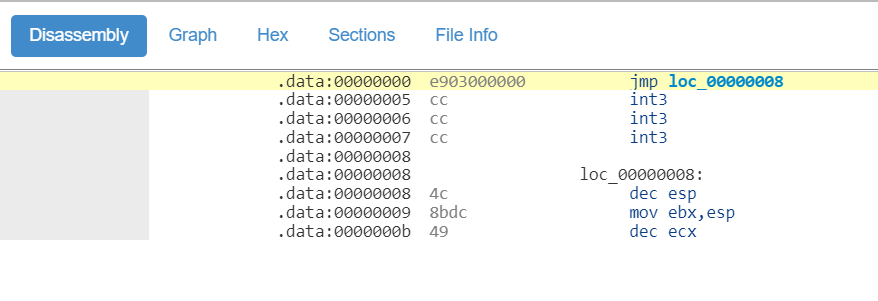
比如,我们给 RCX 赋值,然后显示出来。这里参考之前提到的汇编到机器码的转换方法【参考1】,编写一个汇编语言程序段:
[BITS 64]
mov rax,0xFEDCBA0987654321
使用 Nasm 取得对应的机器码:
48B92143658709BADC- mov rcx,0xFEDCBA0987654321FE
这里提到的机器码比 mov rdx, QWORD PTR value$[rsp]要长,因此我们还需要合适的内容来填充。我请教了一下天杀,他说“VS现在加入了很多伪指令,在intrin.h文件中,比如__readcr0(),__readmsr(),__inbyte(),__cpuidex()”因此,这里直接使用 __nop() 对应机器码 0x90 作为填充。
具体做法是将函数ShowRAX地址赋值给一个指针,然后用这个指针来对内存中ShowRAX() 函数起始地址+9 的内存写入我们需要的指令。需要注意的是这样使用指针会导致一个 Warning 同样需要在[BuildOptions] 设定忽略它。
最终的 INF 如下:
[Defines]
INF_VERSION = 0x00010006
BASE_NAME = pa
FILE_GUID = a912f198-7f0e-4803-b90A-b757b806ec84
MODULE_TYPE = UEFI_APPLICATION
VERSION_STRING = 0.1
ENTRY_POINT = ShellCEntryLib
#
# VALID_ARCHITECTURES = IA32 X64
#
[Sources]
PrintAsm.c
[Packages]
MdePkg/MdePkg.dec
ShellPkg/ShellPkg.dec
[LibraryClasses]
UefiLib
ShellCEntryLib
IoLib
[BuildOptions]
MSFT:*_*_X64_CC_FLAGS = /FAsc /wd4054 /Od
C文件如下:
#include <Uefi.h>
#include <Library/BaseLib.h>
#include <Library/UefiLib.h>
#include <Library/ShellCEntryLib.h>
#include <Library/IoLib.h>
extern EFI_SYSTEM_TABLE *gST;
extern EFI_BOOT_SERVICES *gBS;
void
ShowRAX(UINT64 value)
{
__nop();
__nop();
__nop();
__nop();
__nop();
Print(L"%lx\n",value);
}
/***
Print a welcoming message.
Establishes the main structure of the application.
@retval 0 The application exited normally.
@retval Other An error occurred.
***/
INTN
EFIAPI
ShellAppMain (
IN UINTN Argc,
IN CHAR16 **Argv
)
{
UINT8 *f=(UINT8 *)&ShowRAX;;
volatile UINT64 Value=0x1234567890ABCDEF;
Print(L"%lx\n",Value);
*(f+9 )=0x48;
*(f+10)=0xBA;
*(f+11)=0x21;
*(f+12)=0x43;
*(f+13)=0x65;
*(f+14)=0x87;
*(f+15)=0x09;
*(f+16)=0xBA;
*(f+17)=0xDC;
*(f+18)=0xFE;
ShowRAX(Value);
return(0);
}
对应的 COD 文件如下:
; Listing generated by Microsoft (R) Optimizing Compiler Version 19.00.24215.1
include listing.inc
INCLUDELIB OLDNAMES
PUBLIC ??_C@_19LKIJIFCB@?$AA?$CF?$AAl?$AAx?$AA?6?$AA?$AA@ ; `string'
; COMDAT ??_C@_19LKIJIFCB@?$AA?$CF?$AAl?$AAx?$AA?6?$AA?$AA@
CONST SEGMENT
??_C@_19LKIJIFCB@?$AA?$CF?$AAl?$AAx?$AA?6?$AA?$AA@ DB '%', 00H, 'l', 00H, 'x'
DB 00H, 0aH, 00H, 00H, 00H ; `string'
PUBLIC ShowRAX
PUBLIC ShellAppMain
; COMDAT pdata
pdata SEGMENT
$pdata$ShowRAX DD imagerel $LN3
DD imagerel $LN3+36
DD imagerel $unwind$ShowRAX
pdata ENDS
; COMDAT pdata
pdata SEGMENT
$pdata$ShellAppMain DD imagerel $LN3
DD imagerel $LN3+165
DD imagerel $unwind$ShellAppMain
pdata ENDS
; COMDAT xdata
xdata SEGMENT
$unwind$ShellAppMain DD 010e01H
DD 0620eH
xdata ENDS
; COMDAT xdata
xdata SEGMENT
$unwind$ShowRAX DD 010901H
DD 04209H
; Function compile flags: /Odsp
; File c:\201903\apppkg\applications\printasm\printasm.c
; COMDAT ShellAppMain
_TEXT SEGMENT
f$ = 32
Value$ = 40
Argc$ = 64
Argv$ = 72
ShellAppMain PROC ; COMDAT
; 35 : {
$LN3:
00000 48 89 54 24 10 mov QWORD PTR [rsp+16], rdx
00005 48 89 4c 24 08 mov QWORD PTR [rsp+8], rcx
0000a 48 83 ec 38 sub rsp, 56 ; 00000038H
; 36 : UINT8 *f=(UINT8 *)&ShowRAX;;
0000e 48 8d 05 00 00
00 00 lea rax, OFFSET FLAT:ShowRAX
00015 48 89 44 24 20 mov QWORD PTR f$[rsp], rax
; 37 : volatile UINT64 Value=0x1234567890ABCDEF;
0001a 48 b8 ef cd ab
90 78 56 34 12 mov rax, 1311768467294899695 ; 1234567890abcdefH
00024 48 89 44 24 28 mov QWORD PTR Value$[rsp], rax
; 38 : Print(L"%lx\n",Value);
00029 48 8b 54 24 28 mov rdx, QWORD PTR Value$[rsp]
0002e 48 8d 0d 00 00
00 00 lea rcx, OFFSET FLAT:??_C@_19LKIJIFCB@?$AA?$CF?$AAl?$AAx?$AA?6?$AA?$AA@
00035 e8 00 00 00 00 call Print
; 39 : *(f+9 )=0x48;
0003a 48 8b 44 24 20 mov rax, QWORD PTR f$[rsp]
0003f c6 40 09 48 mov BYTE PTR [rax+9], 72 ; 00000048H
; 40 : *(f+10)=0xBA;
00043 48 8b 44 24 20 mov rax, QWORD PTR f$[rsp]
00048 c6 40 0a ba mov BYTE PTR [rax+10], 186 ; 000000baH
; 41 : *(f+11)=0x21;
0004c 48 8b 44 24 20 mov rax, QWORD PTR f$[rsp]
00051 c6 40 0b 21 mov BYTE PTR [rax+11], 33 ; 00000021H
; 42 : *(f+12)=0x43;
00055 48 8b 44 24 20 mov rax, QWORD PTR f$[rsp]
0005a c6 40 0c 43 mov BYTE PTR [rax+12], 67 ; 00000043H
; 43 : *(f+13)=0x65;
0005e 48 8b 44 24 20 mov rax, QWORD PTR f$[rsp]
00063 c6 40 0d 65 mov BYTE PTR [rax+13], 101 ; 00000065H
; 44 : *(f+14)=0x87;
00067 48 8b 44 24 20 mov rax, QWORD PTR f$[rsp]
0006c c6 40 0e 87 mov BYTE PTR [rax+14], 135 ; 00000087H
; 45 : *(f+15)=0x09;
00070 48 8b 44 24 20 mov rax, QWORD PTR f$[rsp]
00075 c6 40 0f 09 mov BYTE PTR [rax+15], 9
; 46 : *(f+16)=0xBA;
00079 48 8b 44 24 20 mov rax, QWORD PTR f$[rsp]
0007e c6 40 10 ba mov BYTE PTR [rax+16], 186 ; 000000baH
; 47 : *(f+17)=0xDC;
00082 48 8b 44 24 20 mov rax, QWORD PTR f$[rsp]
00087 c6 40 11 dc mov BYTE PTR [rax+17], 220 ; 000000dcH
; 48 : *(f+18)=0xFE;
0008b 48 8b 44 24 20 mov rax, QWORD PTR f$[rsp]
00090 c6 40 12 fe mov BYTE PTR [rax+18], 254 ; 000000feH
; 49 : ShowRAX(Value);
00094 48 8b 4c 24 28 mov rcx, QWORD PTR Value$[rsp]
00099 e8 00 00 00 00 call ShowRAX
; 50 : return(0);
0009e 33 c0 xor eax, eax
; 51 : }
000a0 48 83 c4 38 add rsp, 56 ; 00000038H
000a4 c3 ret 0
ShellAppMain ENDP
_TEXT ENDS
; Function compile flags: /Odsp
; File c:\201903\apppkg\applications\printasm\printasm.c
; COMDAT ShowRAX
_TEXT SEGMENT
value$ = 48
ShowRAX PROC ; COMDAT
; 12 : {
$LN3:
00000 48 89 4c 24 08 mov QWORD PTR [rsp+8], rcx
00005 48 83 ec 28 sub rsp, 40 ; 00000028H
; 13 : __nop();
00009 90 npad 1
; 14 : __nop();
0000a 90 npad 1
; 15 : __nop();
0000b 90 npad 1
; 16 : __nop();
0000c 90 npad 1
; 17 : __nop();
0000d 90 npad 1
; 18 : Print(L"%lx\n",value);
0000e 48 8b 54 24 30 mov rdx, QWORD PTR value$[rsp]
00013 48 8d 0d 00 00
00 00 lea rcx, OFFSET FLAT:??_C@_19LKIJIFCB@?$AA?$CF?$AAl?$AAx?$AA?6?$AA?$AA@
0001a e8 00 00 00 00 call Print
; 19 : }
0001f 48 83 c4 28 add rsp, 40 ; 00000028H
00023 c3 ret 0
ShowRAX ENDP
_TEXT ENDS
END
运行结果:

完整的代码下载:
有了上面的方法,我们能够灵活的在代码中插入需要的汇编语句,对于以后的研究大有裨益。如果你有更好的方法不妨分享一下。
参考:
1. http://sandpile.org/x86/gpr.htm x86 architecture general purpose registers
2. www.lab-z.com/asm2mach/ 汇编到机器码的转换